H. Notes and comments on documents (IRs, FOs, POs)

Supply User Manual ENG -> 4. Procurement -> 4.3 LU-SU3102: Orders Sourcing Tool (OST) -> H. Notes and comments on documents (IRs, FOs, POs)

H. Notes and comments on documents (IRs, FOs, POs)

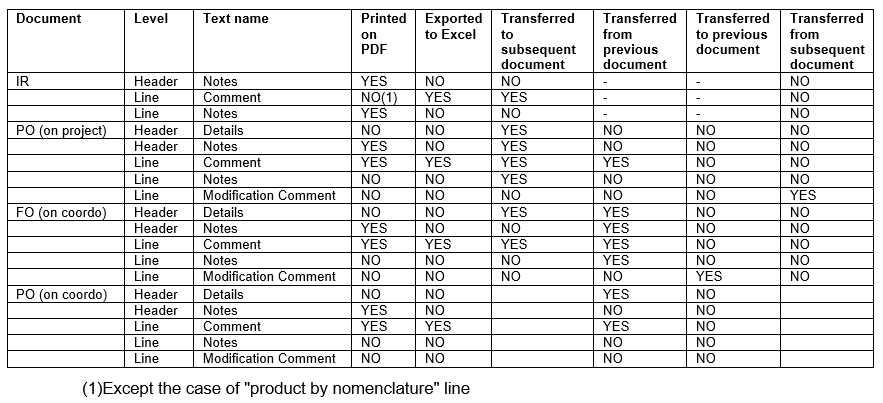
At this stage, it might be useful to have an overview on how notes and comments are exported from documents and transferred to subsequent documents. The table below can help to understand this.

The flow is the following: IR created on a project, fully sourced on order to a PO sent to coordination. Corresponding FO created on coordination by synchro. FO fully sourced on order to an external partner.

G. Planning horizon.

Supply User Manual ENG -> 4. Procurement -> 4.3 LU-SU3102: Orders Sourcing Tool (OST) -> G. Planning horizon.

G. Planning horizon.

The planning horizon (also called scheduler) is a setting defined (in days, e.g. X days) in the “Company Configuration” (administration module of UniField).

It is set per instance. It defines the time window for which procurement documents will be generated. This means that, in case of sourcing, if the requested delivery date (RDD) on your IR(line) or FO(line) is more than X days in the future, the relevant document (i.e. PO, DPO, RFQ or Tender) will not be created/updated until the RDD falls within the planning horizon.

If you wish to extend the planning horizon, this needs to be changed in the configuration of your instance. For more details please refer to “How to update the Scheduler Range Days” in LU-SU3401.

F. How to resource.

Supply User Manual ENG -> 4. Procurement -> 4.3 LU-SU3102: Orders Sourcing Tool (OST) -> F. How to resource.

F. How to resource

UniField allows flexibility in sourcing and changing/reversing the sourcing of goods after a sourcing method has been chosen. In the Orders Sourcing Tool, decisions are taken as to whether the order (IR /FO) line will be sourced from stock (leading to PICK, OUT or INT) or on order (leading to Tender, RFQ, PO or DPO) and for some documents (RFQ, PO, DPO) the supplier will also be chosen at this stage. However it can be necessary to change this decision based on the circumstances, e.g. the chosen supplier can no longer provide goods, or storekeeper finds actually there are no goods in stock, so cannot fulfill the PICK created.

In these situations it is necessary to change the sourcing channel chosen (e.g. order should be sourced to a different supplier, or order cannot be sourced from stock so it should be resourced to a PO). With this need in mind, the resourcing functionality has been developed in order to be able to resource key documents.

It is only possible to cancel & resource documents which have a preceding document flow (e.g. PO created from an FO). You may either resource a specific line of a document or resource the complete document.

However, the document (line) can only be cancelled & resourced if it has not been completed, and if the next document (line) in the chain has not been created (e.g. a PO (line) can be cancelled & resourced if it is in “Draft” or “Validated” status, but not if it has been confirmed, as at this point there will be an Incoming Shipment (IN) available. If the PO (line) has been confirmed then user should resource on the Incoming Shipment.

When the user resources a document (line), the cancelled lines will take the status “cancelled-r” while on the preceding document, the corresponding lines will take the status “cancelled-r” and new lines in state “resourced-v” will be created, ready to be resourced through the OST.

Please see the details of the resourcing process per type of transaction in the related transactions Learning Unit.

E. How to source multiple lines together.

Supply User Manual ENG -> 4. Procurement -> 4.3 LU-SU3102: Orders Sourcing Tool (OST) -> E. How to source multiple lines together.

E. How to source multiple lines together.

The Orders Sourcing Tool also offers the opportunity to source several lines at the same time so that you do not have to source the lines one by one by clicking on the green arrow. If several lines have to be sourced you can use the “(multiple) Source lines” functionality as described in the steps below.

You can sort the lines by clicking on the column’s header.

Go to: Orders / Orders / Orders Sourcing Tool

  1. Tick the checkbox of all the lines you would like to source together (at the beginning of the product line).
  2. In the Action Menu on the right hand side, click on “Source lines“.
  3. In the wizard which appears, you will see all the lines that you selected to source.

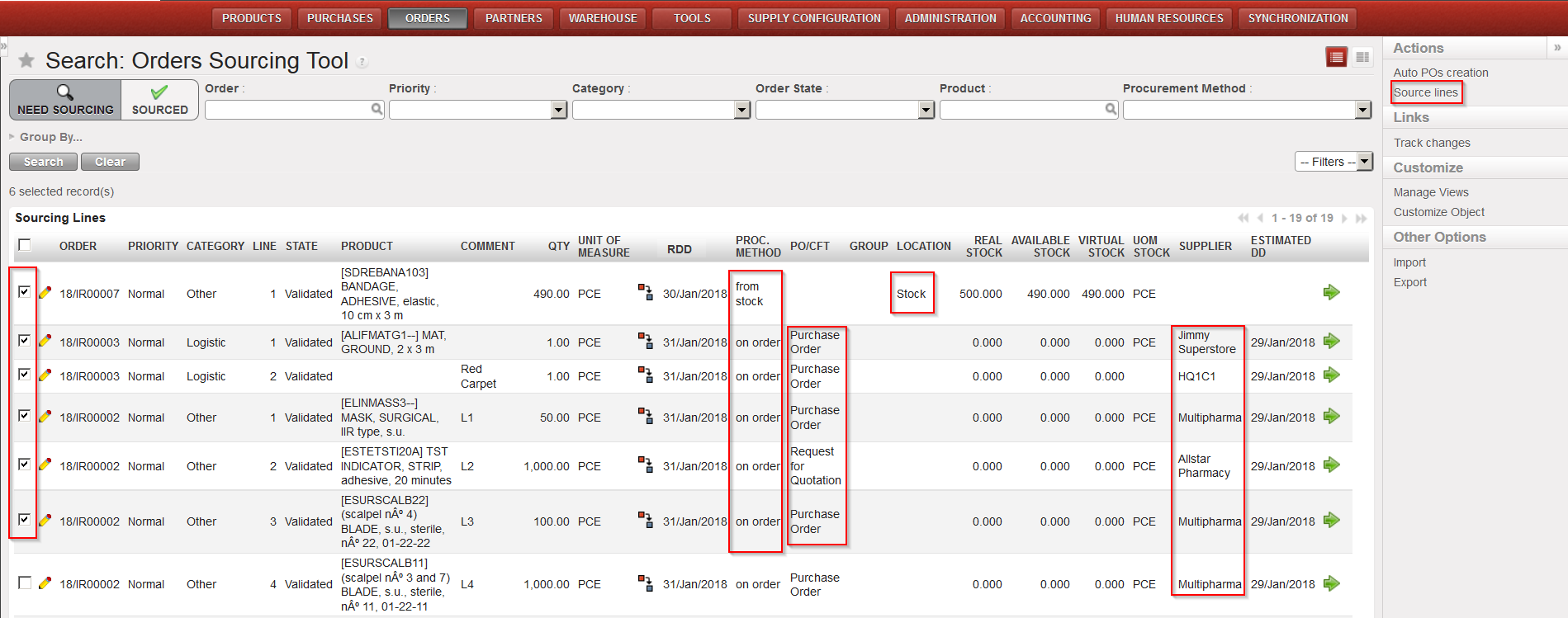
a) If you have already edited all the product lines one by one on the OST screen by updating the “PROC.METHOD“, “PO/CFT“, “LOCATION” and “SUPPLIER” fields without clicking on the green arrow
and nothing needs to be added, you can source them immediately by clicking on the “Source default” button at the bottom of the pop up screen. The “Source default” button will enable you to source lines with different procurement method or different suppliers.

All selected lines updated with different procurement method and different suppliers – Click “Source lines”
Click “Source default”

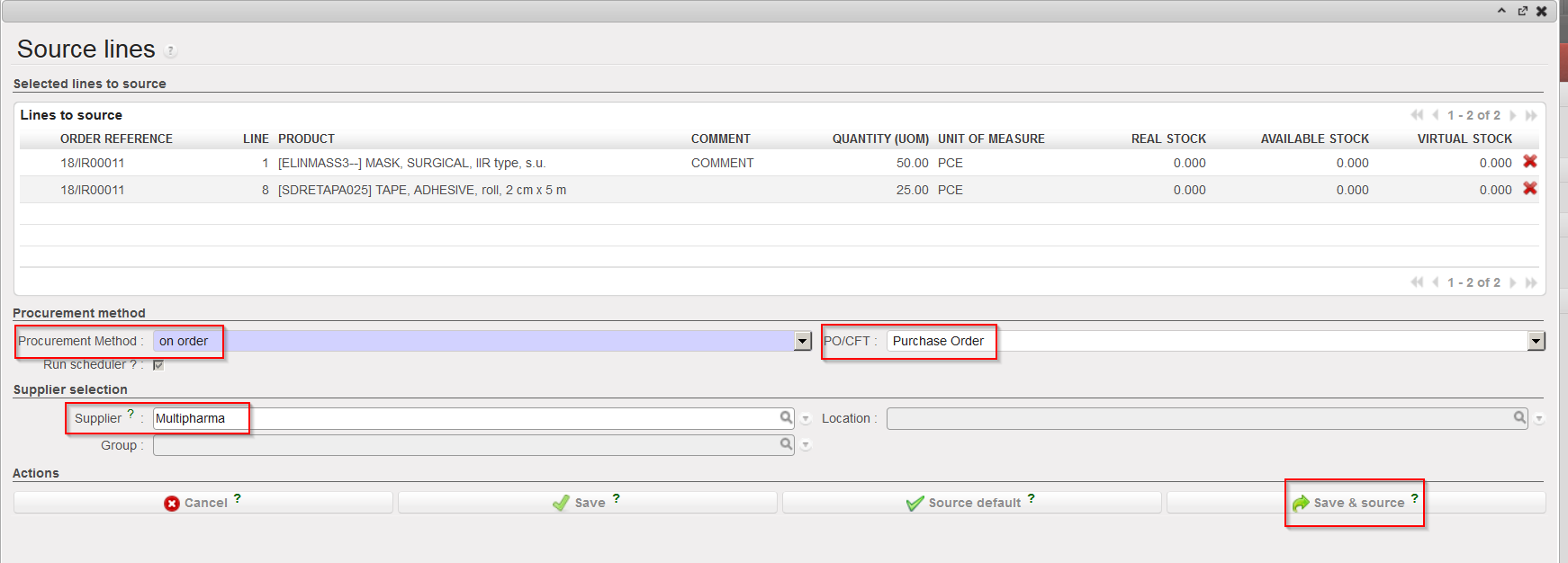
b) If you need to update the details of the lines on the pop up screen, the information needs to be the same for all the product lines (i.e. same “Procurement Method“, same “PO/CFT” choice and same “Supplier“, if needed).

i.) If you select the Procurement Method “from stock”, you will be able to see if any of the   products are in stock from the “Real Stock column”.

ii.) If you select the Procurement Method “on order”, select whether this will be via a:

        • Purchase Order, if there is already a known supplier for these products.
        • Direct Purchase Order, if there is already a known supplier for these products, and you wish the goods to be delivered directly to another instance.
        • RFQ, if you want to inquire for price and availability at a specific supplier.
        • Tender, if the supplier hasn’t been identified yet.

Note that for PO, DPO and RFQ you will need to enter (or search by clicking on the magnifying glass) the name of the supplier for the products. It needs to be the same supplier for all the product lines.

iii.) Finally, click on the:

  • Save and Source” button to save the values entered for every line and to source the lines immediately. All the product lines will be sourced in the same way (from stock or on order).
  • Save” button to only save the values entered, but not to source them yet (so they will stay at the Orders Sourcing stage).
Select the lines that you want to source and Click “Source lines
Complete the sourcing method and Click “Save & source

4. The selected IR/FO lines have now been sourced.

a) You could have a message informing you about the documents created or updated.

b) The sourced IR/FO lines have changed status (an possibly the IR/FO itself as well).

D. How to source individually an IR/FO line to a Tender/Request for Quotation

Supply User Manual ENG -> 4. Procurement -> 4.3 LU-SU3102: Orders Sourcing Tool (OST) -> D. How to source individually an IR/FO line to a Tender/Request for Quotation

D. How to source individually an IR/FO line to a Tender/Request for Quotation

In some cases, the requirements (products) listed in Internal Requests or Field Orders are items which are not available in stock and for which there is no known supplier and/or price. In this case they may need to be sourced to a Tender or a Request for Quotation (RFQ).

It might also be the case for large Purchase Orders, where according to the supply procedure in place on your mission, a Call for Tender (CFT) should be carried out. The system will allow the creation of the Tender/RFQ within the supply process, linking it to the other supply documents, while maintaining the chain of the supply steps.

Generally, the Tender is used when you do not know yet from which supplier you want to get information while the RFQ will be used if you want to ask for products availability and price to a specific supplier.

Go to: Orders / Orders / Orders Sourcing Tool

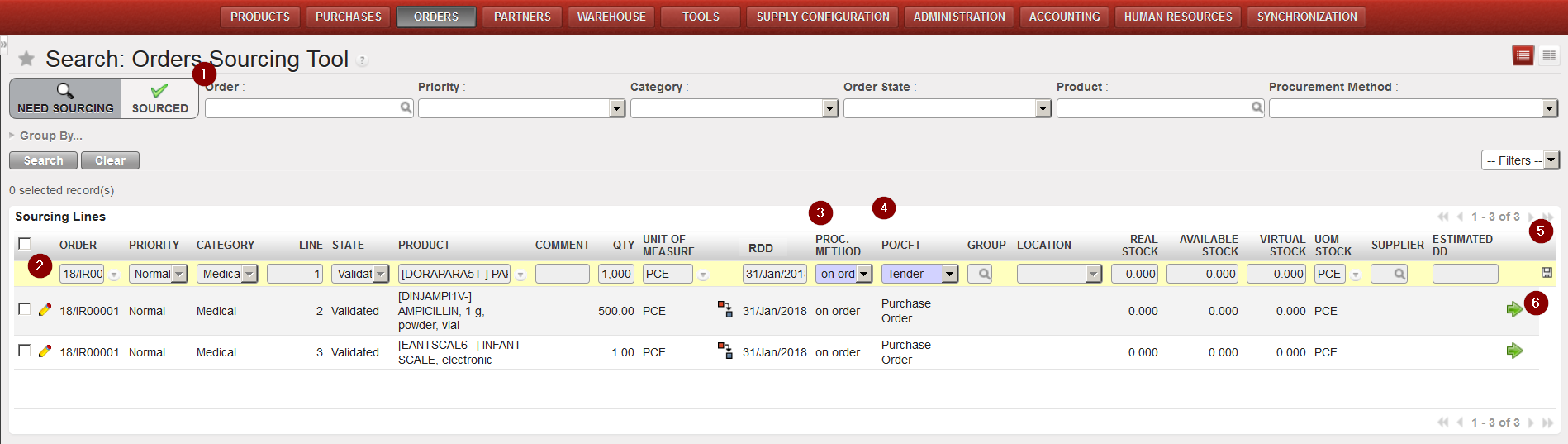
  1. Use the Filter options to filter the lines to be sourced with the appropriate reference.
  2. Click on the pencil on the left side of the screen to edit the sourcing of the appropriate lines.

Sourcing to a Tender

      3. In the “Procurement Method” column, select “on order“.

      4. In the “PO/CFT” column, select “Tender” or “Request for Quotation“. Note that if you select RFQ    you will have to enter a supplier as well.

      5. Click on the floppy disk at the right side of the screen to save the changes.

      6. Click on the green arrow at the right side of the screen to source the line.

      7. The Tender or RFQ document is created by the system.

C. How to source individually an IR/ FO line from stock.

Supply User Manual ENG -> 4. Procurement -> 4.3 LU-SU3102: Orders Sourcing Tool (OST) -> C. How to source individually an IR/ FO line from stock.

C. How to source individually an IR/ FO line from stock.

If there are sufficient quantities in stock, a request can be sourced from the warehouse.

Go to: Orders / Orders / Orders Sourcing Tool

  1. Use filters to display only the order line(s) of the appropriate document (IR/FO) which need to be sourced.

Please note: the orders Sourcing tool will display three stock figures for each sourcing line:

-The “Real stock” column shows the stock level present in the location selected in the “Location” column (Stock, MED, LOG, an intermediate stock or an internal consumption unit). The “Location” column has an editable field and can be changed in the OST. The relevant generated document will be updated consequently (i.e. the PICK/OUT/INT will show this location as source).

-The “Available stock” column shows the stock level which is actually available (i.e. it does not include stock which has already been reserved for another request).

-The “Virtual stock” column (which can also be understood as the future stock) shows the stock level which is due to be available on the requested delivery date (i.e. if the requested date is 28/08/YY, it will include any stock which should be available on this date, taking into accounts planned reception and planned deliveries).

2. To edit and source order lines individually, follow the steps below:

2.1 Click on the pencil icon next to the line you want to source.

2.2 Check the “Real stock”, “Available stock” and “Virtual Stock” columns.

2.3 Select the sourcing method “from stock”.

2.4 Select the location from where you want to source.

2.5 Click on the floppy disk on the right side of the line to save your changes.

2.6 Confirm the sourcing of the line by clicking on the green arrow on the right line side.

Sourcing from stock

3. The system will create the appropriate document. In the table below, you can see which type of  document will be created by the OST according to the document which is sourced and the destination location (for IRs).

Sourced line Destination location Document created by the OST
IR External location Delivery Order (OUT)
IR Internal location Internal Move (INT)
FO   Picking Ticket (PICK)

See paragraph “How to source multiple lines together” below to source multiple lines from stock.

4.3 Orders Sourcing Tool (OST).

Supply User Manual ENG -> 4. Procurement -> 4.3 LU-SU3102: Orders Sourcing Tool (OST).

LU-SU3102: Orders Sourcing Tool (OST).

A. LU Introduction

B. How to source individually an IR/FO line to a Purchase Order

C. How to source individually an IR/FO line from stock

D. How to source individually an IR/FO line to a Tender/Request for Quotation

E. How to source multiple lines together

F. How to resource

G. Planning horizon

H. Notes and comments on documents (IRs, FOs, POs)

C. Track Changes – Product Attributes and Cost price.

Supply User Manual ENG -> Products -> 3.7 Products Reports -> C. Track Changes – Product Attributes and Cost price.

C. Track Changes – Product Attributes and Cost price.

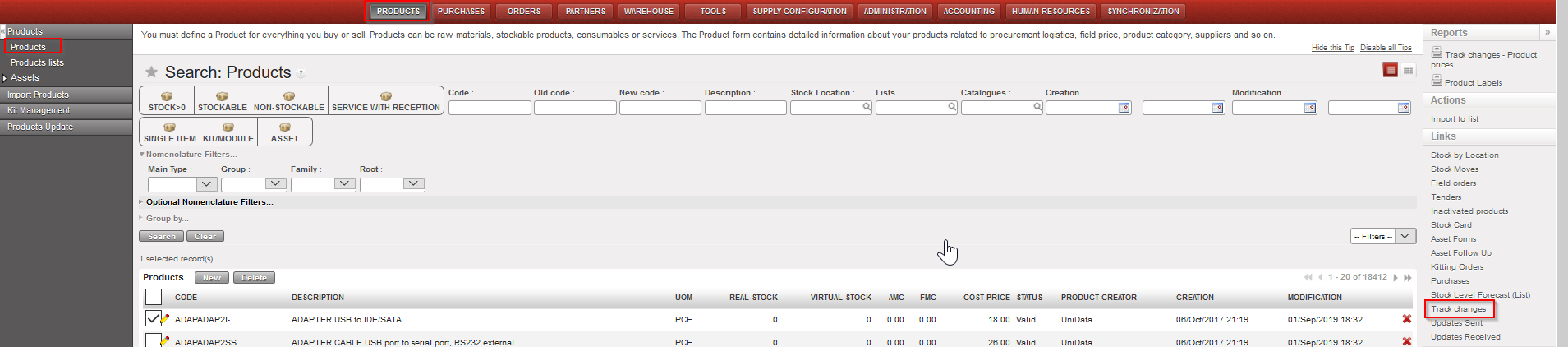
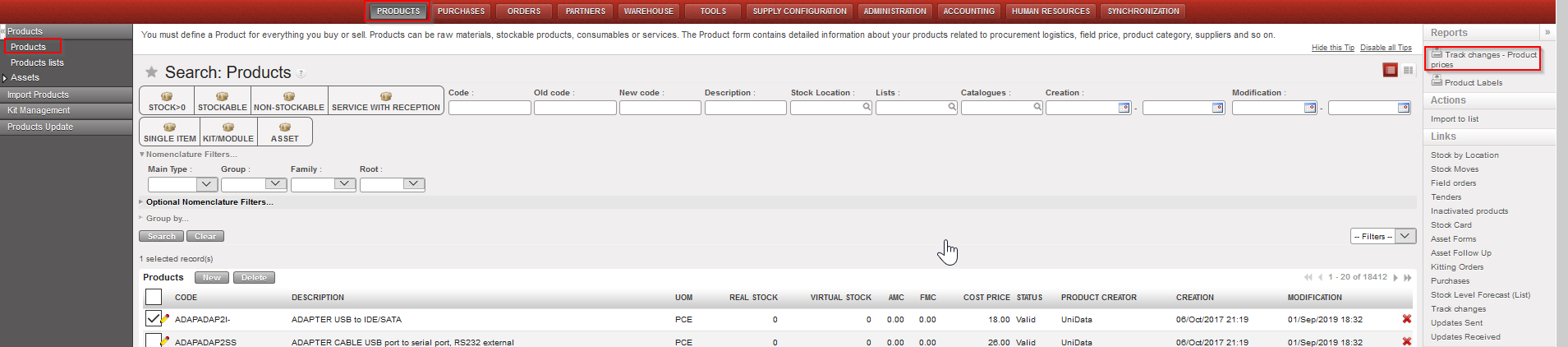
In order to track any modifications made to products, changes can be tracked via the Track Changes Tool in the Action Menu. In order to select these, from the Product data sheet (Products>Products) select the product (click in the checkbox) or open the product, then in the Action menu displayed to the right, select either Track Changes (for changes to product attributes) or Track Changes – Product prices, to display changes to the product’s price.


Track changes:

Go to: Products>Products> > Links (right hand menu) > Track changes

Product Track Changes report – access

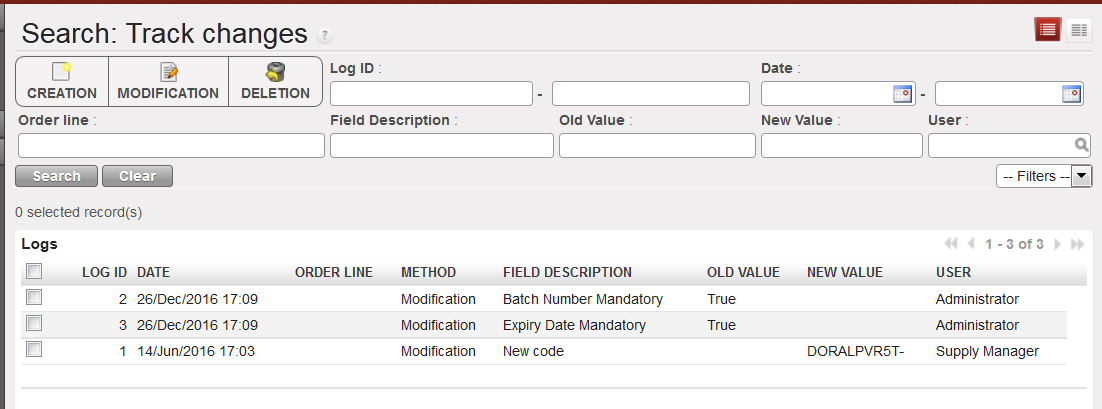
Product Track Changes report – screen

Track Changes will show the method of change, the date and time of the modification, the old value and new value of the attribute, and the user associated with this modification.

Track changes – Product prices:

Go to: Products> Products > Reports (right hand menu) > Track changes – Product prices

Track Changes- Product prices – access

Track Changes- Product prices – Excel

The excel report generated for “Track Changes – product prices” logs every time the product cost price has changed, together with the transaction which triggered this and, if this was due to a reception of Incoming Shipment in which the price was manually changed, this is displayed in the column “Manually changed (at reception)”. Other changes could be triggered by standard purchases at a new price (calculated according to Moving Average Cost (MAC) concept), at creation of a new Initial Stock Inventory, or at a Product cost revaluation.

Please note that you may find in this report a value named “Price corrected”, this value is the result of a mass correction that had to be done on UF9 after a discrepancy has been noted between the old price and new price (due to identified and corrected bugs).

B. Report – Stopped Products

Supply User Manual ENG -> Products -> 3.7 Products Reports -> B. Report – Stopped Products

B. Report – Stopped Products

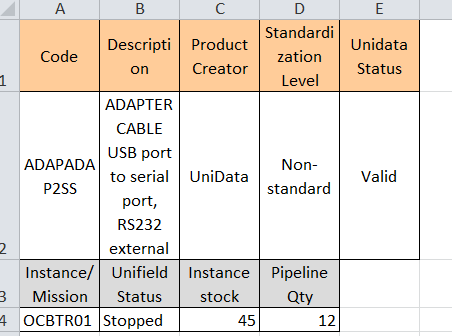
This report is generated in excel at HQ level and shows every product which has the Status set as “Stopped”, the header information of the product is displayed (code, description, product creator, Unidata status), and below this it lists each instance where the product is present in stock or is in the order pipeline. OC guidelines should be consulted before taking any further action.

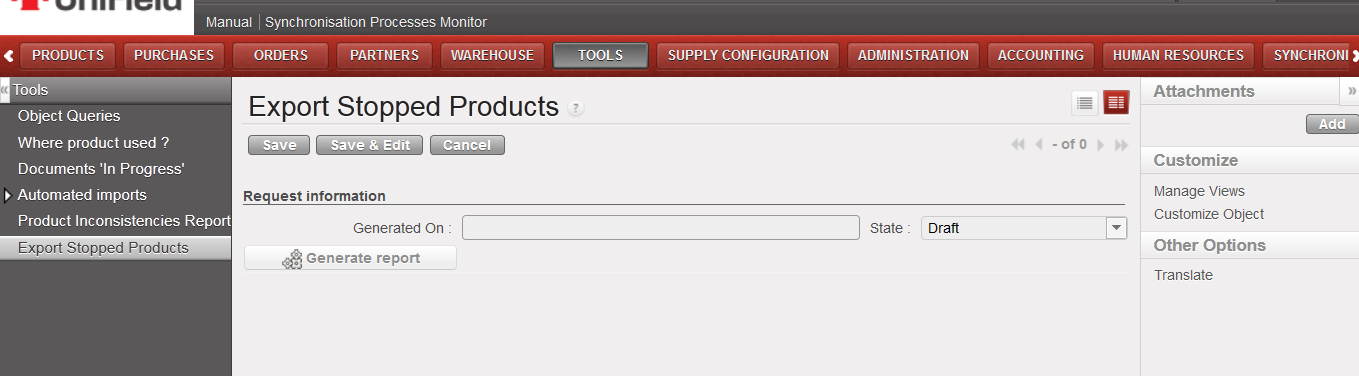
Go to: Tools>Tools> Export Stopped Products

Export Stopped Products – access

Export Stopped Products – screen