
Supply User Manual ENG -> Products -> 3.7 Products Reports
A. Report for product inconsistencies – Batch/Expiry Date
Supply User Manual ENG -> Products -> 3.7 Products Reports -> A. Report for product inconsistencies – Batch/Expiry Date
A. Report for product inconsistencies – Batch/Expiry Date
Due to some modifications on Product attributes after a product was already in use, there have been cases where a product has a batch and expiry date existing in stock while the current product does not have these attributes active (or vice versa). Normally this should not be the case, but in order to check where this inconsistency exists, the report BN/ED Inconsistencies Report can be generated for each instance:
Go to: Warehouse>Traceability>BN/ED Inconsistencies Report
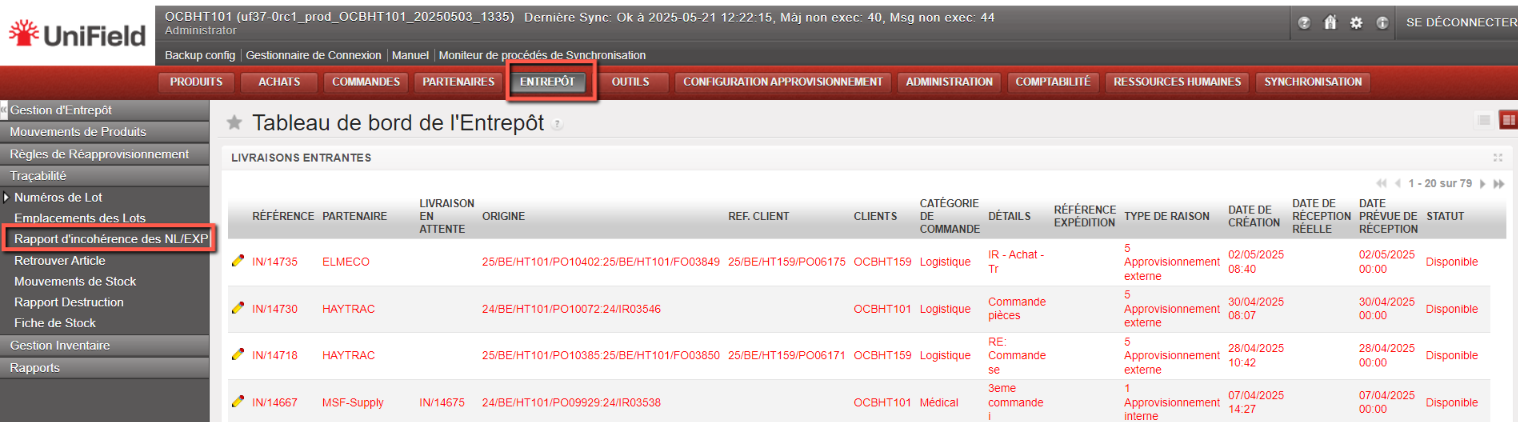


Product Inconsistencies report
The excel report generated will show all products in the instance where the current Batch or expiry date attributes do not correspond to those of the same product which is either in stock or in a transport document. The report shows the “true” attributes of the product according to the product data sheet in the “Batch Number Mandatory” and “Expiry Date Mandatory” columns, and then will show all relevant information for inconsistent quantities and batches of this product with quantities present in any location or any transport documents (Picks, OUTs etc) which contain them. Please refer to your OC policy before taking any action on these.
F. Kit Management: Compare KCL and TKC
Supply User Manual ENG -> Products -> 3.6 LU-SU2105: Kits/Modules -> F. Kit Management: Compare KCL and TKC
1 Overview
The Compare KCL and TKC function is a reporting tool within the Kit Management module that allows you to generate a Missing Components report. It compares the actual contents of a Kit Composition List (KCL) against the Theoretical Kit Composition (TKC) — the standard expected composition of that kit type.
The report is exported as an Excel file (.xlsx) and is designed to help supply and warehouse teams:
- Quickly assess the completion status of kits held in stock.
- Identify items that are missing or in lower quantities than expected.
- Support replenishment planning and needs assessments.
- Track kit quality using deviation KPIs.
Understanding the two documents being compared:
|
KCL — Kit Composition List |
TKC — Theoretical Kit Composition |
|
|
Definition |
The actual contents of a physical kit currently in stock |
The standard / expected composition for that kit type (the template) |
|
Purpose |
Records what is in the kit |
Defines what should be in the kit |
|
Status for comparison |
Must be Completed or Closed |
Referenced via the TKL version linked in the KCL |
TIP: Closed KCLs include kits or modules that form part of a parent kit — these are eligible for comparison.
NOTE: Matching between KCL and TKC lines uses a degressive approach: first matching on Product + Quantity + Batch/Expiry Date, then Product + Batch/Expiry Date, then Product only. This ensures the most accurate comparison possible.
2. Step-by-Step: Generating the Report
Follow the steps below to generate the KCL vs TKC Comparison Report.
|
1 |
Open the Supply module Log in to UniField and click Supply in the main navigation menu. |
|
2 |
Go to Kit Management Select Kit Management from the left-hand or top navigation bar. |
|
3 |
Open Kit Composition Lists Click on Kit Composition Lists (KCL) to view the list of all KCLs. |
|
4 |
Filter and locate your KCL Use the search and filter options to find the KCL you want to analyse. Look for KCLs with a Completed or Closed status. |
WARNING: Draft or in-progress KCLs cannot be used for comparison. If your KCL is still in progress, complete or close it first.
|
5 |
Open the KCL Click on the KCL row to open the record and review its details. |
|
6 |
Confirm the TKC version is linked In the KCL header, verify that a TKC version (TKL) is referenced. This is the standard against which your report will compare. |
The screen below shows a typical KCL record in Completed status, ready for comparison:
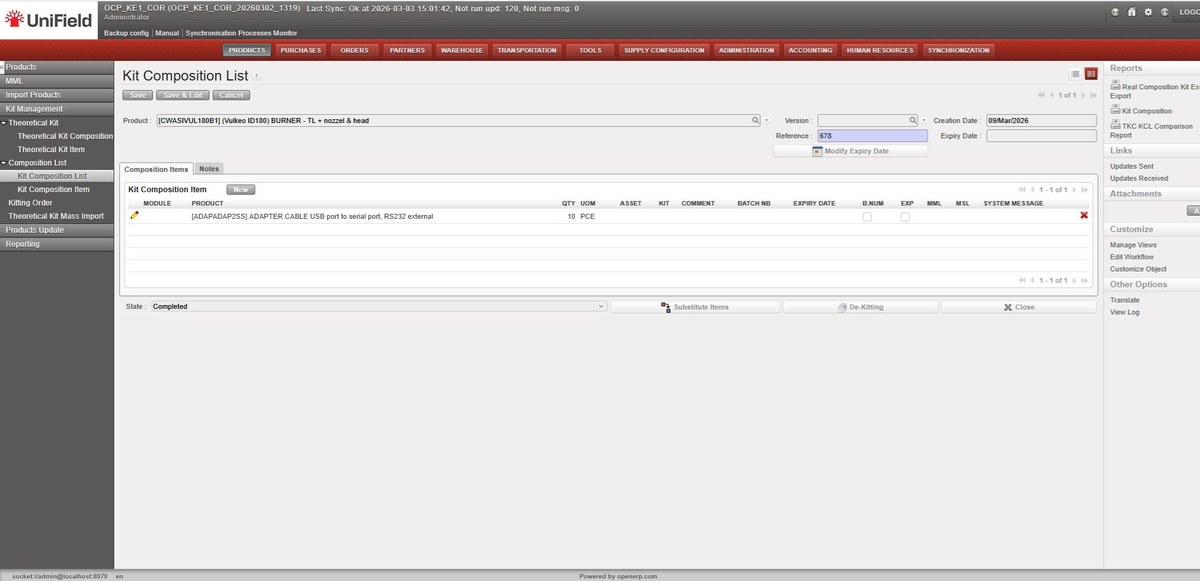
Figure: Kit Composition List — Completed status, showing product, version, reference and composition items
|
7 |
Open the right-side action menu With the KCL open, locate the Actions or right-side menu panel. |
|
8 |
Click “TKC KCL Comparison Report” Select this option from the Reports section of the right-side panel. It is only visible for KCLs with Completed or Closed status. |
The TKC KCL Comparison Report link is located in the Reports section of the right-side panel (highlighted below):
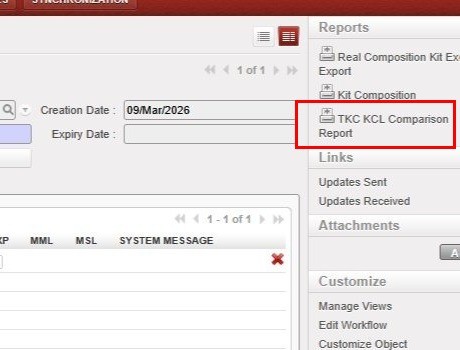
Figure: Right-side Reports panel — TKC KCL Comparison Report button (highlighted)
|
9 |
Save or open the Excel report UniField will generate the report automatically and prompt you to download or open the .xlsx file. |
TIP: The report is generated in Excel format (.xlsx) so that supply teams can use it for filtering, further analysis, or sharing with other stakeholders.
3 Report Layout and Content
The generated Excel report uses layout: TKC columns appear first (columns A–F), followed by KCL columns (columns G–M, highlighted in light green). This order reflects the operational logic used by warehouse teams — starting from what is expected in a kit, then comparing with what is actually present.
Report Header: The top section of the report displays summary information about the kit:
- Kit (Product) Reference
- Kit Creation Date
- TKC Version (TKL)
- Batch Number and Expiry Date
- Date the Report was Generated
The screenshot below shows an example report generated for kit KMEDMEBO05A (Ebola VHF Sampling module), including TKC and KCL details and the Comparison Summary section:
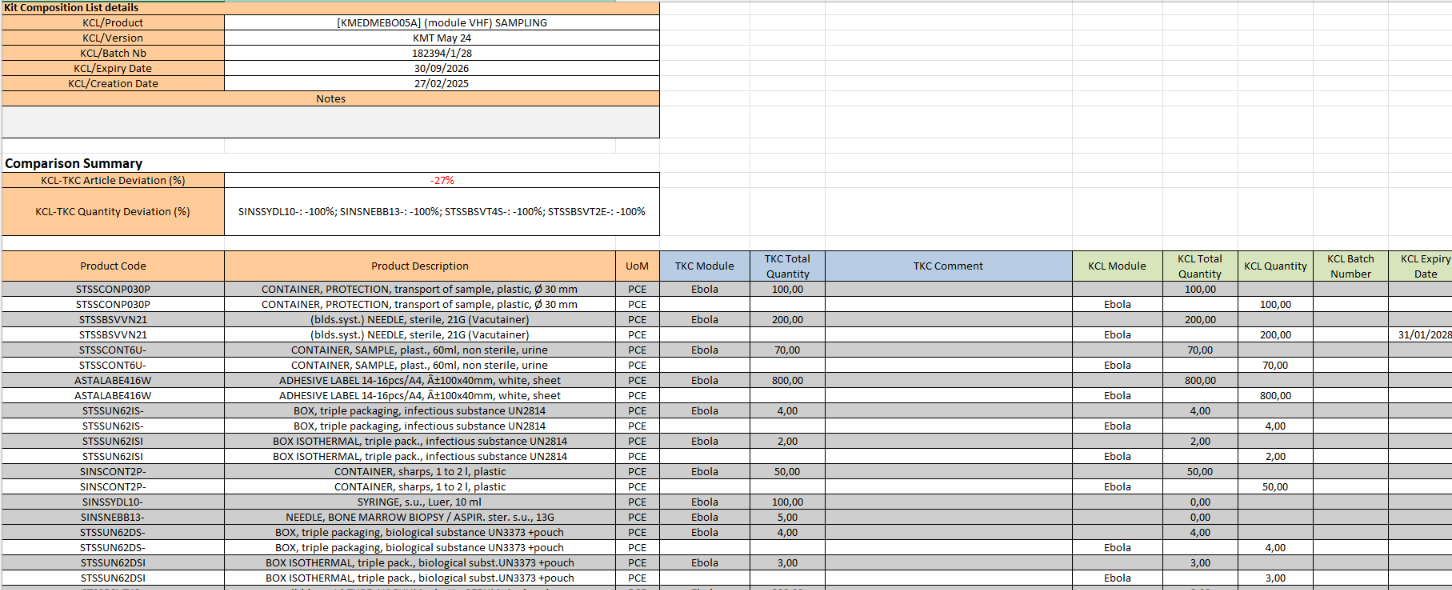
Figure: TKC KCL Comparison Report — header, TKC & KCL details, Comparison Summary and product lines (KMEDMEBO05A, batch 182394/1/28)
Report Columns: Each row in the report represents a product line. Columns are split between TKC (expected) and KCL (actual) data:
|
Column |
Section |
Description |
|
Product Code |
TKC |
Product reference from the Theoretical Kit Composition |
|
TKC Quantity |
TKC |
Expected quantity per the TKC standard |
|
TKC Batch No / Expiry Date |
TKC |
Batch number and expiry date from the TKC |
|
TKC Comment |
TKC |
Any comment recorded on the TKC line |
|
KCL Module |
KCL |
The module within the KCL — positioned between TKC Comment and KCL Total Qty |
|
KCL Total Quantity |
KCL |
Actual total quantity of the product found in the kit |
|
KCL Batch No / Expiry Date |
KCL |
Actual batch/expiry of products in the kit |
|
Deviation |
Summary |
Difference between KCL and TKC quantity (+/−) |
NOTE: The KCL Stock Location column is not included in the report. The focus is on product references and quantities, not physical storage locations.
4. Comparison Summary and KPIs
The report includes a Comparison Summary section with two key performance indicators (KPIs) that provide an at-a-glance view of kit completion status. These KPIs follow the same logic as the PO vs Catalogue mismatch reporting already familiar to UniField users.
|
KPI |
Formula |
What it Tells You |
|
KCL–TKC Article Deviation (%) |
((# codes in KCL − # codes in TKC) / # codes in TKC) × 100 |
Positive = more product types in KCL than expected. Negative = product types are missing from the KCL. |
|
KCL–TKC Qty Deviation (%) per product |
((Qty in KCL − Qty in TKC) / Qty in TKC) × 100 |
Shown per product. 0% is excluded. Negative values appear in red in the report summary. |
Quantity Deviation — Worked Examples:
|
Scenario |
KCL Qty |
Calculation |
Deviation |
|
Kit complete |
100 (matches TKC of 100) |
(100 − 100) / 100 × 100 |
0% — excluded from summary |
|
Slight shortage |
95 (TKC requires 100) |
(95 − 100) / 100 × 100 |
−5% (highlighted red) |
|
Surplus |
110 (TKC requires 100) |
(110 − 100) / 100 × 100 |
+10% |
|
Major shortage |
60 (TKC requires 100) |
(60 − 100) / 100 × 100 |
−40% (highlighted red) |
NOTE: Negative deviation values are highlighted in red in the Comparison Summary. 0% deviations are excluded from the Quantity Deviation field to keep the summary uncluttered.
TIP: If all items match the TKC exactly, the summary will show 0% deviation or display a message confirming the kit is complete with no missing items.
D. How to create a Theoretical Kit Mass Import
Supply User Manual ENG -> Products -> 3.6 LU-SU2105: Kits/Modules -> D. How to create a Theoretical Kit Mass Import
D. How to create a Theoretical Kit Mass Import
In order to be able to download easily numerous Theoretical Kits, a Theoretical Kits Mass import feature has been developed.
Starting at HQ user will be able to download a significant number of Theoretical Kits via import and once created at HQ and set to Completed, this TKL can be synchronized down to all missions as Draft.
Go to: Products/ Kit Management / Theoretical Kit Mass Import
- Click on the “New” button to start the process
- Click on “Get template” to get a template of the import file to update
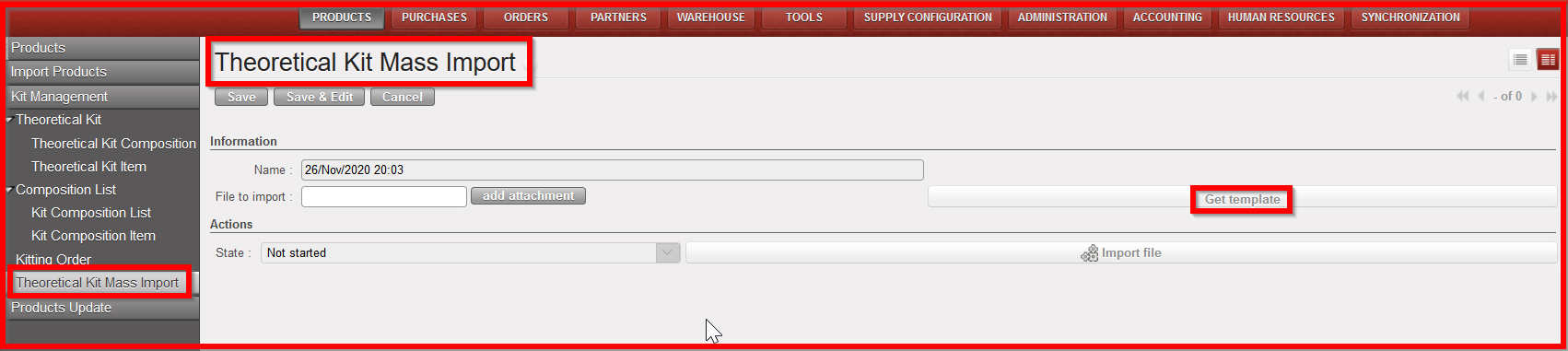
Theoretical Kit Mass import

Theoretical Kit Mass import template to be updated at HQ
3. Once template updated (do not forget to set “Active” column to “True”), click on “add attachment” and add the file to import
4. Click on “Import file”
5. A message will inform that import has been successful and the the TKL has been created
6. Go to sub- menu “Theoretical Kit Composition” and check that TKL has been created as Draft.
7. In order for the TKL to be synchronized down to all missions, the TKL will have to be set to “Completed”.
Kit composition List
Unlike the Theoretical Kit Composition list, the Kit Composition List identifies actual products composing a kit.
A kit composition list can be created during the reception process from an incoming shipment or after a kiting order. Please refer to Chapter Warehouse, LUSU-4101 Incoming Shipments How to receive and add a kit composition list.
However in some circumstances (de-kitting) or action deemed to your procedures you will need to create a Kit Composition List from scratch.
B. How to create a Kit Product
Supply User Manual ENG -> Products -> 3.6 LU-SU2105: Kits/Modules -> B. How to create a Kit Product
B. How to create a Kit Product
A Kit is created the same way as a product, so the product creation procedure seen earlier can be followed here. However, normally there will be no need to create the Kit as a product because products will be automatically synchronized from HQ.
Remember, if you need to create a Kit as a product, the only difference will be on the product sub-type which should begin with the letter K to indicate that the product is a kit.
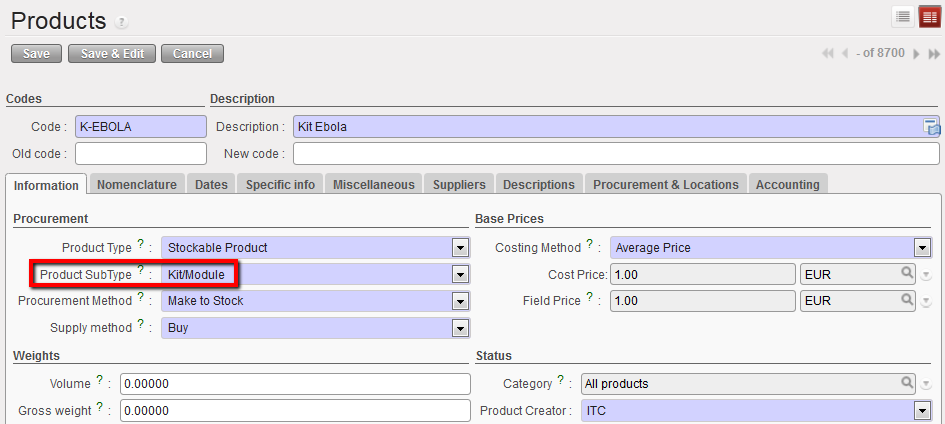
KIT Sub-Type
Theoretical Kit composition List
A Theoretical Kit Composition List (TKCL) represents the list of items that are supposed to compose the KIT. It can be manually created or imported at HQ once and synchronized downwards to all projects and coordination. The main purpose of the Theoretical Kit Composition List is to give an overview of the theoretical content of a Kit when it is being ordered or when we want to produce Kits locally.
It is not always practical to manually enter all the lines of a Theoretical Kit Composition List especially when there are a lot of lines to process. To speed up the process, use an import file to import all the lines at once.
Remember, a Theoretical Kit Composition List can only be used when its status is “completed”. However, having a Theoretical Kit Composition List in status “completed” in the system doesn’t trigger any process and doesn’t affect the related kit in any way. It just means that there is a list ready to be used.
A. LU Introduction (LU-SU2105)
Supply User Manual ENG -> Products -> 3.6 LU-SU2105: Kits/Modules -> A. LU Introduction (LU-SU2105)
A. LU Introduction (LU-SU2105)
Kit as a product
Products are the main items used in UniField. In order to be ordered, purchased, delivered, stocked or dispatched in UniField, an item needs to be registered as product in the system. In consequence, Kits are considered as single products, despite being groups of products on their own (i.e. kits for cholera for 10,000 people)
They are treated as single products throughout the whole supply chain (from order to reception) and their content is managed in a dedicated separated submenu called Kit Management, under the menu Products.
Kits content are not visible in the warehouse but can be displayed when the Kit is being purchased or after its reception.
When some products are inter-related, they may be called a module: for example, a laptop and a charger cable may be called a module (i.e. Module 1 showed in the below graph). There may be several modules in a kit.
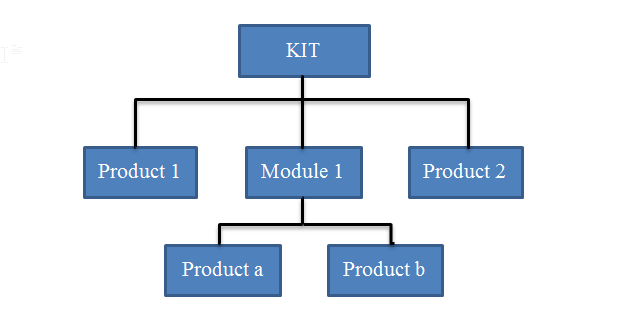
General Structure of a Kit
For a product to be considered as a Kit in UniField, the product Sub-Type should be “Kit/Module” on the product page.
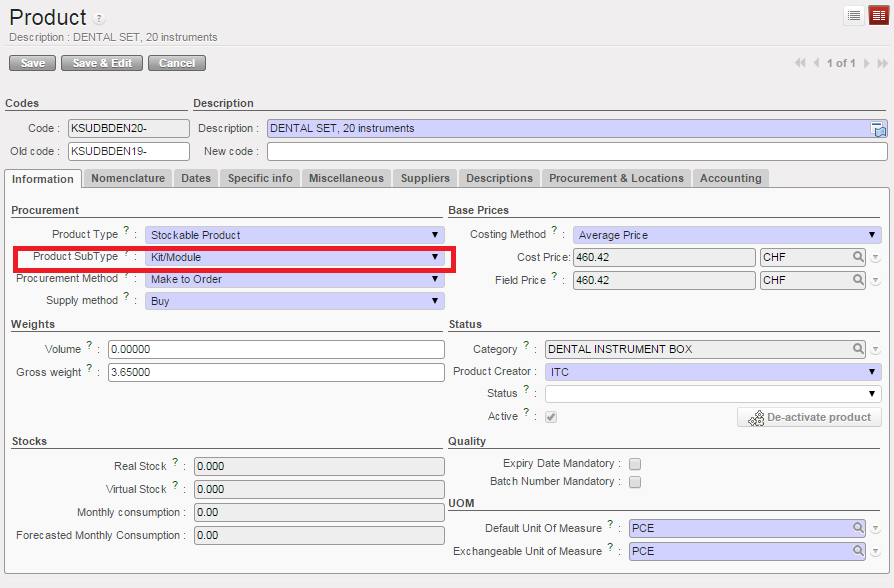
The LEFO (Last expiry, first out) rule will apply when creating KITs. When creating a KIT, Unifield allows you the option of selecting items based on FEFO (First Expired First Out) or LEFO rule.
Choosing LEFO will select the products with the longest expiry date, allowing the kit to stay “fresh” longer, reducing the frequency of updating kits by UF user.
FEFO is applied automatically to all other stock operations. The advantage for using LEFO for KIT production is that KIT stays “fresh” and ready to use longer. It also requires less workload for the KIT refresh.