UniField v27.0 Release Notes

Release Details

Release version: UF 27.0

Date of production synchronization server patch: 7th December 2022 / 18:00 Geneva time

Latest user rights files updated: UF27.0 can be found here

Note that no user rights need to be loaded at each HQ. This will be done at the Sync Server by the Core team and will update the user rights via Sync for all HQs and missions.

JIRA filter for all integrated tickets: https://jira.unifield.org/issues/?filter=12448

Cross-functional

(US-9406) Electronic Validation

A new functionality which has been developed in this release is that of Electronic Validation. This has been developed for both Finance and Supply with requirements raised by OCA (Finance) and OCB (Supply), with the aim of providing users with the ability to sign key documents online which will reduce the need for signatures on printouts and give improved traceability of the signature process for each document.

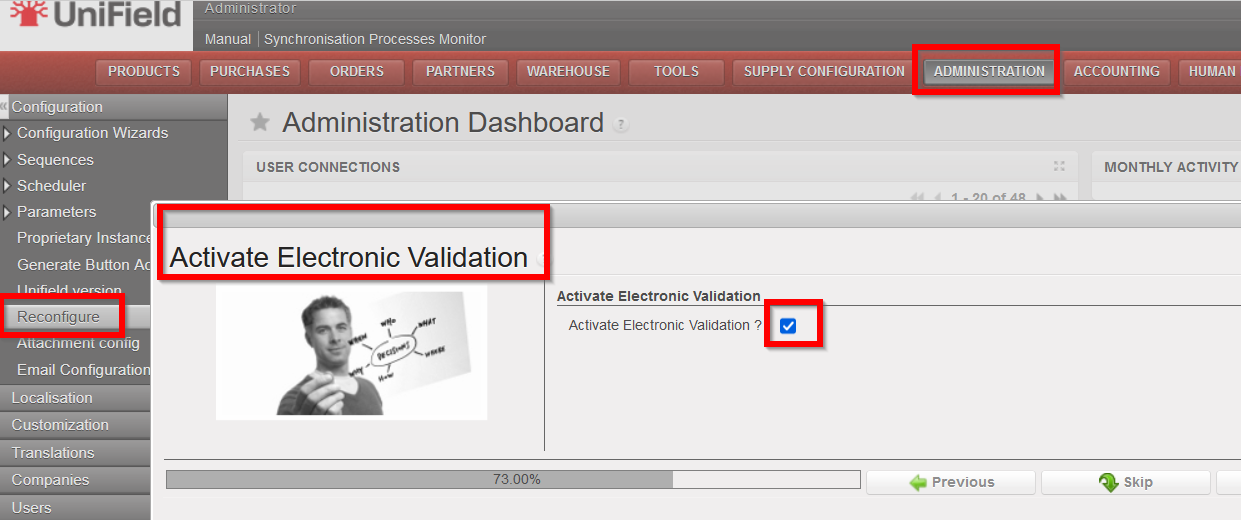
This functionality will only be available if it has been configured to be active at instance level (in the instance which wishes to use E-validation), via the Reconfigure menu.

If there is no change to the Reconfigure settings, it will not be possible to access or use the E-validation functionality (users will see no change).

Once E-validation has been activated in the Reconfigure, each user who should have access to the functionality (e.g. because they will need to sign documents or should manage part of the online signature process) will need their User Profile to be configured to allow for this (to be managed in the same way as user rights are currently).

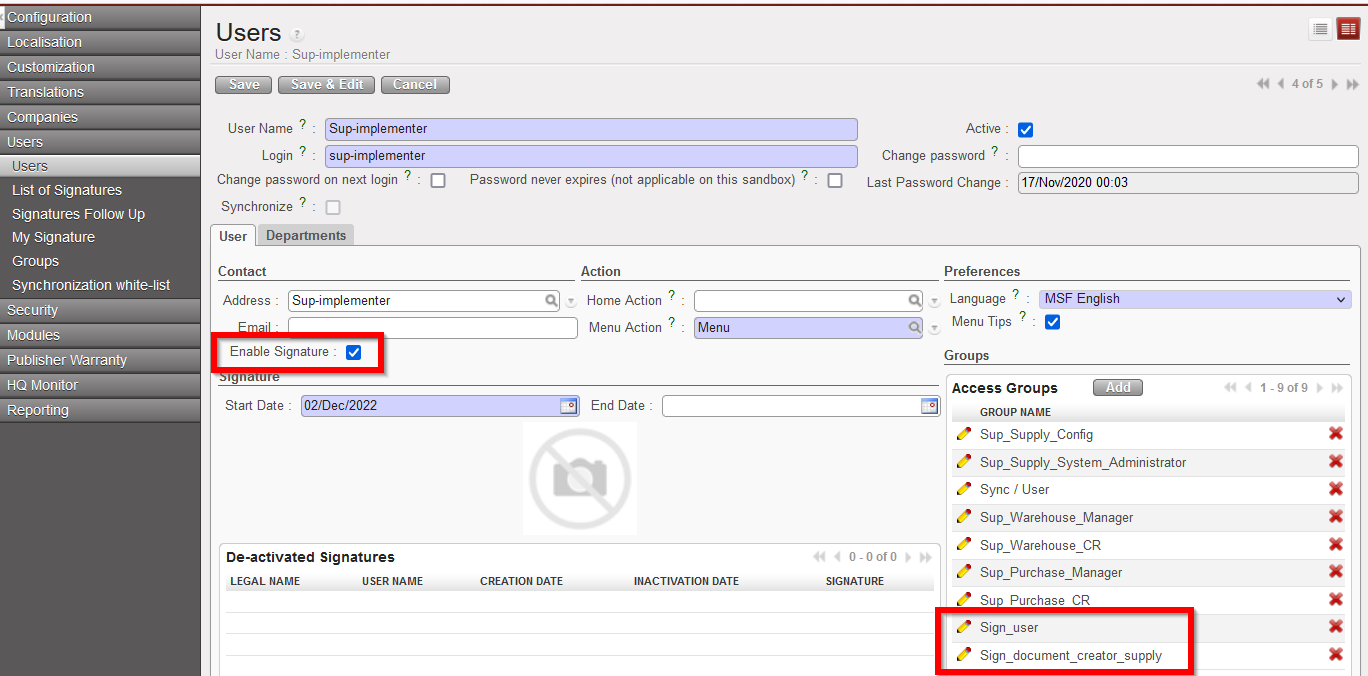
In the User profile, the checkbox “Enable Signature” should be ticked, Start date and End date can be filled (or can be left as default settings as from today without an End Date) and the relevant Signature user groups must be added to the profile:

Sign_user = for user who needs to sign documents (either Finance or Supply)

Sign_document_creator_supply = user who decides who should sign each Supply document, can decide to Close signature part of Supply documents and has visibility of documents for follow up.

Sign_document_creator_finance = user who decides who should sign each Finance document, can decide to Close signature part of Finance documents and has visibility of documents for follow up.

For users who need to manage the signature process and be able to sign they will need more than one of the groups added.

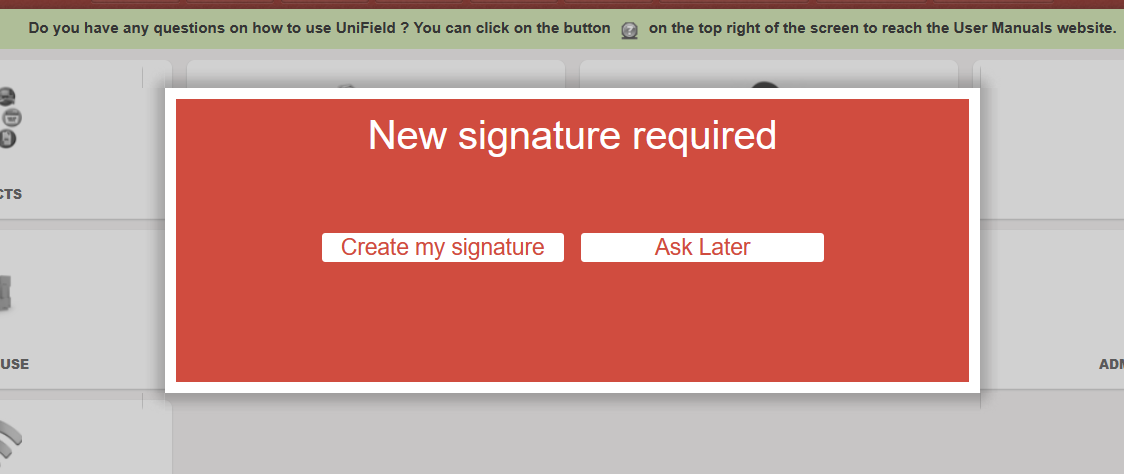
Once a user has had the Signature enabled on their User profile, they need to add their signature. This can be done either by filling in the pop-up which they will see when they next log in to Unifield:

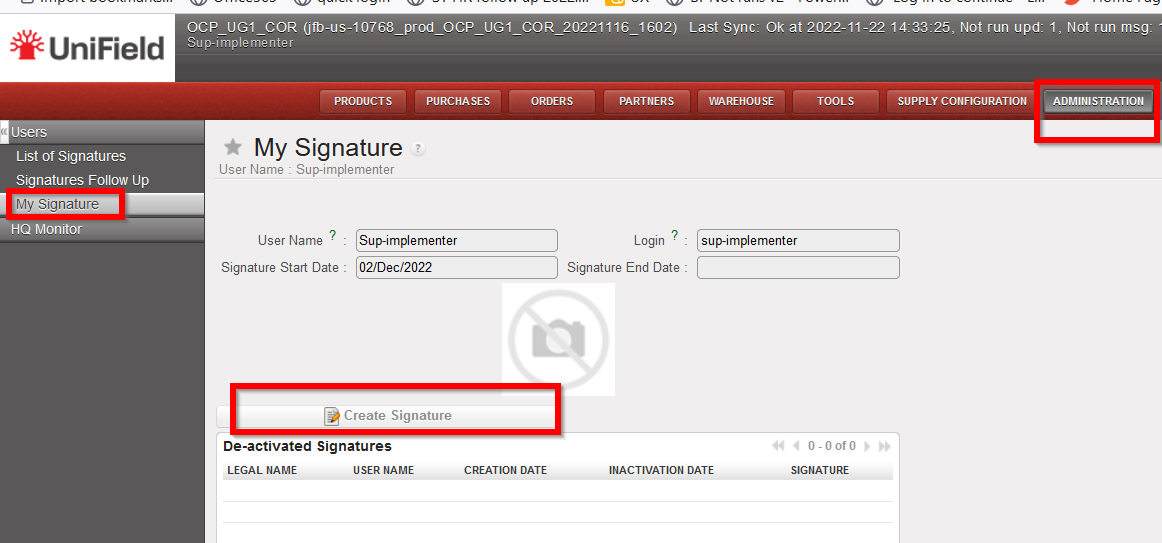
Or by going to the submenu which will now appear to help manage their signature in Administration>Users>My Signature.

(This submenu screen can also be used later for if user wishes to replace or delete their signature)

Once the E-validation functionality has been activated, users will be able to manage signatures and / or sign for the following documents: Supply: Internal Request, Purchase Order, Incoming Shipment, and Finance: Supplier Invoice, Donation Invoice, Bank reconciliation, Cash reconciliation, Full report.

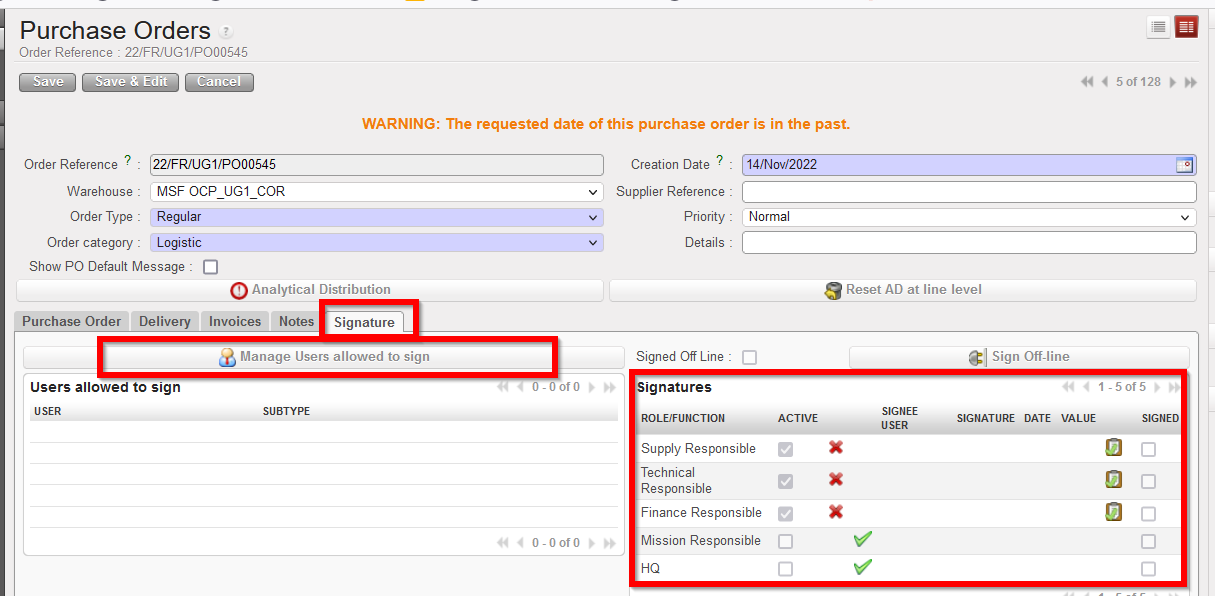
Each of the above documents will now have an additional tab for signatures.

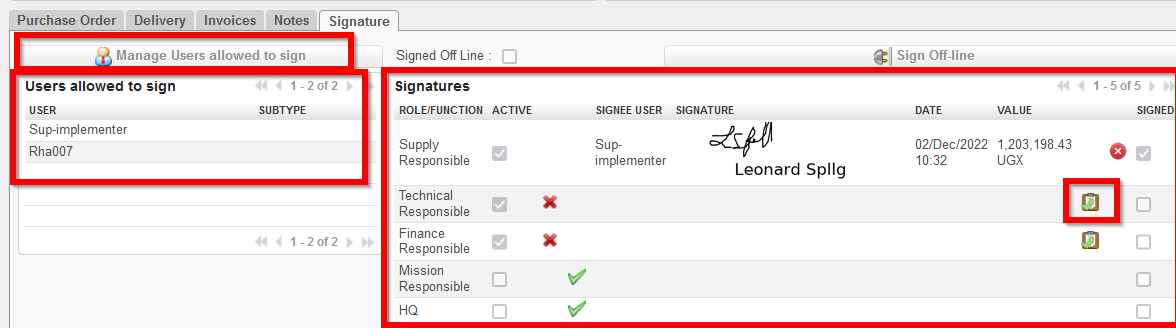
A user can only sign a document on which they have added as “allowed to sign”.

The button “Manage Users allowed to sign” can only be used by a user who has specific document_creator user right.

The default and optional Signatures (right panel) are based on the signatures already displayed in the relevant PDF of that object.

When a user that has been added as allowed to sign then signs the document (using the tick box icon ), their signature will be displayed on the object Signature tab, and also in any relevant PDF of that document. Track changes of document will also record any signatures added, removed or changed.
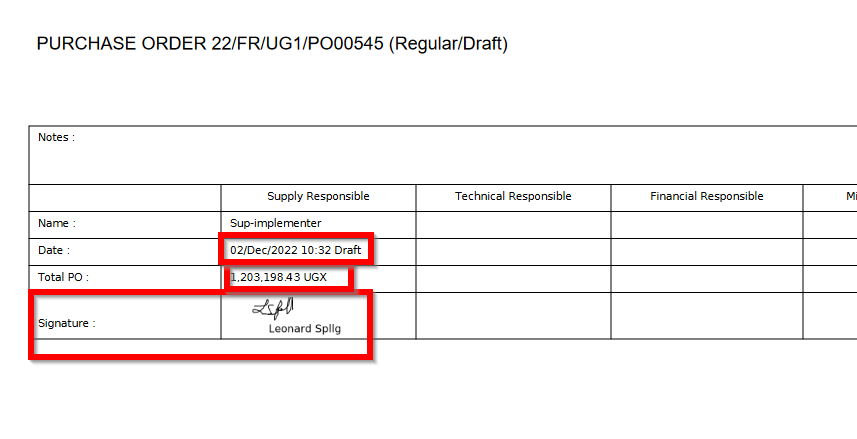
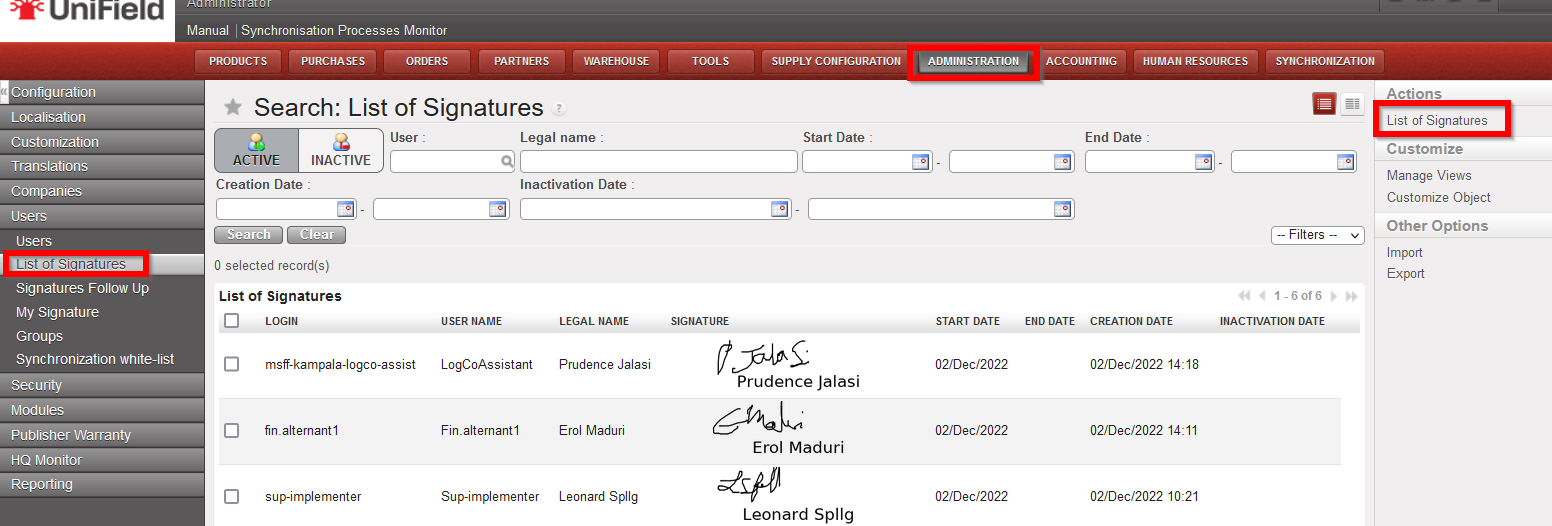
For users who have specific rights, they will be able to see the “List of Signatures” (Administration>Users>List of Signatures) which also has a PDF in the Action menu

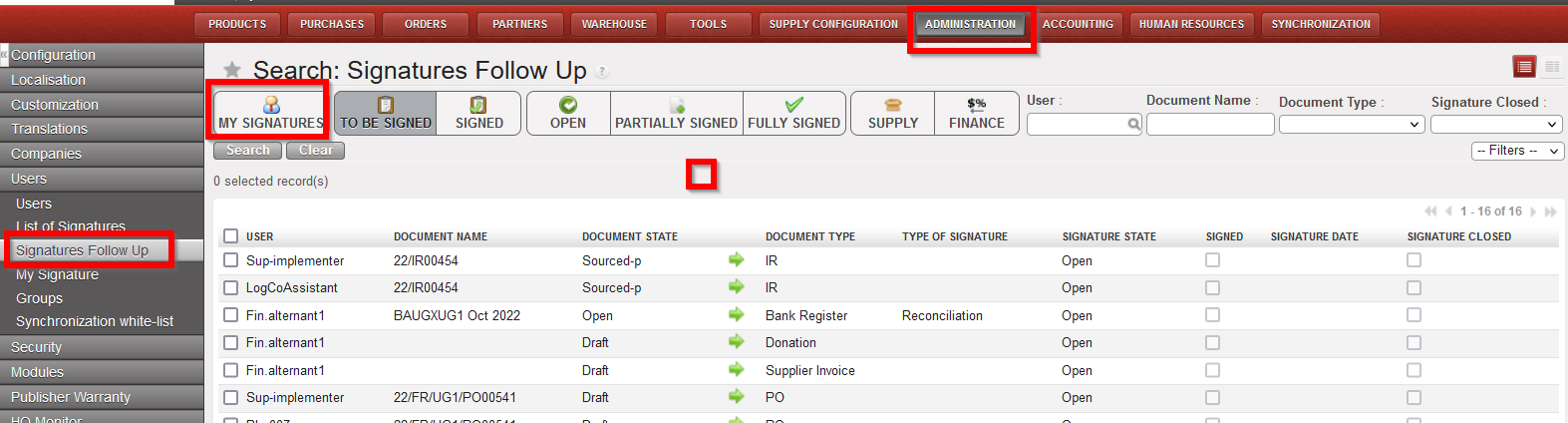
And a “Signatures Follow up” screen (Administration>Users>Signatures Follow up) is available, in a limited capacity, depending on rights, to allow users to follow up which documents are assigned to them for their own signature, or for those with further rights, which documents are assigned to other users for signature.

Supply

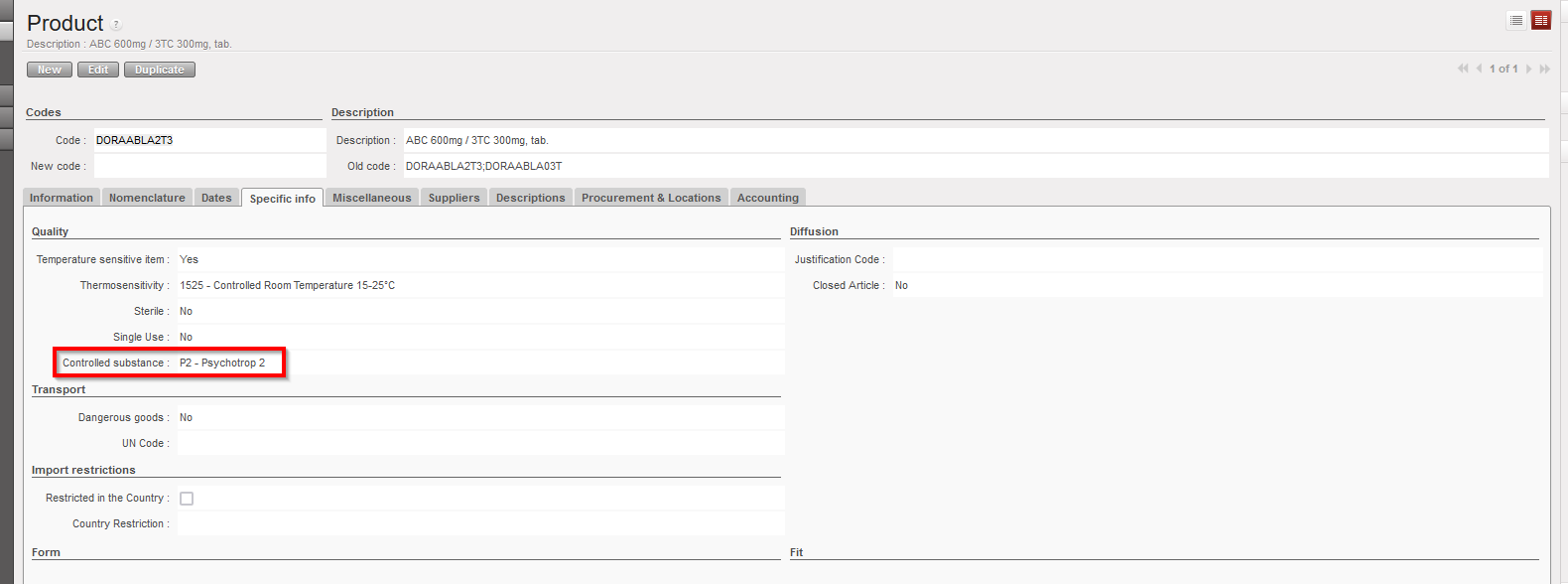
(US-10798) Product field: “Controlled Substance” value: P2 – Psychotrop 2

New request from OCBA-HQ Medical data steward, due to new value which has been created for field “Controlled Substance” attribute in PMD of UniData: P2 – Psychotrop 2. This value should now be available in UniField Products to allow for UD linkage to work. When it is selected for a product, it will behave in same way as for any another value selected in Controlled Substance field – ie in all transport docs (PICK, OUT, IN etc) and reports which have the “CS” checkbox or column.

(US-8749) (US-10777), (US-8749) LOAN report displays new status Cancelled & (US-10403) correction of Loan report for External Partner flow

Improvement requested by OCB for Loans report, to show consistent statuses for PO/FO lines in loans report (column R) with documents, means the following:

  • Where original loan has been dispatched but for return of loaned goods, PO/FO documents lines are cancelled (no returns) – line status in report is Cancelled (new status).
  • Where PO/FO document lines are closed (complete flows – complete or partial goods quantities returned) – line status in report is Closed.
  • PO/FO documents lines are open (pending returns) – line status in report is Open.
  • PO/FO documents to external partner, goods received and returned, lines status in report is Closed.
  • Where no stock movement (IN / Out) has been done and PO/FO document lines to external/internal partner are cancelled (no ships nor returns) – no line displayed in report.

There has also been a correction to the report for a specific flow to External Partner.

(US-8386), (US-10766), Renaming of reports “PO Follow-up per supplier” and “FO Follow-up per client” & report location changes

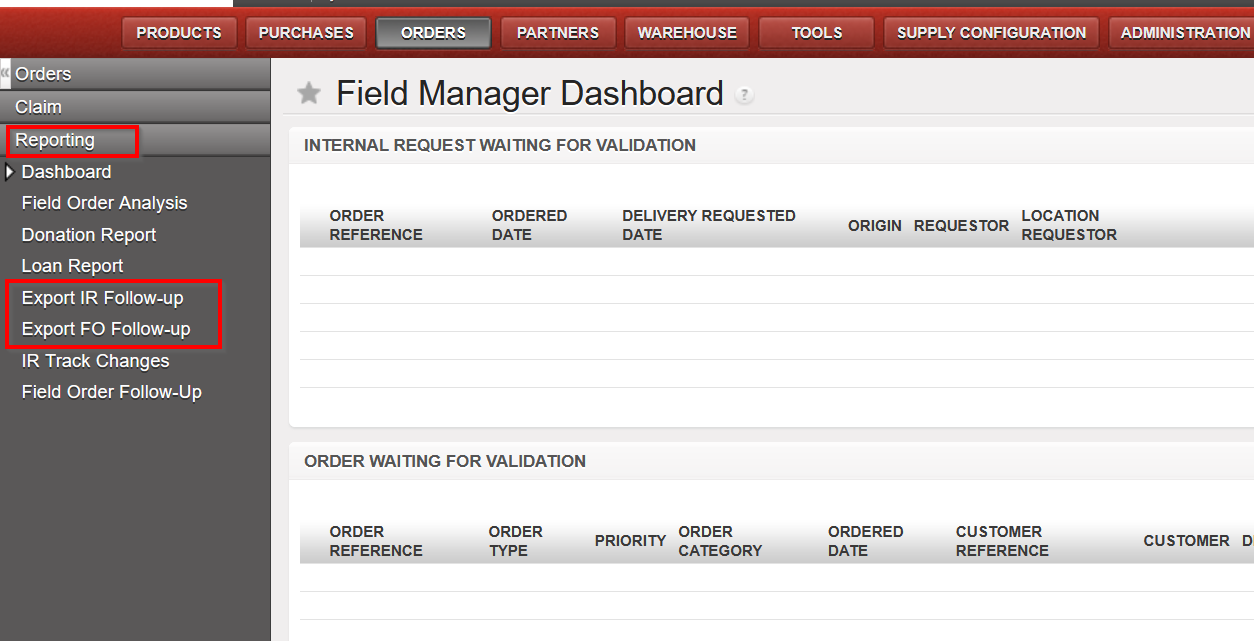
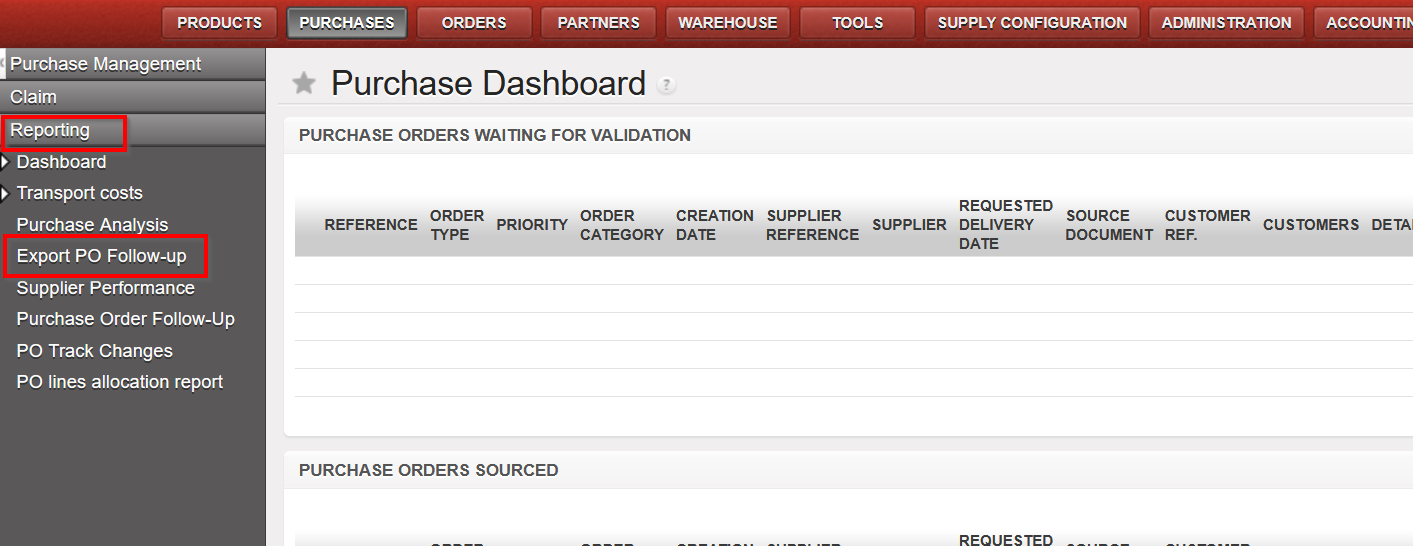
Improvement requested by OCA to rename IR/FO/PO follow-up reports and to change their locations so that they are all under the “Reporting” submenu as per below:

  • Original “IR follow up per location” is now named “Export IR Follow-up”
  • Original “FO follow up per customer” is now named “Export FO Follow-up”
  • Original “PO follow up per supplier” is now named “Export PO Follow-up”

US-9394, US-10721 Modification of Physical Inventory Adjustment Types and new field Sub Reason Type

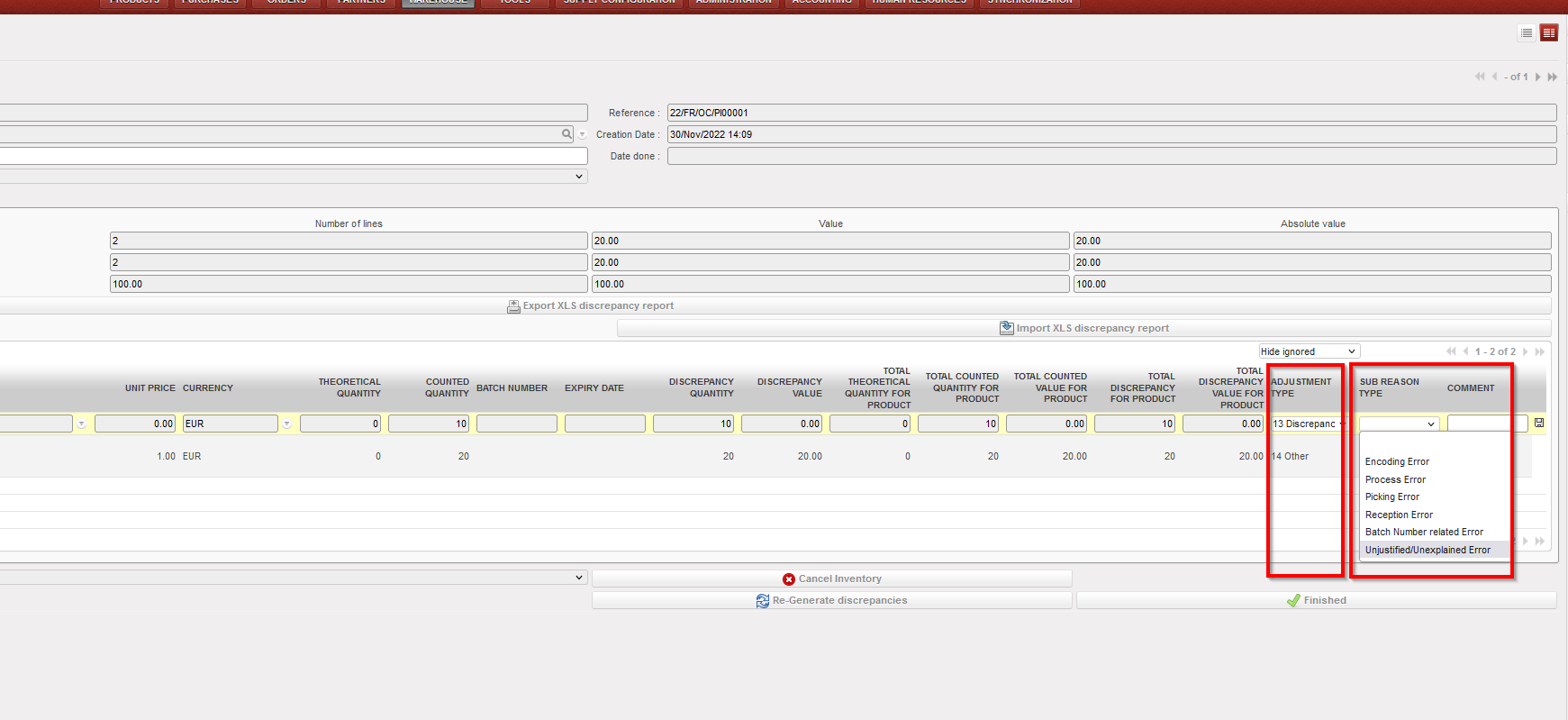
Improvement requested by OCG, in Physical Inventory – Discrepancy report, now for the “Adjustment type”, only 2 options are available, “Discrepancy” and “Other”, it is no longer possible to add or import other options. There is an additional (new) field, also at line level “Sub Reason Type” which is optional to fill in. This field can only be used if “Adjustment Type” is “Discrepancy”. “Sub Reason Type” allows the following options to be selected from the dropdown list or they can be imported. This new field can be changed until the PI is Closed and will appear in all reports:

i)Encoding Error

ii)Process error

iii)Picking error

iv)Reception error

v)Batch Number related error

vi)Unjustified/Unexplained error

(US-10600) RR: Real Stock in Inventory review + Order Calc takes into account all projects & (US-10554) RR: Coordo cannot access project Expiry date info

Corrections raised by OCB for the Replenishment Rules (RR) functionality: When RRs are configured in Coordo and include synced locations in projects, after computing data on all levels , in the Inventory Review report and Order Calculation, the system will now consider the expiry dates of the stocks in Coordo along with those in the configured project locations, and will no longer consider stocks from projects which were not included in the Location Config of that RR.

(US-10598) Addition of Service product to Regular PO from FO no longer possible.

Improvement to avoid having service products in crossdocking location: User will now be blocked from adding a service product to a regular PO created from a synced FO, a blocking message will be displayed in this case. It is still possible for user to add Service type product to a DPO (Direct Purchase Order).

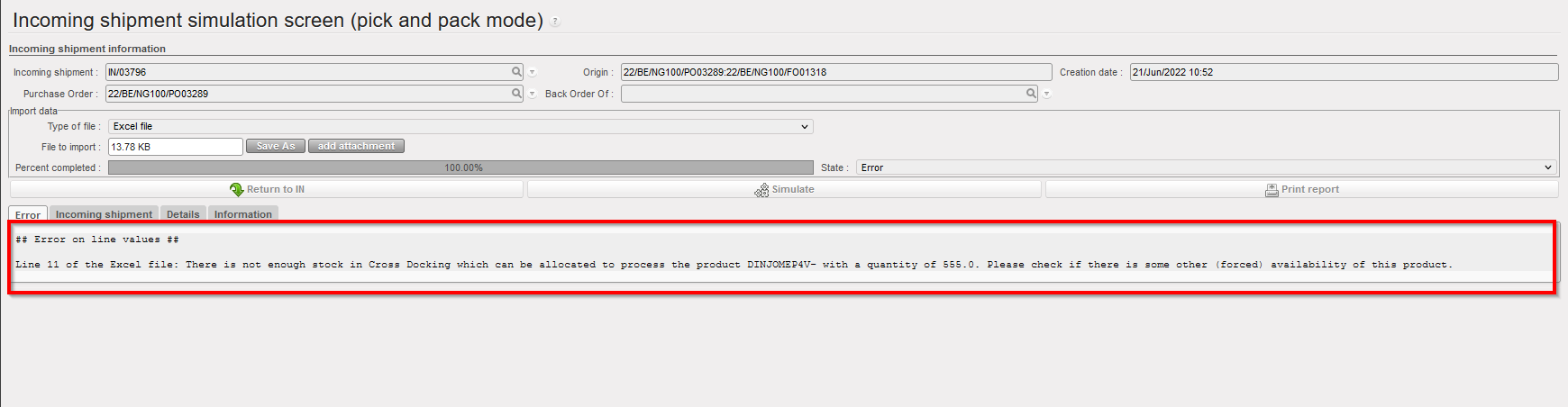
(US-10596) Automated VI E-PL of IN message & check on forced availability in stock correction

Improvement to solve the issue of failed automated import of E-PL in IN due to negative/forced inventory of relevant product in crossdocking location. In the case where there is an import of IN via VI which includes direction to P/P/S goods directly, if those goods are already forced “Available” on an unrelated Out/Pick document (meaning they will be “Unavailable” for the Out/Pick doc linked to E-PL IN) there will be a blocking message There is not enough stock in Cross Docking which can be allocated to process XXXX with a quantity of XXX” . This message / block of process will only be displayed for the case of POs from FOs for which the IN to PPS option has been selected, and no longer for cases of INs of POs which are from scratch or which come from IRs.

The same checks are done for manual VI IN import.

(US-10587) Reason Types in PPS & OUTs for Loans & Donations correction.

Correction raised by OCB, to fix the reason type in P/P/S & OUTs for Loans & Donations, now all picking documents (Picking, PPL, Packing, SHIP and Out) Reason Types will correspond to RT of preceding order document and adhere to the following rules:

FOs:

– where FO has Order Type “Regular”, Pickings now have RT “Deliver Partner”

– where FO has Order Type “Donation before Expiry”, Picking docs now have RT “Donation before Expiry”

– where FO has Order Type “Standard Donation”, Picking docs now have RT “Standard Donation”

– where FO has Order Type “Loan”, Picking docs now have RT “Loan”

IRs

– for IR to External CU, picking docs now have RT “Deliver Unit”

(US-8684) KIT: Partial qty removal of one component/line & (US-10579) Addition of “Completed” Status Filter in TKC and KCL

Improvement to ease the management of KITs. In the Kit Composition List (KCL), the option to substitute (remove lines and add others in their place), products is now more flexible meaning it is possible to remove a partial quantity of an existing line (previously it could only be the full quantity). This means that in the KCL Substitution pop-up, the field “Qty” will be modifiable for products being removed.

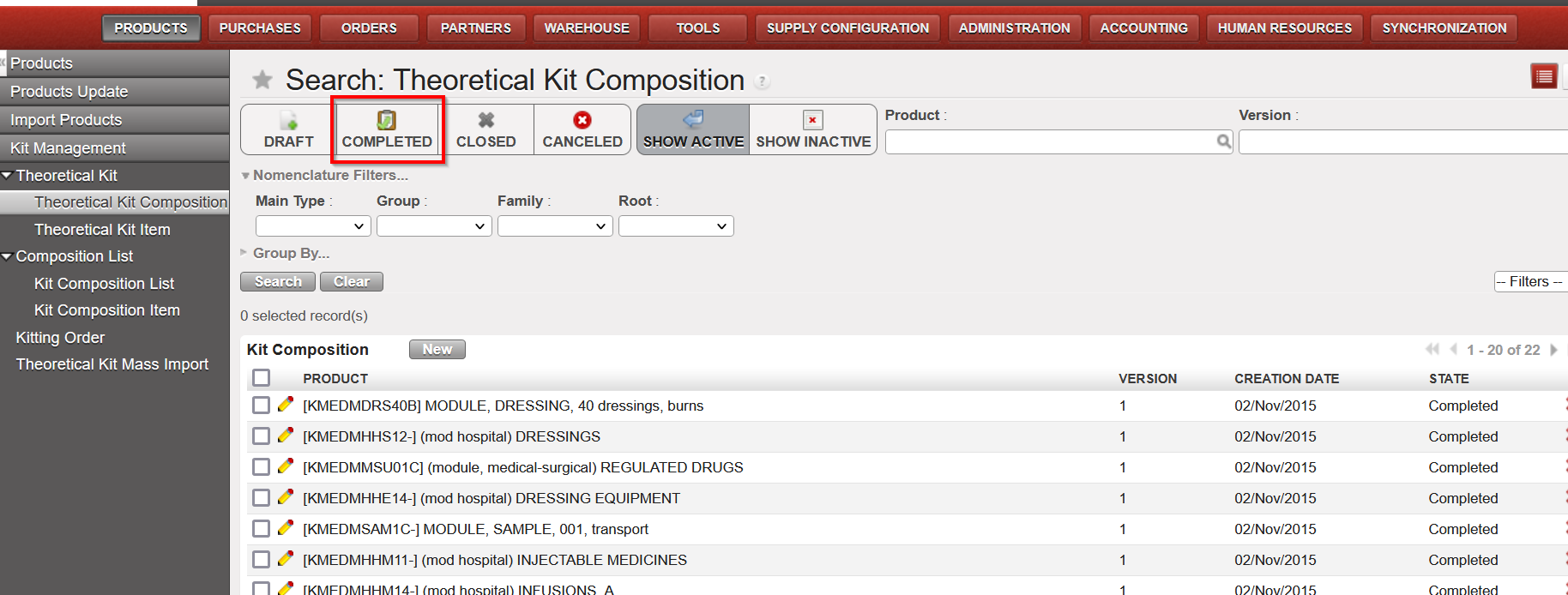
Also another improvement to be more user-friendly, a new filter “Completed” has been added to both Theoretical Kit Composition (TKC) and Kit Composition List (KCL).

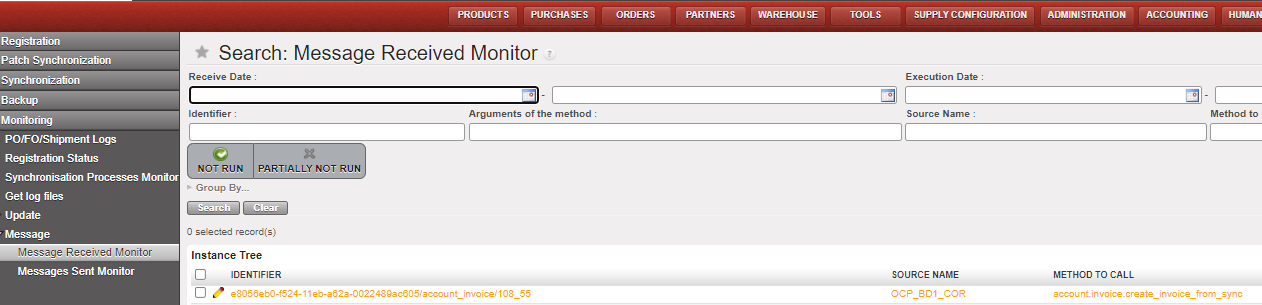
(US-10491) Synch Messages: Automatically set to “Run without execution” for Not Runs from INs processed before SHIP sent

As per agreement with OCs, this improvement ticket means specific types of Synch Messages which were “Not Run” will now be Run automatically without execution. The aim of automatically running them is to reduce the amount of Not Runs in the system which need to be manually run (the flows themselves cannot be treated as already closed/processed). The type of Not Runs which will be treated in this way are for the Use Case:

Project (or other requesting instance) process an Incoming Shipment (ignoring warning message) for which the Coordo (sending instance) has not yet processed/sent the SHIP. Then when Coordo do send the SHIP, this creates a Not Run message since it cannot update a Closed / already treated IN.

This type of Synch message (Run without Execution) can be identified by searching for the following in the Synch Messages screen:

Method to Call. “stock.picking.partial_shipped_fo_updates_in_po”

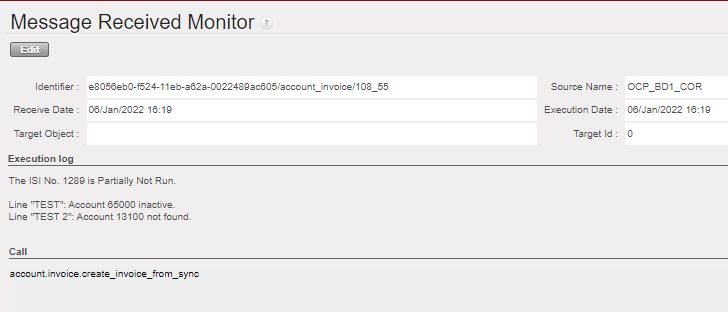
Execution Messages starts with “Exception: Unable to receive Shipment Details into an Incoming Shipment in this instance as IN” .

(US-10369) IR follow up perf improvement

Improvement to decrease the time needed to export IR f/up per location report, time required to export this report has been reduced by around 3 times less than before.

(US-10193) SYS filter in Internal Move label made more accurate

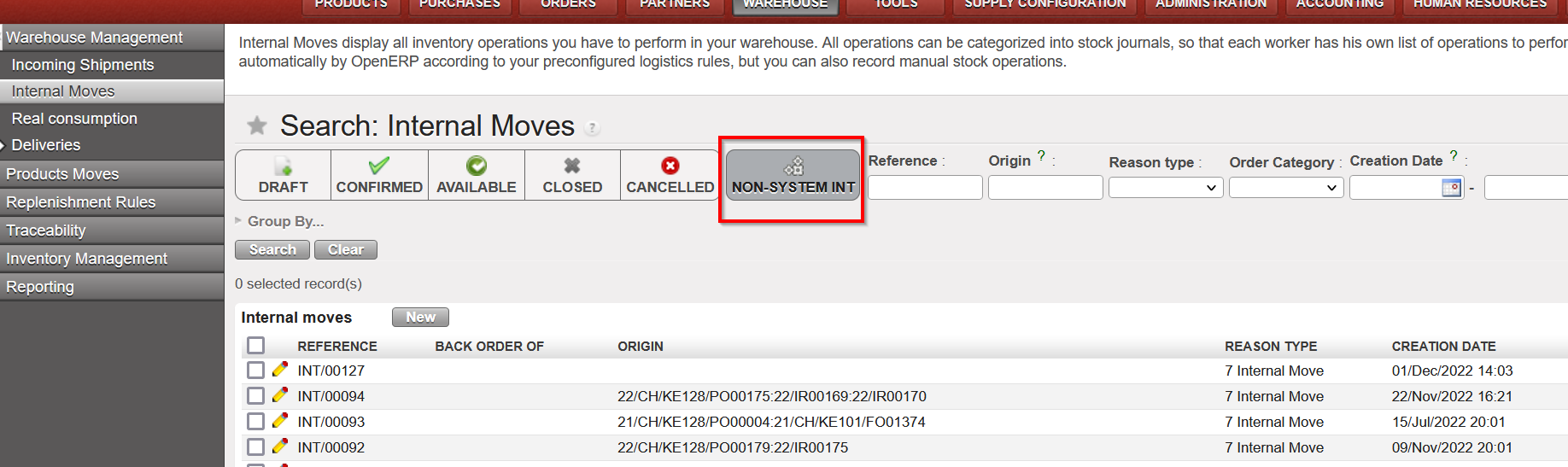
Improvement requested by OCB, to be more logical for users, in list view of Internal Movements “INTs”, the filter button named “SYSTEM INT” has been renamed to “NON-SYSTEM INT”, no other change has been made to this functionality.

(US-10067) (US-10068) Change to how taxes can be added to POs

There has been a change to the way the taxes can be added to POs, please see Finance section for more details

(US-7434) Track changes added to OUT & PICK

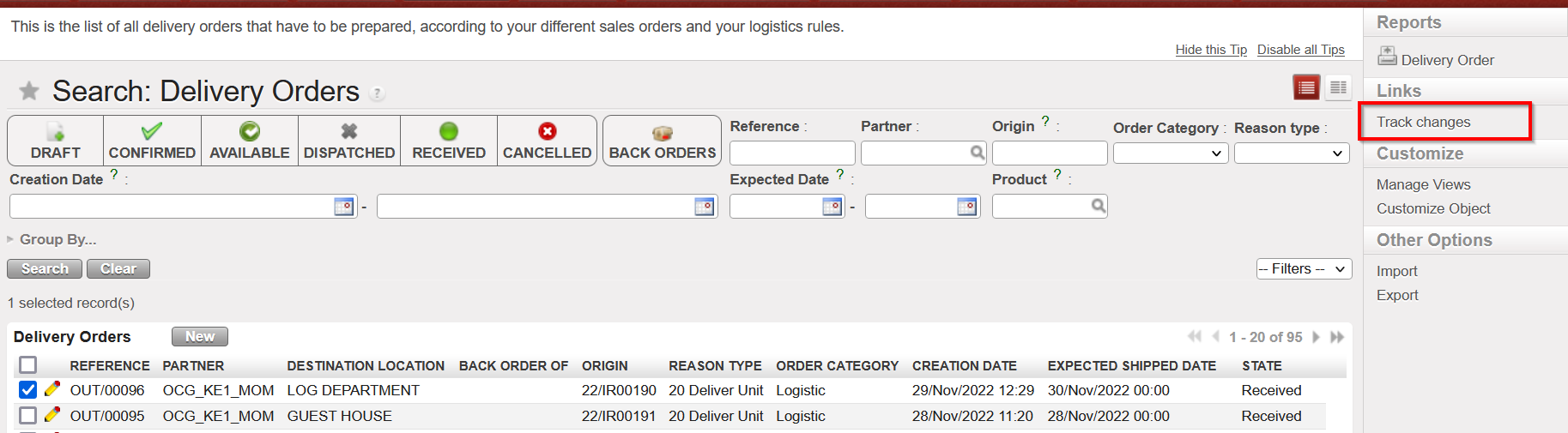
Improvement to add Track changes in the Action Menu > under links, to Delivery Orders (OUTs) and Picking Tickets (Parent & Child pickings) to make more user friendly and to get the information easily for analysis.

The track changes will show same information as was already displayed in Track Changes of INs.

N.B.: See below in IT section for explanation on new Supply User group with possibility to add to white list (for synched users)

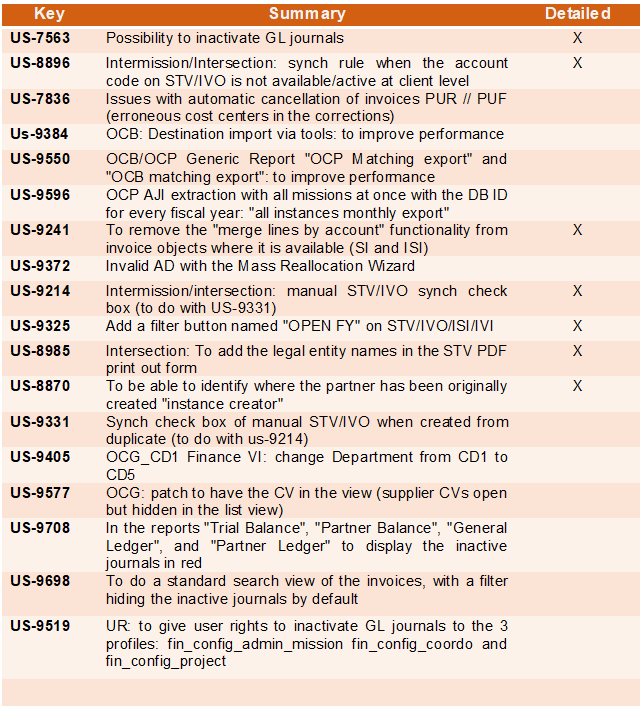
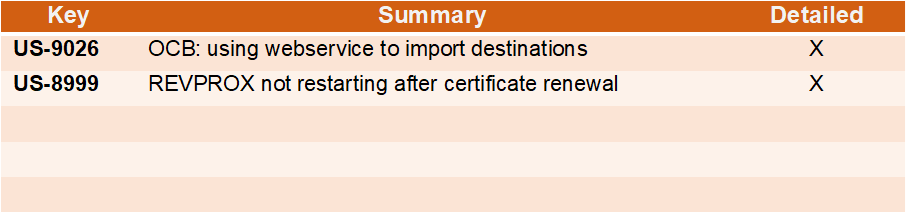
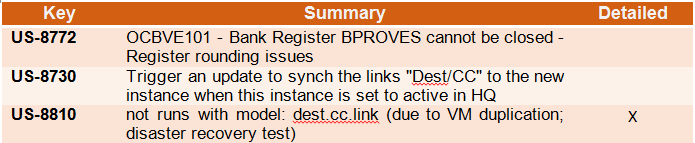
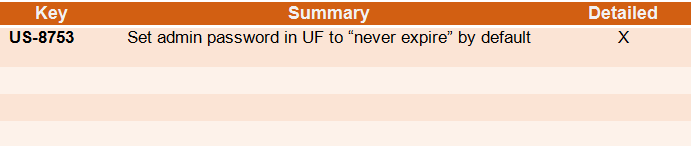
All Supply tickets integrated in UF27.00

Key

Summary

Detailed

US-10812

[US-10475] Extra space in Sup_Config_HQ group name

US-10802

UR: E-Validation change to User Rights for view of Signatures Follow up screen

US-10798

UD: PMD controlled_substance: extra value: P2 – Psychotrop 2

X

US-10787

E-VALIDATION: “Signatures Follow up” data protection. View screens supply / finance

US-10777

(US-8749) Extra check on Loan report

X

US-10768

Electronic Validation corrections / adjustments

US-10766

The files exported from the 2 reports “Export IR Follow-up” excel and pdf export. & “Export FO Follow-up” excel export. do not have the same titles like the name of the reports

X

US-10721

Impossible to import a Sub Reason Type on the Physical Inventory’s discrepancy lines

US-10600

RR: Real Stock in Inventory review + Order Calc takes into account all projects

X

US-10598

Addition of Service to Regular PO from FO should not be possible.

X

US-10596

Automated E-PL of IN was failed with error (There is not enough stock in Cross Docking which can be allocated)

X

US-10587

RT in P-P-S & OUTs for Loans & Donations needs correction

X

US-10579

Kit Management – Add “COMPLETED” Status Filter in TKC and KCL

X

US-10567

OCBCD100: RR-AMC do not show consumption

US-10554

RR: Coordo cannot access project Expiry date info

X

US-10522

To improve error message when importing CS which includes not existing products in PI

US-10491

Synch Messages: Set to “Run” without execution for NR IN processed before SHIP sent

X

US-10480

UR: Prevent Local finance user to create intermission / intersection partners at mission level

US-10475

Synchronize user from HQ is not possible for supref HQ user


US-10403

Loans report: remains Open PO to External Partner

X

US-10369

IR follow up perf improvement

X

US-10193

SYS filter in Internal move works in opposite logic than in other applications

X

US-10068

To prevent to add taxes on line nor on header on External PO with Order Type In Kind Donation

US-10067

To avoid the possibility to add taxes at line level in the PO for internal suppliers (internal flows)

US-9406

Electronic Validation

X

US-9394

Modification of Physical Inventory Adjustment Types and Comments

X

US-8749

LOAN report to show status Cancelled for cancelled lines

X

US-8684

KIT: Partial qty removal of one component/line

X

US-8386

Rename reports “PO Follow-up per supplier” and “FO Follow-up per client” & report location changes

X

US-7434

Add track changes to OUT & PICK

X

Finance.

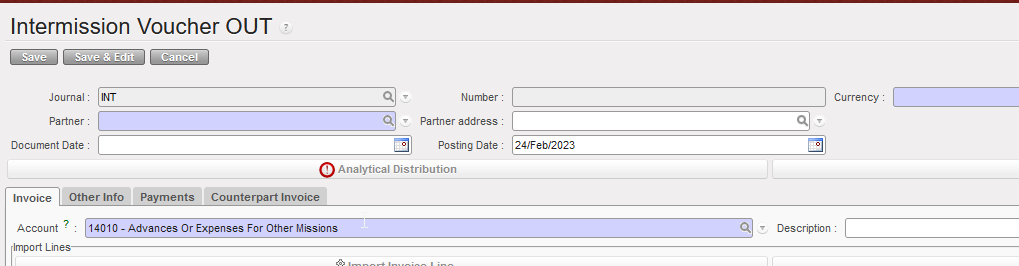
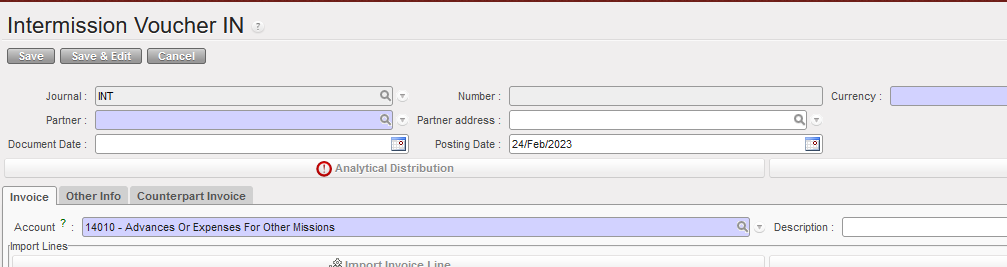
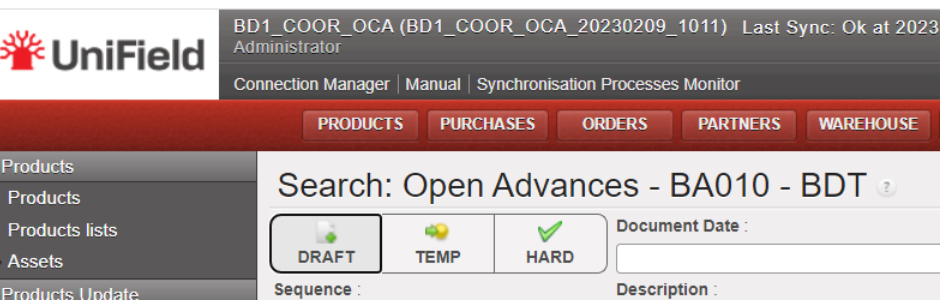
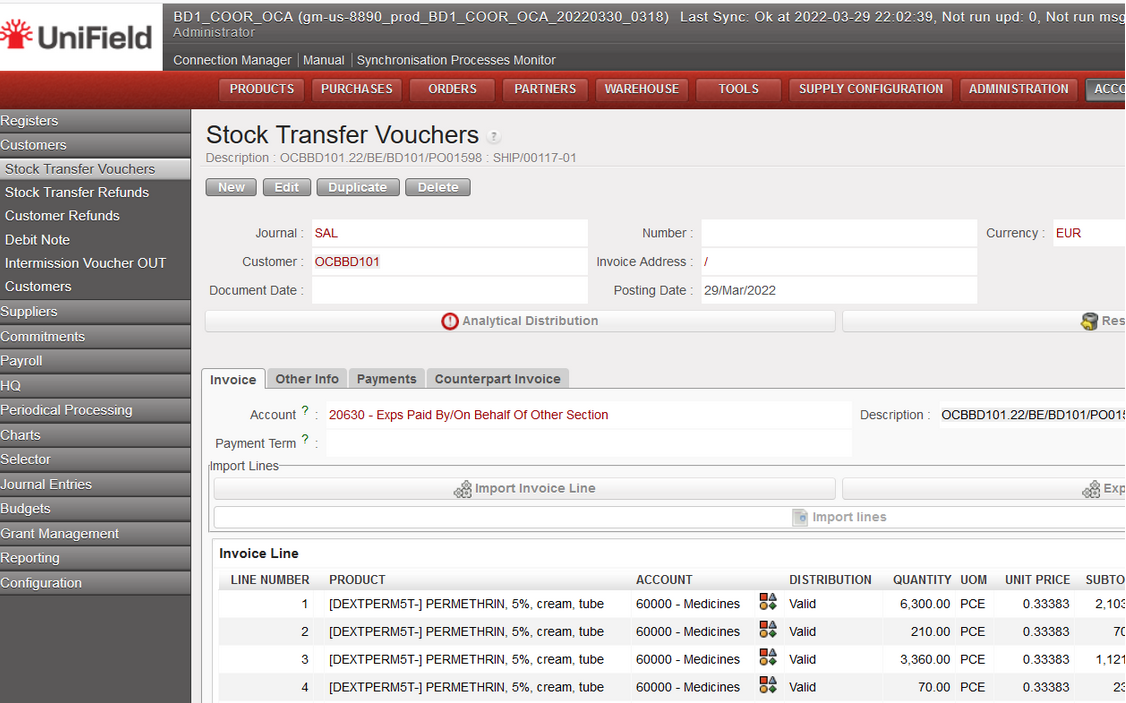
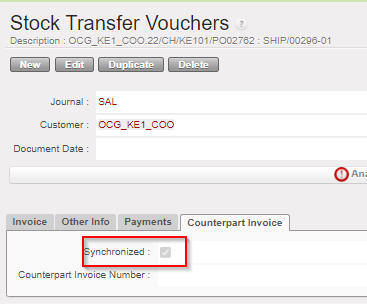
3.1 (US-6844) Intermission / intersection flow: Counterpart invoice status filter on IVO/IVI/STV/ISI.

We have added new filters to show the states of the counterparts for the following transactions:

  • Stock Transfer Vouchers
  • Intermission Voucher OUT
  • Intersection Supplier Invoices
  • Intermission Voucher IN

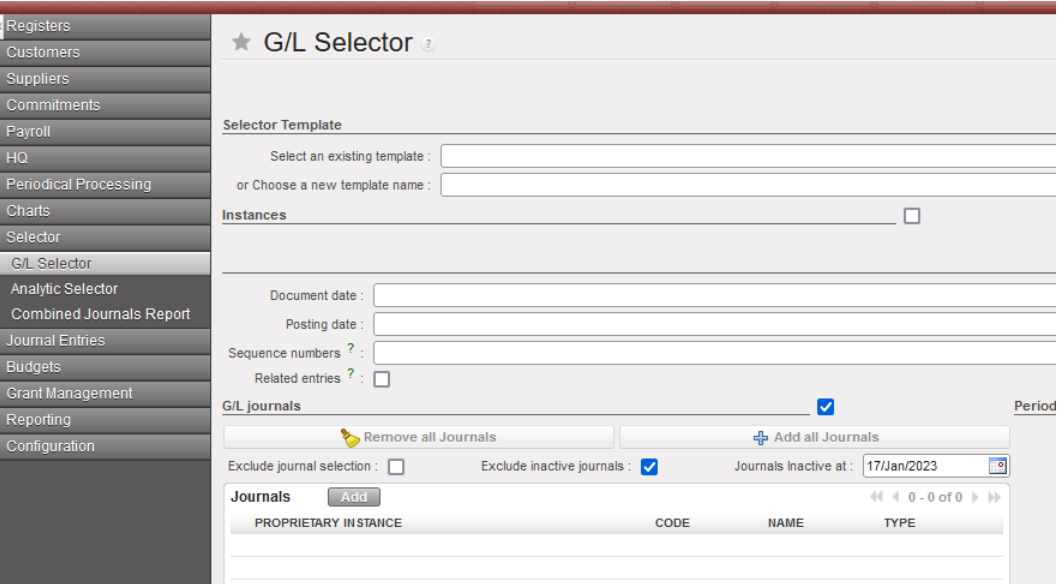
3.2 (US-9142) Add in Interface the total of Output Amount/Output Credit and Debit when Output Currency is selected in Selector.

The improvement has been done in both search results: “Analytic Journal Items” & “Journal Items” interfaces that are created from the selector search screen.

Please to see this, go to Accounting / Selector/ G/L / Selector and then select in the Selector the field “Display in output currency “with a currency.

Both “Analytic Journal Items” & “Journal Items” interfaces will appear with two columns and their totals “Output amount” & “Output curr.”:

  • Total output amount at the end in the entries interface when using the Analytic selector
  • Total Output Credit and Output Debit at the end in the entries interface when using the G/L Selector

3.3 (US-9271) Full report: add the correction lines when using Wizard of correction on return of advance expenses.

The improvement is in the extract of the “Full Report” from the registers. When the correction of the analytic distribution belongs to an advance line (expenses) through the “Analytic Distribution Items” interface, the extract of the “Full Report” will show both lines “Corrected” and “Reversal”:

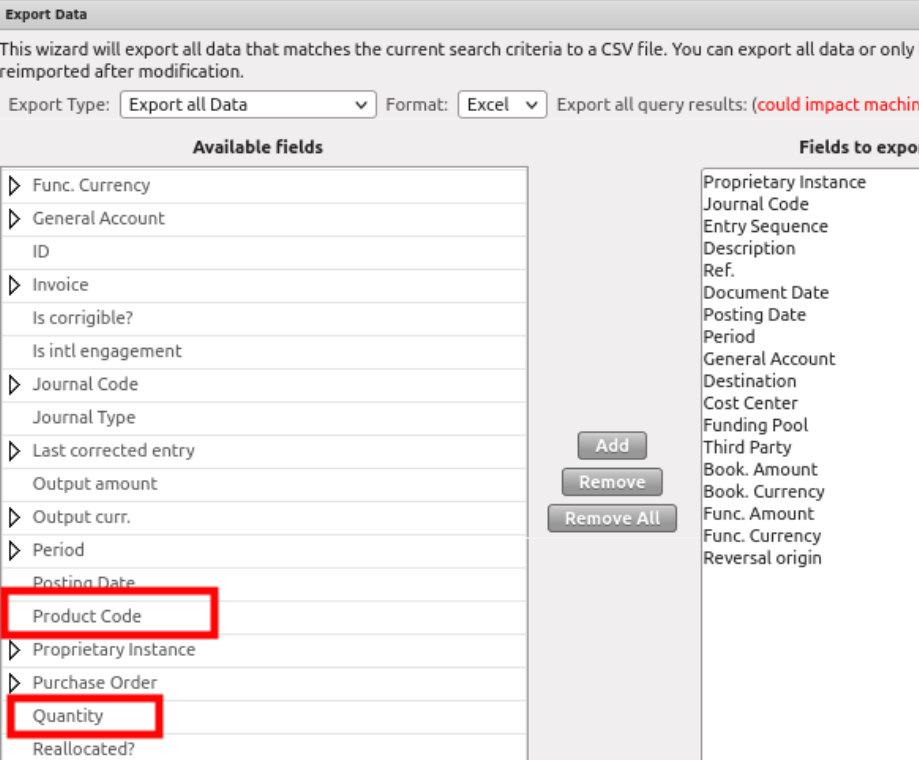
3.4 (US-9301) Possibility to get the product code and quantity of the expense in the JI (Journal Items) and AJI (Analytic Journal Items) export.

The improvement is done in the Export data excel file through both interfaces “Journal Items” and “Analytic Journal Items”.

Now we can get the Product code and the quantity available in the Export of JI and AJI of each entry, line by line.

3.5 (US-9357) Donation’s improvements miscellaneous: filters, journals, fields.

There have been additional improvements for the donation’s functionality:

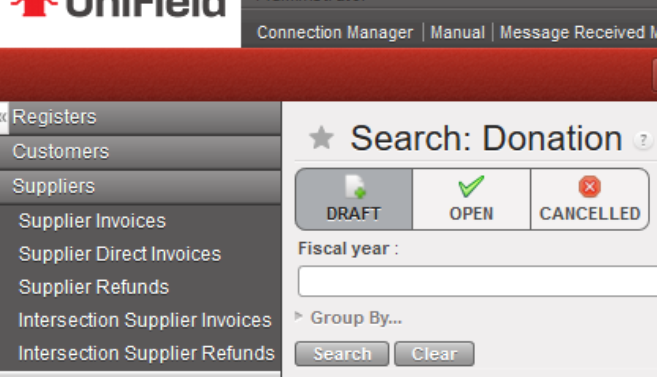
Go to Accounting > Suppliers > Donation:

  • The default search of the donations is the “Draft” state:
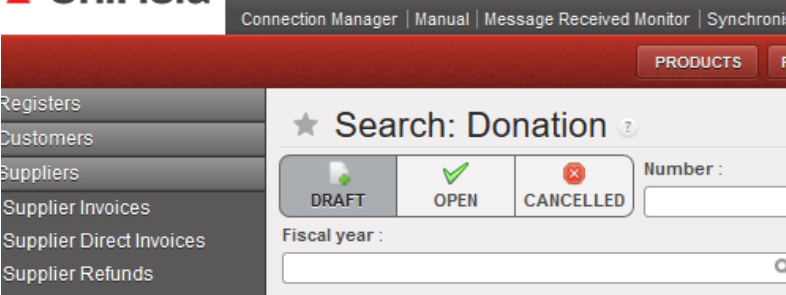
  • Below the 3 states of donation filters, we have added a new filter named “Fiscal year”, to allow to filter by year:
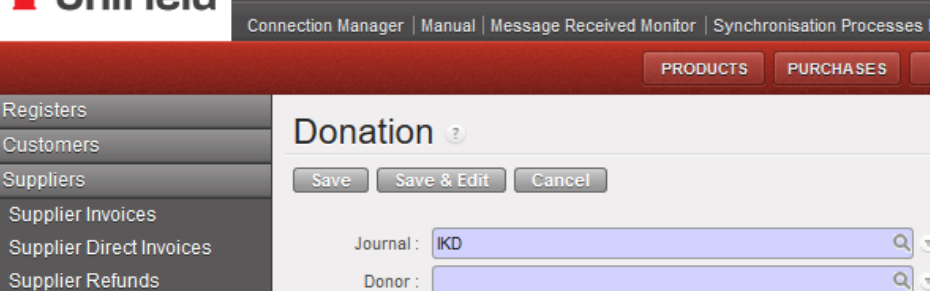
  • The only journal available is now the IKD journal -In kind donations- (it is not possible to select the ODX journal in manual. This ODX journal will be used just for automatic entries):

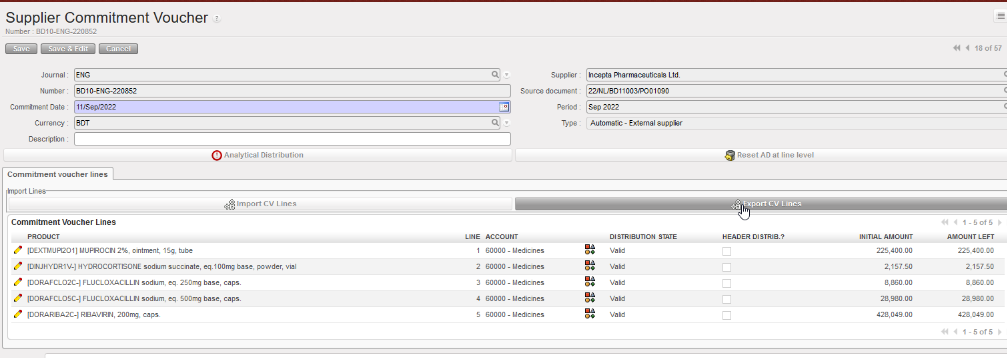
3.6 (US-9389) Commitment Voucher CV: to set up “export CV lines “and “import CV lines” like for the supplier invoices (to do with US-9732).

We have done an “export cv lines” report and an “import cv lines report” (as the ones that we have developed for the supplier invoices in the ticket US-9732).

  • We have created two new buttons in the “Commitment voucher lines” tab named: “Import CV Lines” and “Export CV Lines”.
  • The “Export CV Lines” includes 10 columns: 4 columns are editable which are “Account” plus the analytic distribution columns.
  • Each line has its own ID defined in the column “Internal ID”.
  • In the case that a line of the commitment voucher has been split in several lines, the AD will be empty. We will have the word “SPLIT” in the column “Analytic distribution”. The 3 last columns Cost Center, Destination and Funding Pool will be empty.
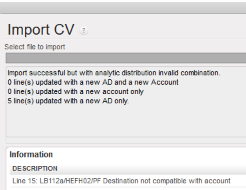
  • We can export the information, change the data and import the file with the data in Unifield. The import fails in case one of the main components do not match: “CV Number, Currency, Supplier, Source Document and CV Type“: an error message will be shown:

3.7 (US-9588) The filtering for the periods 13, 14, 15 and 16 (extra accounting) is not correct in AJI on ENGI (international commitments).

The display of “ENGI” lines in the “Analytic Journal Items” interface has been corrected.

The ENGI will be seen in the filter of the ordinary periods (Jan-Dec).

3.8 (US-9732) Extend to AD the Export/Import invoice lines (to do with US-9389).

We have improved the excel file by adding the analytic distribution:

  • The exported file “Export Invoice line” has been improved by adding 4 additional columns: Analytic Distribution, Cost Center, Destination and Funding Pool).
  • If the invoice line has been split, we will have the word SPLIT in the excel file and the analytical distribution will be empty.
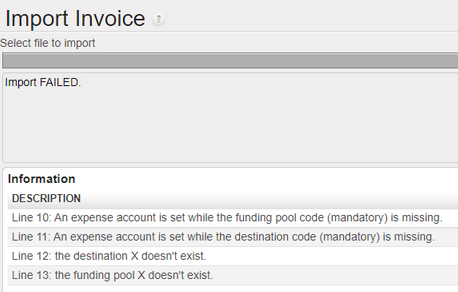
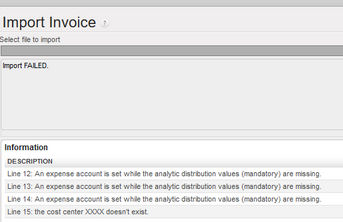
  • If we try to import incorrect values (cost center that does not exist, mandatory values not reported…), the import will fail, and we will have error messages that will help us to correct the errors and to import again the file.

3.9 (US-9770() and (US-10780) OCA: Closing of Period 15 and end of year REV: to add checks and warning messages.

UF has the functionality to revaluate a/liquidity every month, b/liquidity end of year (using a currency table) and c/regular balance end of year (using a currency table).

OCA is using this option.

REV is happening at Coordination instance only – it can be applied once and not correctable.

REV is optional. If an account code for REV is set at company configuration, an instance type coordination could not be closed without REV being processed for a defined list of periods: Jan – dec. We did not include extra accounting periods.

This improvement request is to add P15 in the list of months where we do a revaluation and to add warning messages in case of not respect of the procedure.

The current list of periods to be revaluated is January to December. Those periods have only a/ liquidity every month revaluation.

In Period 15 we have to do the revaluation in 2 steps:

B/ liquidity end of year and c/ regular balance end of year (in both cases it is compulsory to use a currency table).

This improvement has added to P15 2 revaluation checks and additional warning messages:

(EoY: End of Year revaluation)

1. No EoY revaluation run = no warning message.

2. Liquidity EoY has been done => “EoY Revaluation of liquidity has been done”.

3. B/S EoY has been done => “EoY Revaluation of B/S has been done”.

4. Both has been done ==> “Both EoY Revaluation have been done”.

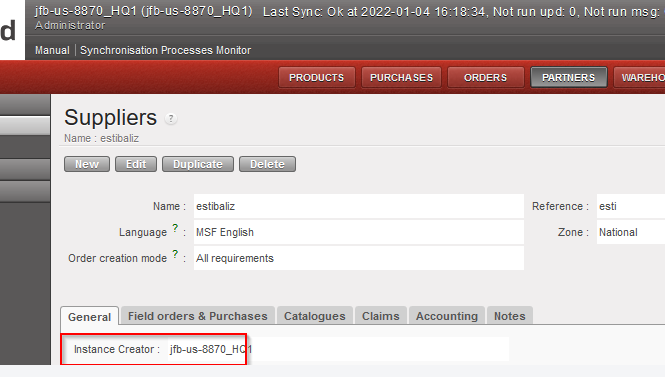
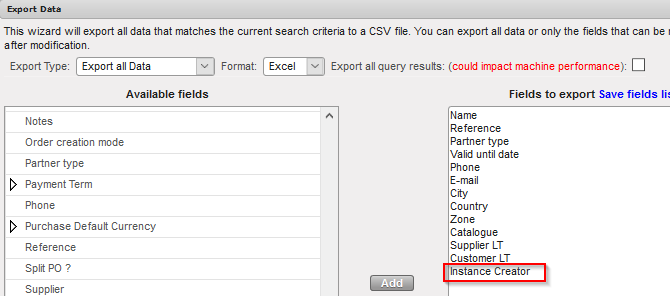
3.10 (US-9869) To be able to identify where the LOCAL staff has been originally created “instance creator”.

We have added a new field in the Employees tab indicating the instance where the employee has been created. The field is named “instance creator of the employee”.

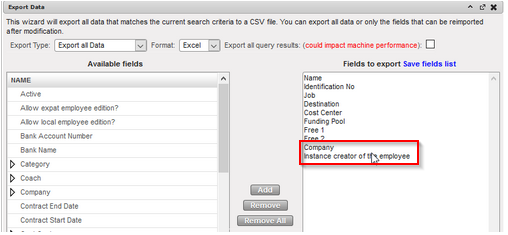
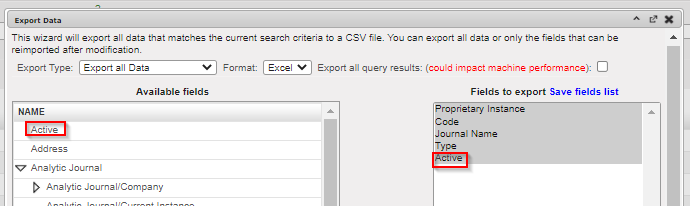
We have added in the export report (in the right action menu), the field “Instance creator of the employee” and the field “Company”.

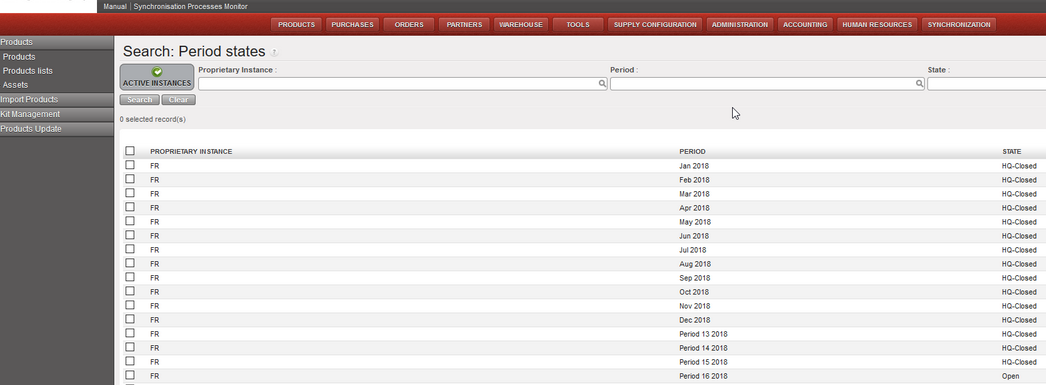
3.11 (US-9941) To add a filter button named “ACTIVE INSTANCES” in the “Search: Period States” interface

Go to accounting / configuration / financial accounting / periods / periods

1. We have added a new button called “Active Instances” to filter only the Active Instances.

2. This button “Active Instances” will be selected by default.

3.12 (US-10067) To avoid the possibility to add taxes at line level in the PO for internal suppliers (internal flows).

We have disabled the possibility to add taxes at line level in the PO for internal suppliers (internal flows).

3.13 (US-10068) To prevent to add taxes online nor on header on External PO with Order Type In Kind Donation.

We have disabled the possibility to add taxes at line level nor on header on External PO with Order Type In Kind Donation.

3.14 (US-10073) How to inactivate liquidity journals from decommissioned instances in an easy way.

At coordination level, it is now possible to inactivate the journals of a decommissioned/deactivated project.

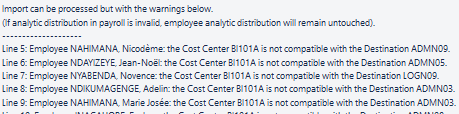
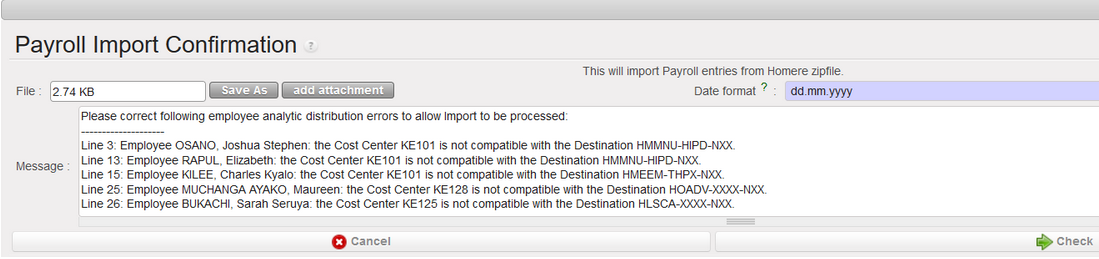
3.15 (US-10124) To allow the import PAYE_UNIFIELD even if Destination and Cost centers in the file are not compatible.

UniField will allow the import of the Paye Unifield file even if the combination of cost center and destination is not active. But in this case, a warning message will appear:

The incorrect payroll lines will be reported as invalid and there will be no update of the analytics on staff with error.

The correct payroll lines will be reported as valid and there will be the update of the analytics on staff without error.

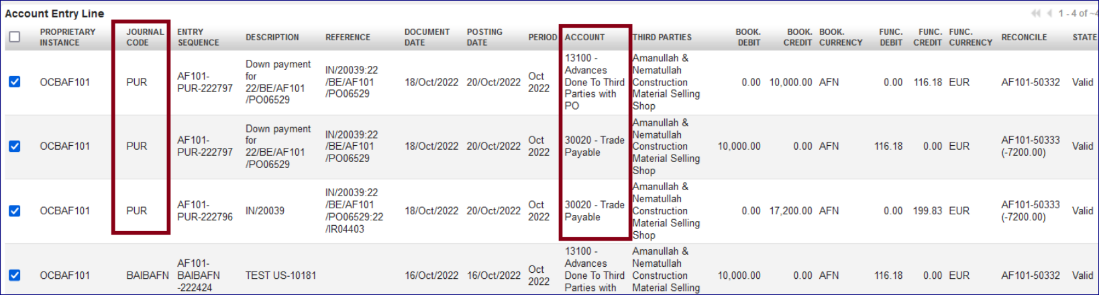
3.16 (US-10181) Improve the booking of Entries linked to down payments function: use the PUR journal.

The improvement in the column “Journal Code” in the “Journal Items” interface.

When an account code is configured “type for specific treatment = down payment”, the down payment entry in the register needs to be linked to a confirmed PO. The entries related will appear in “Journal Items” interface as below (example):

  1. 13100 – Advances Done To Third Parties with PO” recorded in the liquidity journal will appear under the journal code of the liquidity journal.
  2. All other lines related created automatically from the reconciliation will be booked in the “PUR” journal.
  3. Below you have an example:

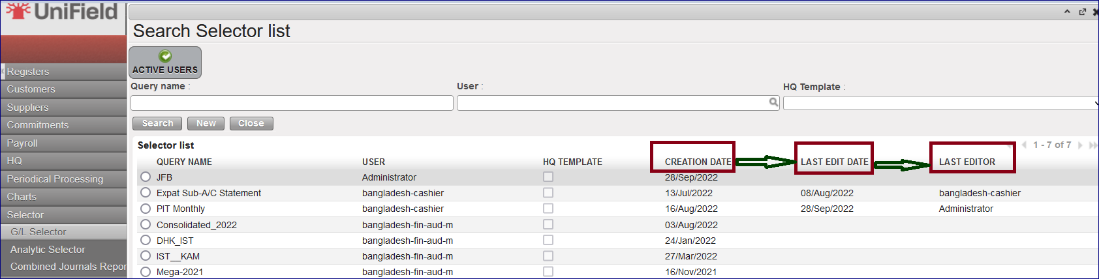
3.17 (US-10237) Selector saved query list view: add creation and last edit date/editor fields.

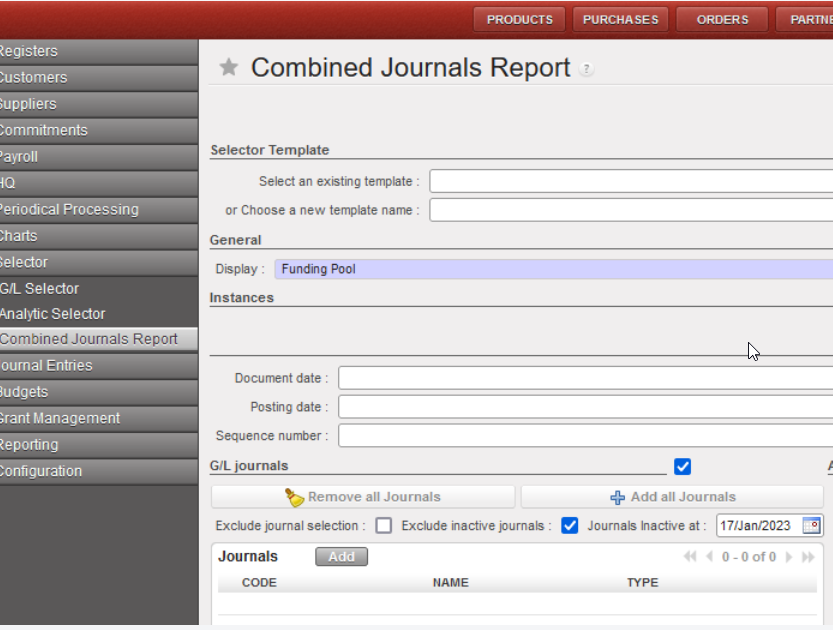
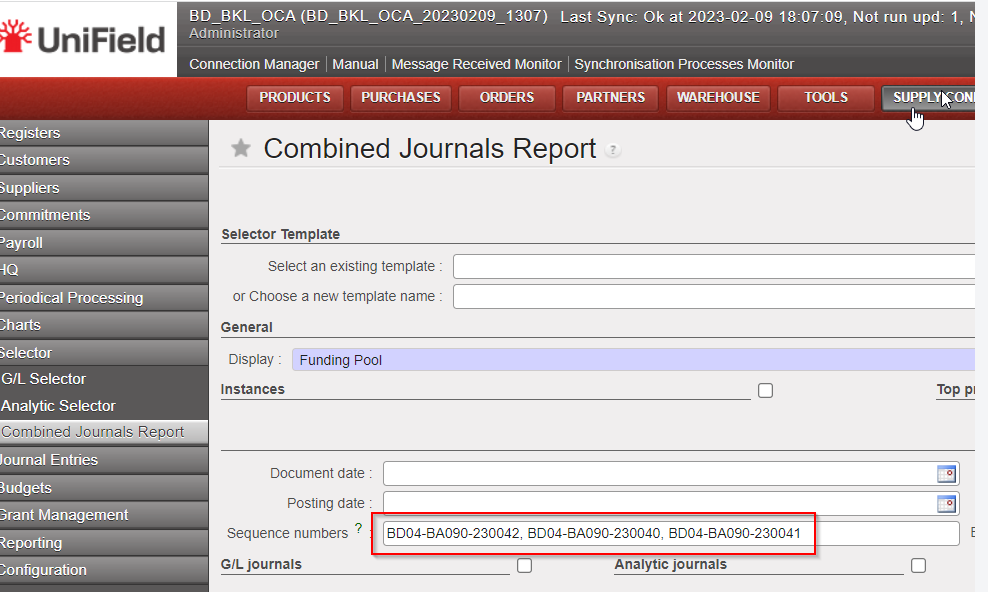
This is an improvement in the “Selector” at saved queries for “GL Selector”, “Analytic Selector” and “Combined Journals Report “.

We have created three additional columns:

  • CREATION DATE
  • LAST EDIT DATE
  • LAST EDITOR

3.18 (US-10262) To block the possibility to create a Journal if the currency parametrized is not active.

The improvement blocked the possibility to select an inactive currency during the creation of a new journal.

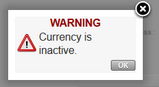
Now with the creation of a new journal, if an inactive currency is selected, you will receive a popup message with “WARNING Currency is inactive” and you will not be able to save.

3.19 (US-10480) UR: Prevent Local finance user to create intermission / intersection partners at mission level.

The possibility to create intermission / intersection partners at mission level has been blocked for the groups of users below:

  • Sup_Demand_Manager
  • Sup_Purchase_Manager
  • Sup_Purchase_Officer
  • Sup_Store_Keeper
  • Sup_Supply_Config
  • Sup_Supply_System_Administrator
  • Sup_Warehouse_Manager
  • Fin_Config_Coordo
  • Fin_Config_Project
  • Fin_Config_Full

3.20 All Finance tickets integrated in UF27.0

Key

Summary

Detailed

US-6240   

Change of Color codes for HQ entries: validated (to black) and split lines (to green)

US-6844 

Intermission / intersection flow: Counterpart invoice status filter on IVO/IVI/STV/ISI.

X

US-7719   

Remove the space at beginning and at the end of the “journal code” and “journal name” object when saving.

US-7852

Report the third party “code” and not the third party “description” in the Analytic Journal Items interface.

US-8065   

Default [destination] could not be displayed in the AD wizard of the Direct Invoice.


US-8672

In the register import file, technically allow this special character “…”


US-9142  

Add in Interface the total of Output Amount/Output Credit and Debit when Output Currency is selected in Selector

X

US-9259

Impossible to validate a direct invoice (DI) after having deactivated the original destination.

US-9271

Full report: add the correction lines when using Wizard of correction on return of advance expenses

X

US-9279

Advance settlement wizard: to make AD screen a pop up on top of the advance settlement wizard.


US-9301

Possibility to get the product code and quantity of the expense in the JI and AJI export.

X

US-9357

Donations improvements miscellaneous: filters, journals, fields.

X

US-9389

Commitment Voucher CV: to set up “export CV lines “and “import CV lines” like for the supplier invoices (to do with US-9732).

X

US-9588

The filtering for the periods 13, 14, 15 and 16 (extra accounting) is not correct in AJI on ENGI (international commitments)

X

US-9732

Extend to AD the Export/Import invoice lines (to do with US-9389).

X

US-9770

OCA: Closing of Period 15 and end of year REV: to add checks and warning messages.

X

US-9809

AD check on HQ entries not correctly applied: check on both parametrized account code and Cost centres of the Destination.


US-9842

To remove the white space in the beginning and end of the identification number of the international employees.

US-9869

To be able to identify where the LOCAL staff has been originally created “instance creator”.

X

US-9941

To add a filter button named “Active Instance” in the “Search: Period States” interface.

X

US-9999

Accruals: to change the default display ACC in the list view.

US-10067

To avoid the possibility to add taxes at line level in the PO for internal suppliers (internal flows).

X

US-10068

To prevent to add taxes online nor on header on External PO with Order Type In Kind Donation.

X

US-10073

How to inactivate liquidity journals from decommissioned instances in an easy way.

X

US-10105

Invoice object default display + Commitment vouchers (CV) in list view: draft State on the top


US-10124

To allow the import PAYE_UNIFIELD even if Destination and Cost centers in the file are not compatible.

X

US-10181

Improve the booking of Entries linked to down payments function: use the PUR journal.

X

US-10214

Pending Invoice Report to fix: not to add the temp posted register entries for direct invoices (draft DI).

US-10228

Payroll entries shown as Valid without AD (analytic distribution): behaviour to be changed! they must be Invalid.


US-10237

Selector saved query list view: add creation and last edit date/editor fields.

X

US-10262

To block the possibility to create a Journal if the currency parametrized is not active.

X

US-10443

OCG_LB1_COO: Cheque paid in May appears as unpaid in July : code fix to exclude FXA entries from later period check.

US-10480

UR: Prevent Local finance user to create intermission / intersection partners at mission level.

X

US-10586

Patch script: to turn all one-time accruals manually reconciled in status Running to status DONE in OCA and OCB prod instances.

US-10780

End of year REV on P15: change warning messages.

X

US-10787

E-VALIDATION: “Signatures Follow up” data protection. View screens supply / finance.

X

US-10819

To add product_id and quanity in account_move_line sync rule 412

Non- functional

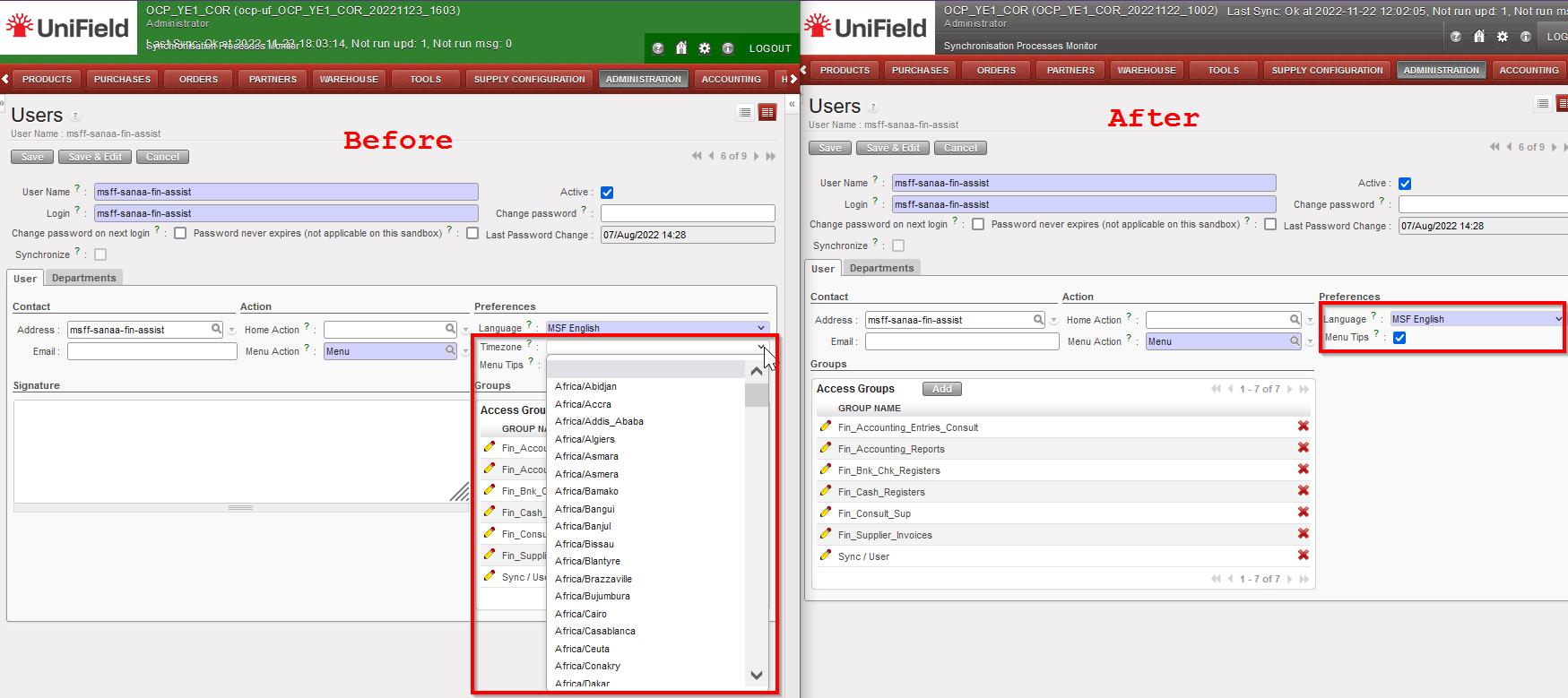
(US-10662) Error: No valid Time zone detected: Disable time zone field on user preference and user form.

The timezone field on user preference and user form has been removed for all users. This fixes the bug that was causing application error when timezone is set on a user profile. The standard openERP behaviour when timezone is set on a user profile is to:

  • Detect the system Timezone
  • Change time displayed on the User Interface to apply the rule: database time – system timezone + user timezone

Most of the time OpenERP is unable to detect the system timezone on Windows so the default UTC timezone is set.

This release removes the timezone drop down menu from Users and Settings to prevent this behaviour. Only the database time and system timezone will be taken into account.

Graphical user interface, application

Description automatically generated
Graphical user interface, application

Description automatically generated

(US-10475) Synchronize user from HQ is not possible for supply referent HQ users

Prior to this release, only the group Fin_Config_Full had access to the synchronization whitelist. We have created a new group Sup_Config_HQ only at HQ level for supply to independently manage the Supply synchronized users.

(US-10604) To improve the performance of the HQ entries import

The performance of the HQ entries import has been improved. A progress bar and state of the import has been added. The state will show status: In progress, Done or Error if import fails with the reason for the failure displayed. See finance part of the release notes for the functional details

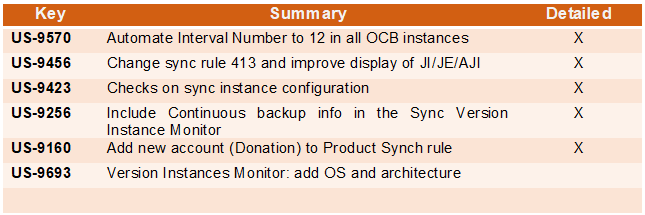
All Non-functional tickets integrated in UF27.0

Key

Summary

Detailed

US-10662

Error: No valid timezone detected: Disable timezone field on user preference and user form.

X

US-10475

Synchronize user from HQ is not possible for supref HQ user

X

US-10604

To improve the performance of the HQ entries import

X

UniField v26.0 Release Notes

Release Details

Release version: UF 26.0

Date of production synchronization server patch: 14th September 2022 / 18:00 Geneva time

Latest user rights files updated: UF26.0 can be found here

Note that no user rights need to be loaded at each HQ. This will be done at the Sync Server by the Core team and will update the user rights via Sync for all HQs and missions.

JIRA filter for all integrated tickets: https://jira.unifield.org/issues/?filter=12435

Supply

(US-10168) Lookups for headers and constants should be case insensitive

This improvement ticket is to ease the importing job in UF, it is now acceptable for all Supply imports in UniField to have inconsistent cases, e.g., UoM “pce” instead of “PCE”, or “Pce” instead of “PCE”, file will be recognised and imported.

(US-10051) Accurate naming / addition for product codes XMLID / MSFID

This ticket is to improve the accuracy / visibility of background product id codes:

  • In Tools>Object Query > Products

Possible search field has been updated so that it is now named “MSFID” (previously it was named “hidden field for UniData). It is also now possible to search for additional field “SDref”.

  • In Product PMD>Action menu>View Log:

i) existing label “Internal module data ID” is now renamed to “SDref”
ii) existing label “UniData xmlid_code” is now renamed to “xmlid_code”

  • In Product PMD>Action menu> Export

User can search for field MSFID, and MSFID is not possible to be changed by users via import or update products menus (should not be possible to update MSFID of product via import (MSFID should ONLY be added/changed by by UniData)

  • Log to show if the MSFID of a Product has been changed has been added to track changes In Product PMD>Action menu> Track Changes

(US-10010) Avoiding Local products import at Project

This improvement ticket is to avoid the issue of users accidentally creating or updating products in project-level instances. In this release below sub-menus are no longer accessible in projects:

  • via menu Products > Import products> import products
  • via menu Products > Import products> update products
  • via menu Tools > import / export > Supply
  • via menu Tools > automated imports > Products

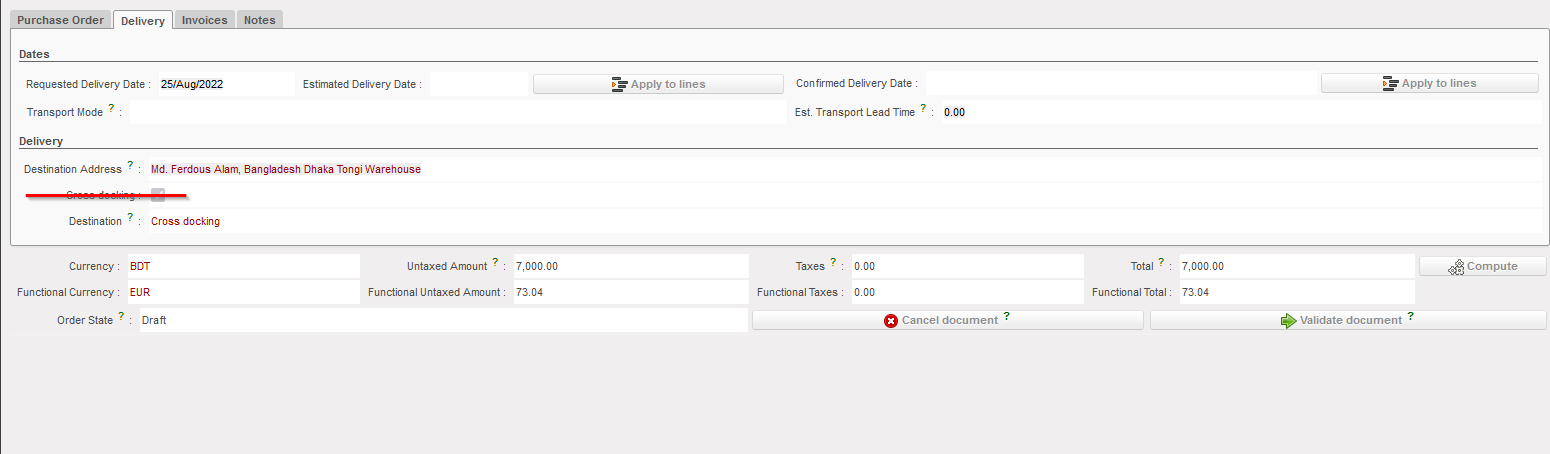
(US-10008) Disable tick box “Cross Docking”

This improvement ticket raised by OCA, to prevent user from changing the destination location on the PO level. Users can still do the change in the IN level. In the PO, the tick box “Cross Docking” in the tab “Delivery” is not visible anymore for users.

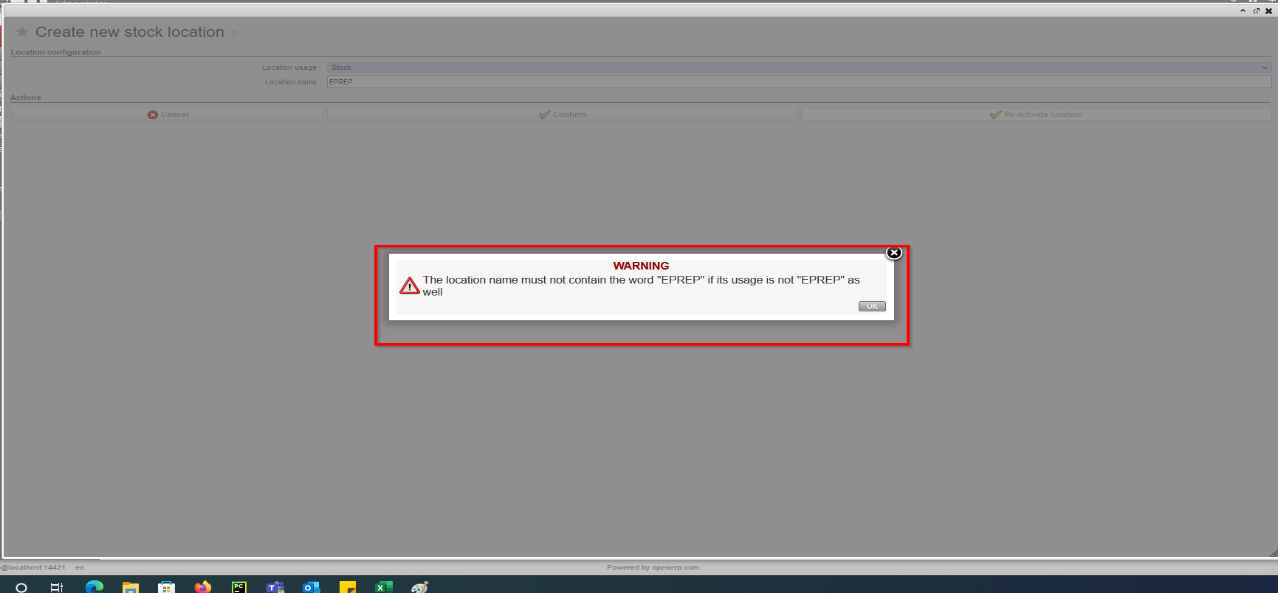
(US-9968) Blocking the creation of EPREP in Intermediate stock location

Improvement ticket raised by OCB, to stop the creation of “EPREP” location under the “Stock” category, system prevents such a location being created if name includes word “eprep” and a message is displayed to stop this action:

(US-9962) VI: If E-Packing IN > PPS import cannot be done (forced availability/negative stock) clearer message

Improvement ticket raised to avoid previous issues found by OCB. In the flow of ordering, sourcing, and importing E-packing VI import into IN with the option to pick & pack after, if one of the products is already “forced” as “Available” in an unrelated OUT from the same location (Crossdocking), the import could not be processed. With this dev, system will now check at IN import (if IN>P/P/S) that products do not have a negative available stock in CD location, and if so, the import will be blocked and product code / qty displayed in warning message. Same check done for all types of VI IN import.

(US-9744) Remove PI C/S check on line reference.

Improvement ticket raised by OCB, to avoid any duplication in Physical Inventory. At import of Counting Sheet, system will no longer check the line reference in file at import of counting sheet.

System will keep the check of Product / BN / ED, duplicate lines, and match imported Prod/BN/ED, add new lines, etc.

(US-9509) Product UniField Status after re-activation of product.

Improvement ticket raised by OCG, to ensure the consistency for UF Product Statuses when a product is manually re-activated. At manual re-activation, the product’s “UniField Status” should change accordingly. In the case of UniData products, the UF Status should be updated based on its “UniData Status” and “OC Subscription”.

  • For HQ, ITC and ESC products at HQ: If product re-activated, then UF Status automatically set to “Valid”
  • For Local products at Coordo: If product re-activated, then UF Status automatically set to Valid
  • For UniData products at HQ: If product re-activated, then the following is the result:
  • If Product is OC Subscribed = FALSE, then UF status > No change (remains Archived or Phase out)
  • If Product is OC Subscribed = TRUE, and:
  • UD Status = Forbidden then UF status > No change (remains Forbidden)
  • UD status = Archived then UF status > No change (remains Archived)
  • UD Status = Valid / Outdated/Discontinued then UF status > set to Valid

(US-9229) New Reason Type for OUTs: Deliver Unit

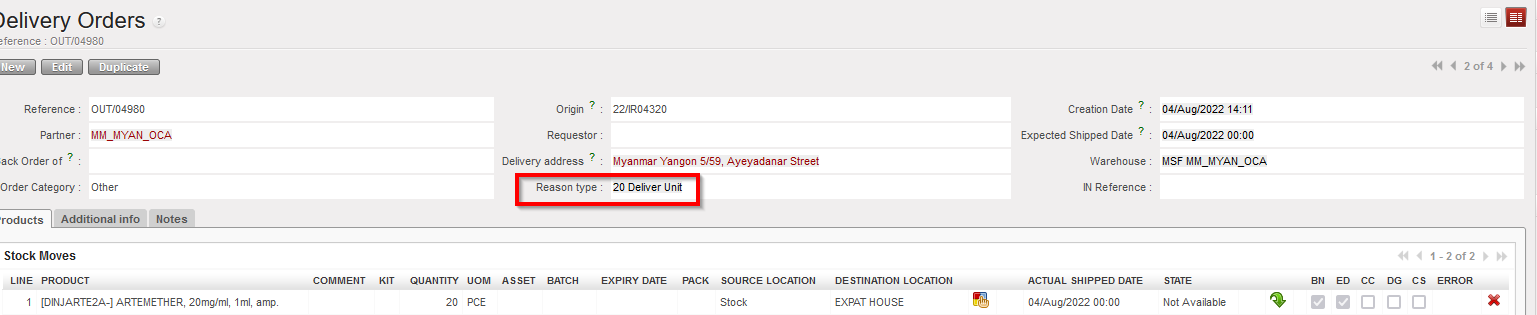
Improvement ticket raised by OCA, to improve the analysis of stock movements and to ensure greater consistency. With this ticket a new Reason Type (RT) is introduced for stock movements towards External Consumption Units. The default RT on any OUT or (converted) Pick to an External CU is now “Deliver Unit”. This new RT can also be selected in an OUT from scratch (although Default RT remains “Deliver Partner” for this). For both Picks and Outs, the RTs at line level will now be consistent with header level RT. The RT “Other” can no longer be selected.

Previous documents (Picks and Outs) have been migrated to conform to the RT logic as follows:

“Deliver Unit” for all OUTs created for IR with Ext CU.

“Deliver Unit” for all Picks created (via converting OUT) for IR with Ext CU.

“Deliver Partner” for all OUTs and Picks created for FO to customer.

“Consumption Report” for all OUTs created via a Consumption Report.

These documents have had their RTs at line level adjusted to be consistent with header level RT

(US-8966) Cancel / C&R multiple lines to be consistent with single lines in IR/FO/PO

This improvement requested by OCB, ensures Cancel and C&R of lines is consistent in IR/FO/POs. It is possible now to cancel / C&R multiple (Draft/validated) lines, in Draft-p / Validated/ Validated-P IR/FO, and also in POs with supplier type ESC or external, (It is not possible to Cancel / C&R validated lines in PO with Internal/Intermission/Intersection type suppliers if they are beyond “Draft” status).

(US-8864) Export Inventory Level lists batches with no movement in the selected period

Improvement ticket raised by OCA, to improve the Export Inventory Level report, in case the checkbox “Include products with stock <= 0 with movements in the last months” is ticked, and X months is selected, report generated will include Products and their EDs/Batches which are in stock or have had movements in the last X months, and exclude the ED/batches which have not moved in the defined value X months and are not in stock.

(US-8428) Physical Inventory – Planned Inventory vs Stock Correction

Improvement ticket raised by OCB, to improve options for inventory management, in the Physical Inventory, the checkbox for “Full inventory” is replaced by a mandatory drop-down list with below options:

  • Full inventory count (planned),
  • Partial inventory count (planned)
  • Stock correction (unplanned).

If 3rd option is selected “Stock correction (unplanned)”, only the “Add” button displays to allow products to be added. The button “Products selection” is not displayed.

Drop-down list values of (Inventory Type) options can be changed as long as no products have been added yet.

The rest of the functionality stays as per before.

(US-7323) Add Product search field for INs etc and PMD Action menu links

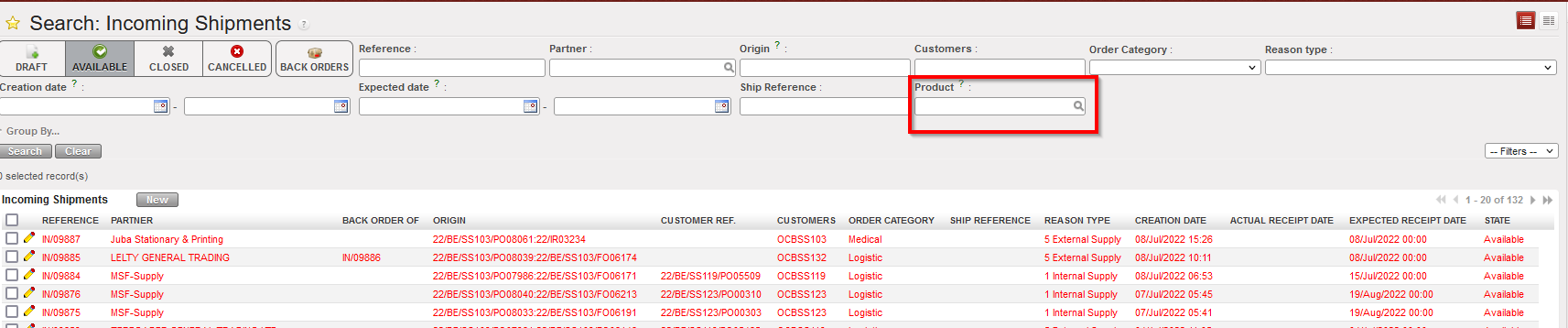
This Improvement ticket was raised by OCG. For more consistency and to extend the searching possibilities, an additional search field for “Products” has been added at header level in the List View for each of these documents: IR, FO, Tender, RFQ, INs, INTs, Outs, Picking, PPL, so as to behave like that existing in POs list view.

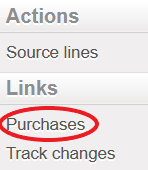
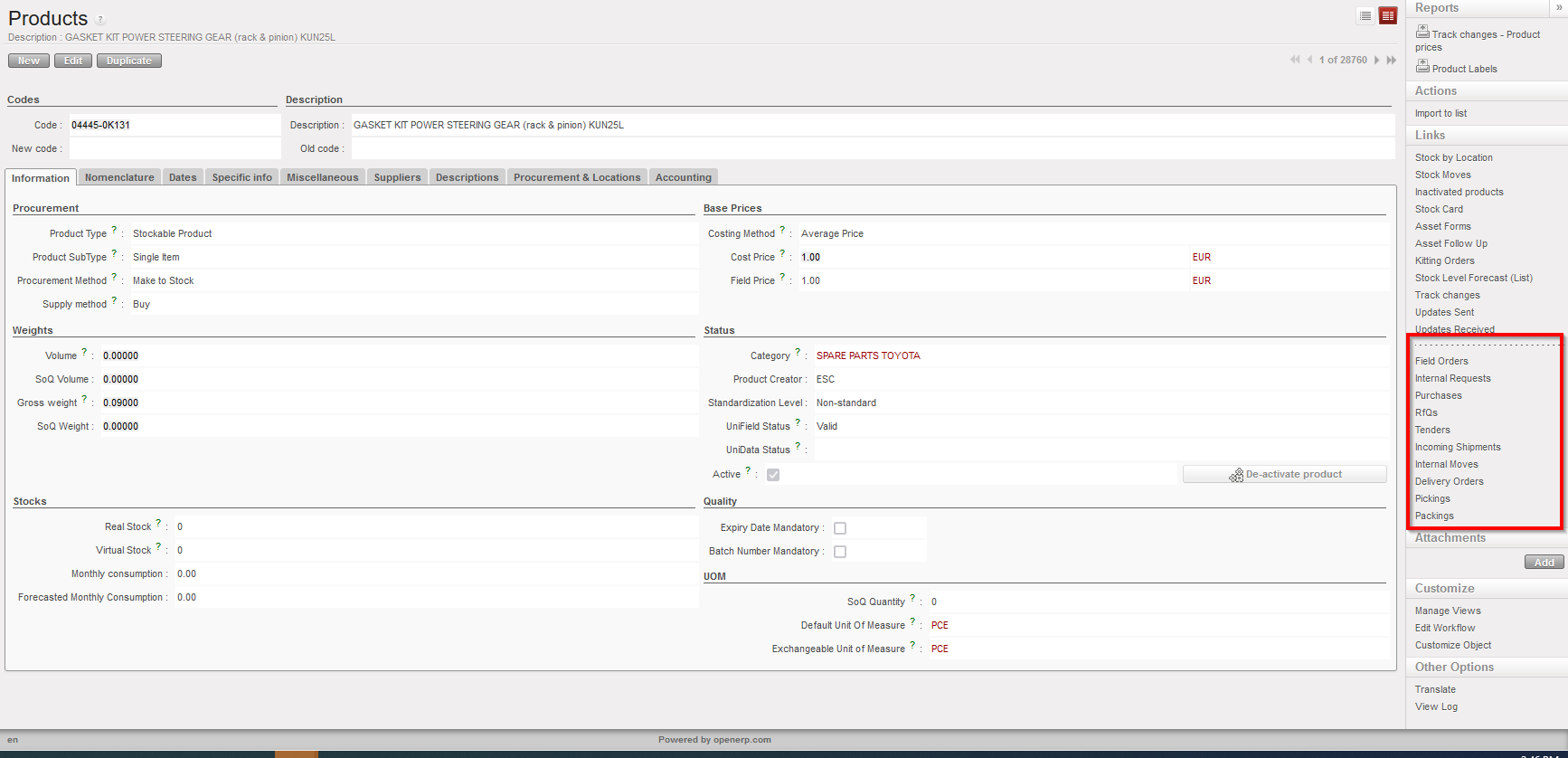
Also, in the Products/PMD Action menu, links to see the relevant documents for selected (ticked) product have been added. Links displayed are: Field Orders – Internal Requests – Purchases- RfQ’s – Tenders – Incoming Shipments – Internal Moves – Delivery Orders – Picking – Packing.

(US-5190) Remove possibility to split Draft FO lines

This improvement ticket is to avoid several issues caused in the past leading to NRs and wrong data, and means it is now not possible to split FO lines directly in FO in Draft status. Other functionalities allowing split in FO lines at a later stage (OST, PO, IN etc) remain as before.

(US-3694) Product sheet: Display inventory level from all locations

Improvement ticket raised by OCA, to update the calculation of Real stock and Virtual stock displayed for products so that more locations are taken into account. The calculation of Real/Virtual stock now includes the product Qty in the following locations: LOG/MED in main stock AND all configured Internal locations (Intermediate stock and Internal consumption units). AND E-Prep internal locations. It (still) does not include any transition locations (such as Input, Packing, Cross-Docking etc). The revised stock calculation is displayed in the below menus:

  • Product Data sheet – a) list view and b) form view
  • Search screen for products – ie pop up when selecting products from other transactions (e.g. IR, PO, FO, Tender, RFQ, OUT) having the calculation of the value for Qty “Real Stock” and “Virtual stock”.

Improvement corrections on reports (US-10296, US-10222 & US-7388)

The last 3 improvement tickets to increase the efficiency of UF reporting and for more consistency,

  • Bug solved to correct the CDD/EDD in “IR Follow-up per location” report.
  • Performance improved for the times’ needed to export “FO follow-up per client” report, selecting IR in order ref no longer possible in this report to decrease the time since there is another dedicated report for IRs doing the same checks.
  • “IR follow-up per location”: For more consistency, in the “IR follow up per location” in case of cancelled lines in Delivery out, report is now more accurate and consistent in display of “Qty to deliver” and in displaying “INT Ref.” where relevant. please refer to ticket “US-7388” for more details.

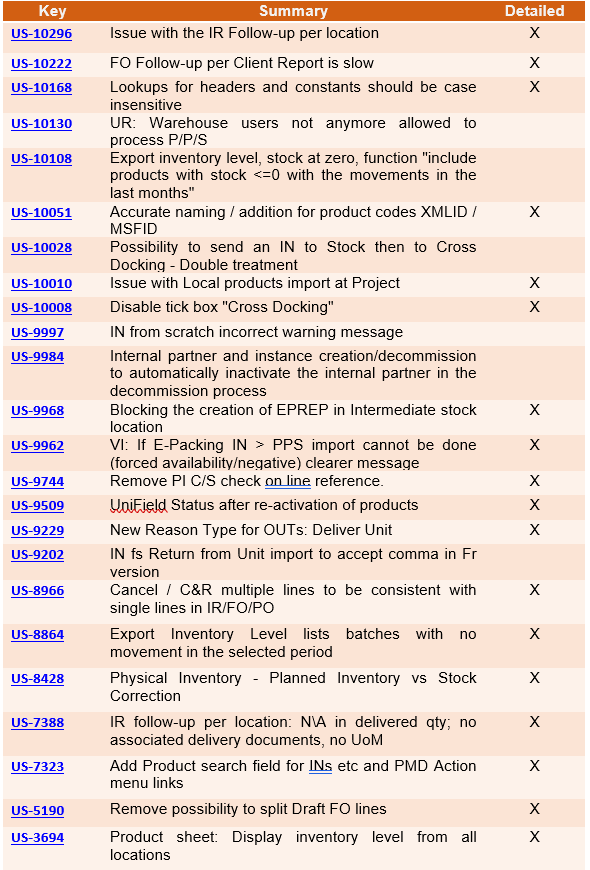
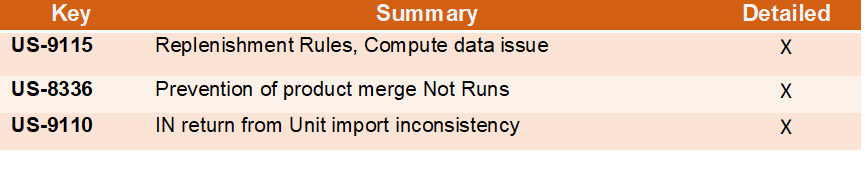
All Supply tickets integrated in UF26.0

Table

Description automatically generated

Finance

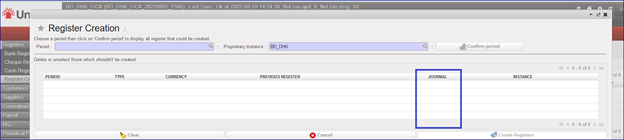
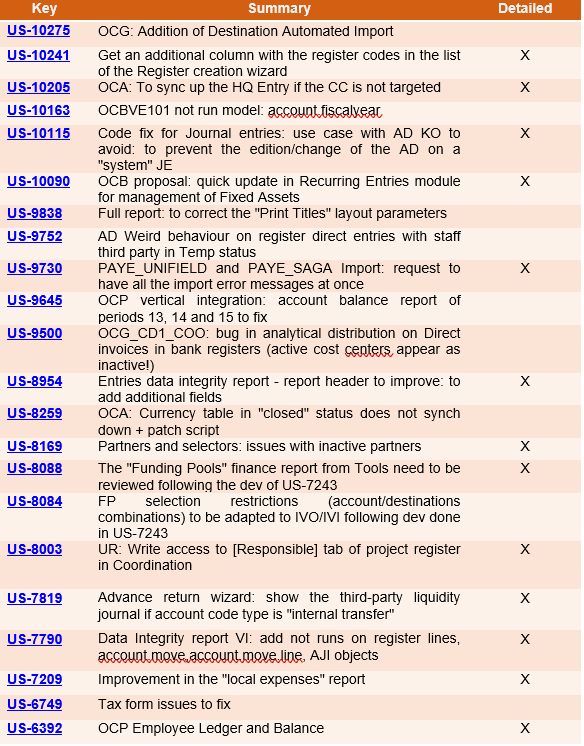
3.1 (US-10241) Get an additional column with the register codes in the list of the Register creation wizard

In the register creation wizard (the path is Registers/Register Creation), we have added a new column named “JOURNAL” that will contain the register code:

3.2 (US-10205) OCA: To sync up the HQ Entry if the CC is not targeted

There is a new behaviour for the cost centers: if the instance at HQ level is targeted with the cost center XX02, but the parent instance is not targeted with the XX02 cost center, now it is possible to synchronize the HQ entry down with the cost center XX02 to the parent instance.

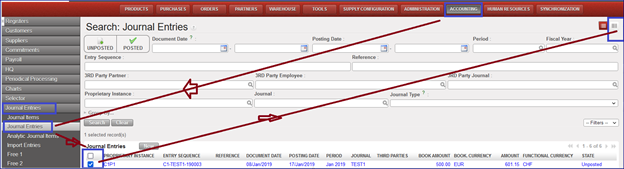
3.3 (US-10115) Code fix for Journal entries: use case with AD KO to avoid: to prevent the edition/change of the AD on a “system” JE

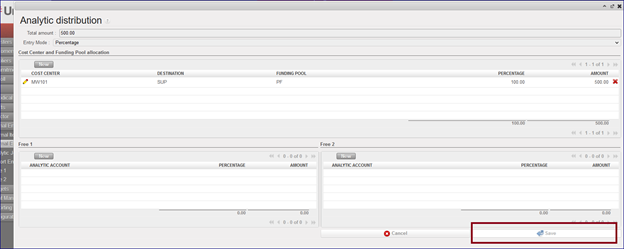
In this dev we have unable the edition/change of an AD on a “system” JE. The “Save” button in the wizard is in grey, so it is not possible to use it. So now it is not possible to update the AD through the “Form” view.

To check this you can:

  • Go to Accounting > Registers > Cash register.
  • Click in “New” and create a direct entry as expense and temp post.
  • Go to “Journal Entries” > “Journal Entries”
  • Click on “check box” of the temp posted entry.
  • Click on “Form” view:
  • Click on the “Analytical Distribution” line. It will open a new window named “Analytic distribution”.
  • Click on “Save” and you will see that it is in grey so the command is not active.

3.4 (US-10090) OCB proposal: quick update in Recurring Entries module for management of Fixed Assets

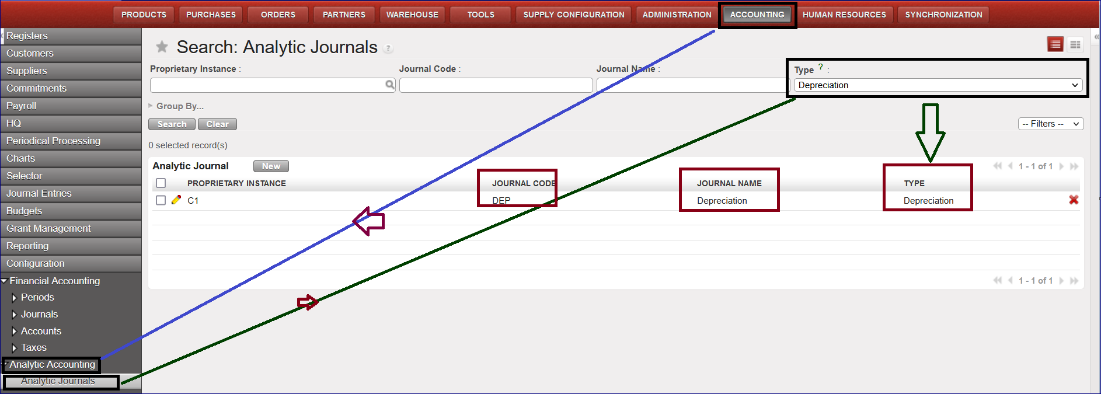
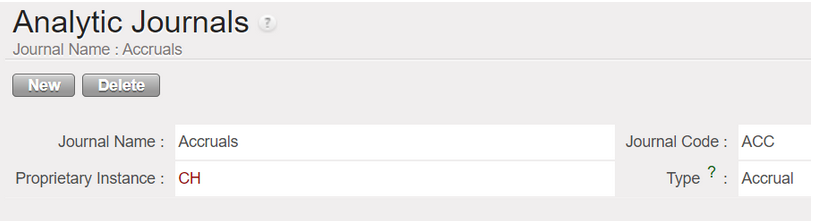
A new Analytic journal DEP has been created in order to use the recurring entries module for the management of the fixed assets.

This is optional per OCs. OCA will not use that for the moment.

  • Go to Accounting > Configuration > Analytic Accounting > Analytic Journals
  • The Journal code is named DEP, the Journal Name is Depreciation, and the type is also named Depreciation:

The process to create a depreciation entry follows these steps:

  • Go to Accounting >Configuration > Financial Accounting > Accounts> Accounts, activate the GL codes for the accumulated depreciation (example code 21200 for the Non-Medical Equipment).
  • Go to Accounting > Periodic processing > Recurring entries > Recurring models.
  • Click on the button “New” to create a “Recurring Model”
  • Go to Recurring Plan and create a “New” Recurring Plan by selecting the Recurring model previously created in the Recurring Model screen.
  • Go to “Generate entries” and click on “Generating entries”: it will create entries with the “Journal code” DEP.

3.5 (US-9730) PAYE_UNIFIELD and PAYE_SAGA Import: request to have all the import error messages at once

When we import the payroll file in Unifield, the file import can be unsuccessful because of errors in the import file. Before this dev, we had the first error message, then when it was corrected, we had the second message and so on.

In this request we have requested to have all the wrong messages at once. Here is an example:

  • go to accounting/Payroll/employee update: import permois file
  • go to accounting/payroll/Import payroll: proceed to the import of the Payroll File.

==> the import is not possible because many errors have been detected. As requested in this dev ticket we have all the error messages at once, and not one by one.

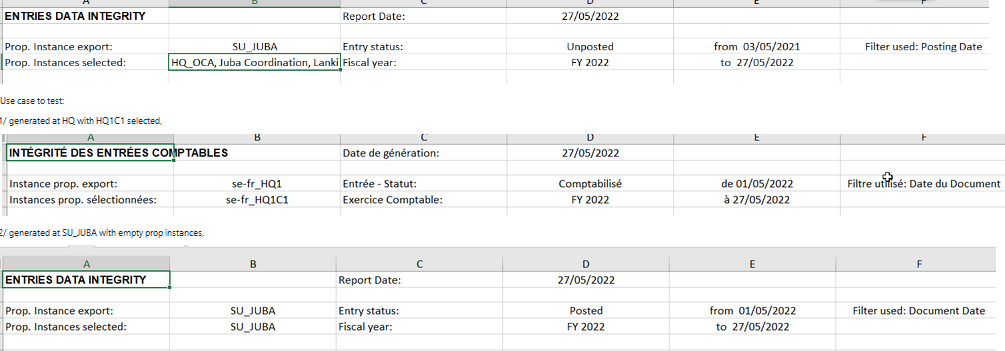
3.6 (US-8954) Entries data integrity report – report header to improve: to add additional fields.

We have improved the Data Integrity report by adding additional fields to the report header in order to have a better visibility of the filter done.

The path to see this report is this: Go to Accounting > Reporting > Generic Reporting > Entries Data Integrity.

Now after improvement the header columns are these:

Name of the field

Content

Example of content

Report Date

Hard coded

01-09-2022

Prop. Instance export

From where the selection is done

BD-HQ

Prop. Instances selected

Selected proprietary instances

BD_KAM, BD_BKL

Entry status

empty by default, Posted or Unposted

Posted

Fiscal year

Selected fiscal year

FY2022

from

Beginning date

01-09-2022

to

End date

30-09-2022

Filter used

Document date, posting date

Posting date

Some examples of the new header after dev:

3.7 (US-8169) Partners and selectors: issues with inactive partners

In this development we have fixed these issues:

  • In the GL selector => The search filter works now also for partners that are inactive. This is to enable the search at HQs, where all partners are inactive.
  • For the Journal Items and for the journal entries => The filter active/inactive have the option active by default but give the possibility to select inactive partners too. This will be useful at HQs, where all partners are inactive.

3.8 (US-8088) The “Funding Pools” finance report from Tools needs to be reviewed following the dev of US-7243.

The release UF19 changed the behaviour in the Funding Pools by adding two new fields in the parameters: “Allow all Cost Centers” and “Select Accounts Only”.

According to this, the new Tools Finance report “Funding Pools” has to take into account these new two fields, so we added the columns J and K in the report corresponding to Allow all Cost Centers and Select Accounts Only.

To see the Funding Pool finance report, please follow this path: go to Tools/Import/Export/Finance and choose Object to import/Export: Funding Pools

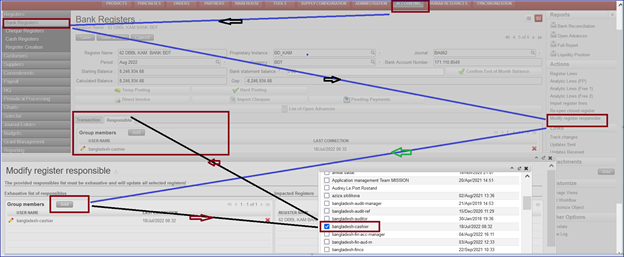
3.9 (US-8003) UR: Write access to [Responsible] tab of project register in Coordination.

In this dev we have added a window action menu in the right panel of registers called “Modify register responsible”: we have given the rights to this window action only to Fin_coordo group. A wizard is displayed to add or to remove users from the responsible field. The results update the responsible tab in the register.

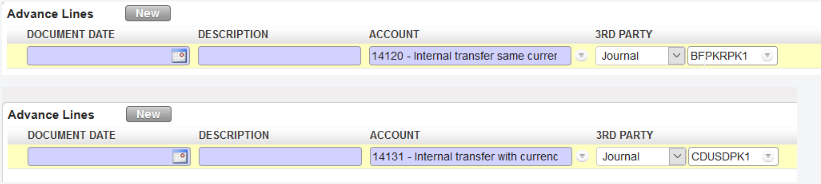
3.10 (US-7819) Advance return wizard: show the third-party liquidity journal if account code type is “internal transfer”.

We have corrected a behavior in the system and now:

  • for “Internal Transfer (same currency)”, we are able to select all the liquidity journals in the same currency except the current journal itself (it is not possible to do a transfer to yourself).
  • for “Internal Transfer”, we are able to select all the liquidity journals in another currency.
  • Now we have the third party to allow the booking of the entry. It corresponds to the Journal code.

3.11 (US-7790) Data Integrity report VI: add not runs on register lines, account.move,account.move.line, AJI objects

“Not runs” help us to spot problems so we have added the “not runs” on reg.lines, account.move,account.move.line, analytic.account.move objects in the data integrity report as per below:

3.12 (US-7209) Improvement in the “local expenses” report.

This report had performance problems in the past that made it unusable. In order to avoid this, we will not be able to select all the instances at once.

To see this:

  • Log into HQ instance
  • Go to Accounting > Reports > Generic Reporting > Local Expenses
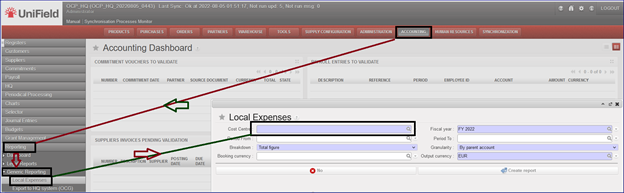
  • It will open a new window “Local Expenses”. Now the default “Cost Centre” is empty. You can not choose the cost center OC (all instances at once).

3.13 (US-6392) OCP Employee Ledger and Employee Balance.

Two new reports have been created for employees following the partner ledger and balance model.

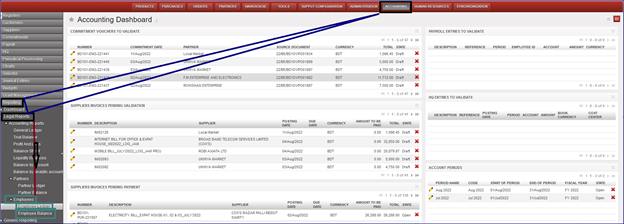
We can see the reports here: go to Accounting > Reporting > Legal Reports > Accounting Reports. We have a new menu called “Employees” with two sub-menus “Employee Ledger” & “Employee Balance”:

Employee Ledger:

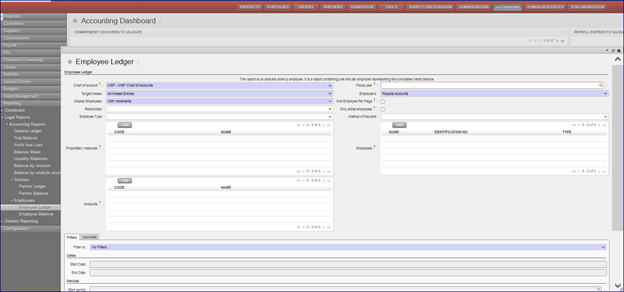
This report is an analysis done by employee. It is a report containing one line per employee representing the cumulative credit balance.

Go to Accounting > Reporting > Legal Reports > Accounting Reports > Employees > Employee Ledger:

We will have several possibilities to do our selections using the filters.

Employee Balance:

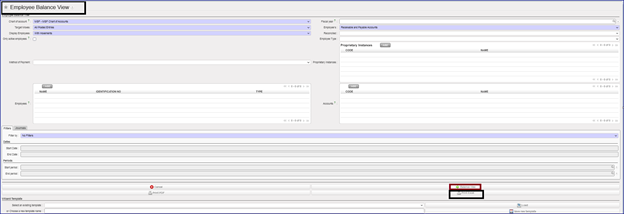
To see this new report, we go to Accounting > Reporting > Legal Reports > Accounting Reports > Employees > Employee Balance:

We will have several possibilities to do our selections using the filters.

It’s optional to tick on “Only active employees”.

All Finance tickets integrated in UF26.0

Table

Description automatically generated

Non- functional

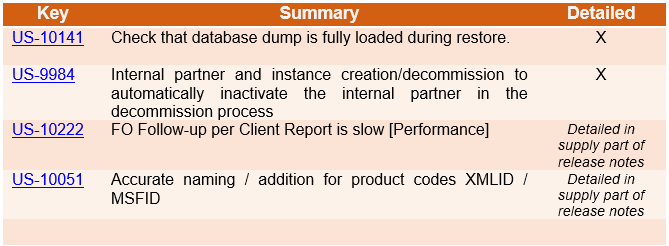
(US-10141) Check that database dump is fully loaded during restore.

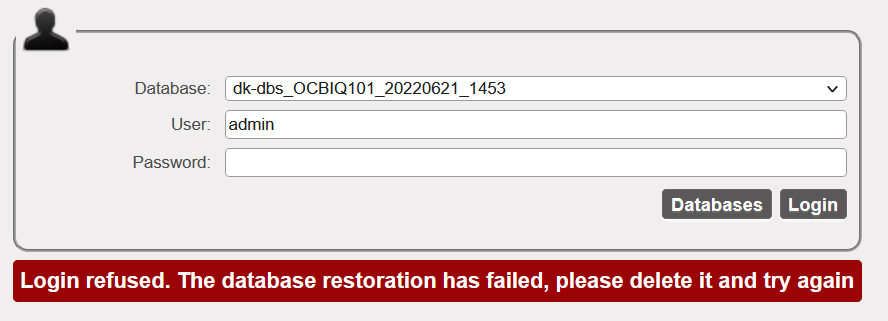
As seen in US-10140 and US-10117 pg_restore can be stopped before the end of the process. This results in a psql schema with missing data: indexes, foreign keys…. etc which on the web application displays the server as stuck on updating modules with no end.

This release adds a check at login to ensure that indexes and foreign keys are OK, and if not, prevent login and sync. This means that restore will be executed as a single transaction wrapping the emitted commands in BEGIN/COMMIT. This ensures that either all the commands complete successfully or exit-on-error.

Below is the error displayed in the case of a failed db dump restore

Graphical user interface, text, application, email

Description automatically generated

We have also added a warning message on the restore window to inform the IT user to wait to be automatically redirected to the login screen once restore process is completed.

(US-9984) Internal partner and instance creation/decommission to automatically inactivate the internal partner in the decommission process

Prior to this release: When an instance is inactivated, the internal partner stays active in the partner instances. This behaviour is corrected in this release to ensure consistency. The inactivation of a proprietary instance at HQ also triggers the inactivation of the internal partner via sync.

This improvement also ensures that:

  • If there are open/ongoing supply documents on the partner (no proper cleaning before inactivation), NotRun message msf.instance is generated when the inactive status from HQ is synced down to the instance. This means the inactive status will not be received by the “decommissioned” instance as well as the linked internal partner.

All open documents linked to the target instance for decommission must be closed and synched to clear the NR message msf.instance. Once NR is cleared, the inactive status of the prop instance and internal partner is received by all the mission instances.

All Non-functional tickets integrated in UF26.0

Text

Description automatically generated with medium confidence

UNIFIELD V25.0 RELEASE NOTES

Release Details

Release version: UF 25.0

Date of production synchronization server patch: 15-June-2022 / 18:00 Geneva time

Latest user rights files updated: UF24.1 can be found here

Note that no user rights need to be loaded at each HQ. This will be done at the Sync Server by the Core team and will update the user rights via Sync for all HQs and missions.

JIRA filter for all integrated tickets: https://jira.unifield.org/issues/?filter=12420

Supply

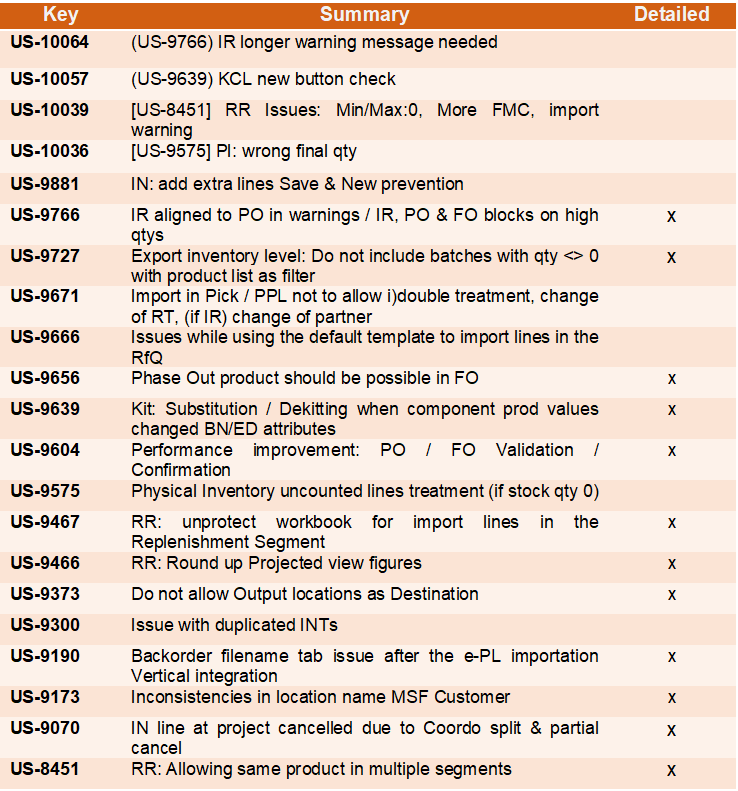
(US-9766) IR aligned to PO in warnings / IR, PO & FO blocks on high qtys

This ticket aligned the warning messages in the IR to the ones in the PO/FO, and also added some extra checks to avoid excessive digits for Qty / amounts which previously had caused issues. Now for IRs, FOs and POs, adding a line with Qty more than 10 digits is not allowed and warning message is displayed. For IRs, line-level check is made on result of the Quantity x Unit Price that it does not exceed 10 digits, and also for IRs at document level there is a check if total amount/value has more than 15 characters. Warning messages are displayed for all of these cases.

(US-9727) Export inventory level: Do not include batches with qty <> 0 with product list as filter

This ticket raised by OCA, for the inventory level export, when a location and a specific product list have been chosen, and in case there is a product with many batches and zero stocks, reports will exclude the batches with 0 stocks and include one line for the product with zero qty.

(US-9656) Phase Out product should be possible in FO

This ticket raised by OCA to assure that FO with external and internal customer could have “Phase out” products added/validated, and the check for sourcing external or internal will be in OST.

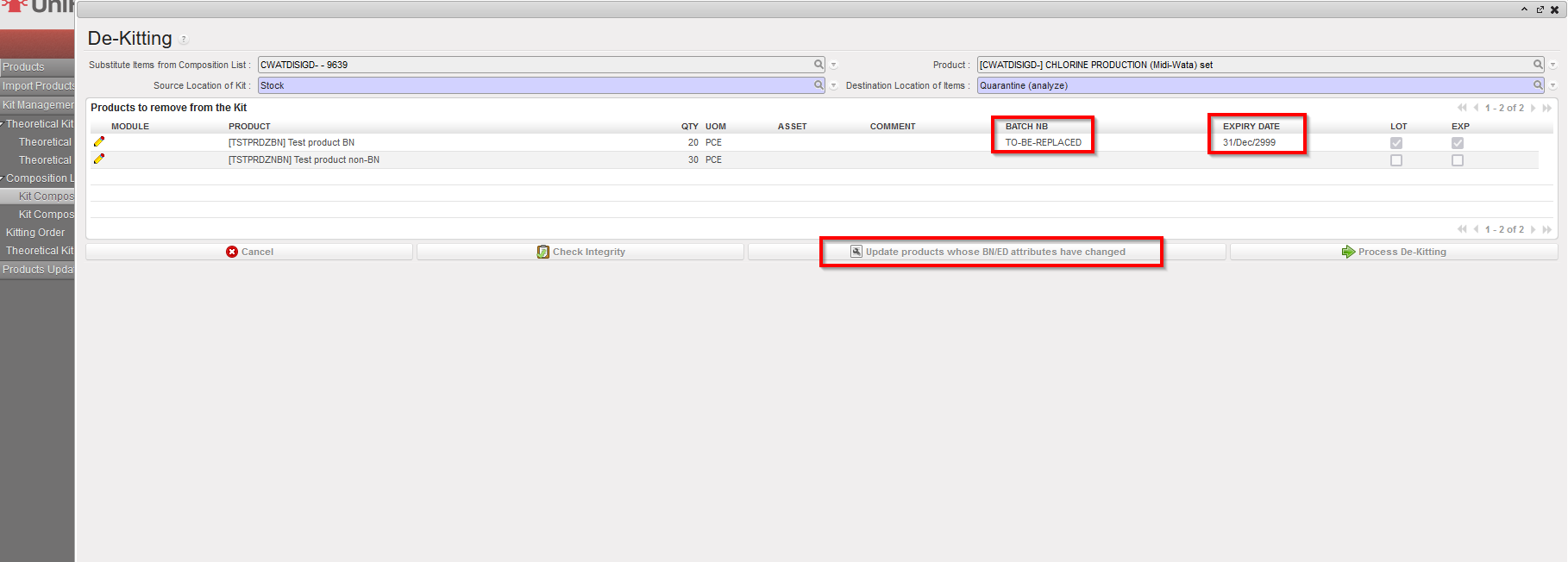
(US-9639) Kit: Substitution / Dekitting when component prod values changed BN/ED attributes

This improvement requested by OCG, will enable the processing of KCL De-kitting or Substitution for products with BN/ED attributes which have changed. Now there is an extra button “Update products whose BN/ED attributes have changed” which appears in KCL processing window. When button is used, any affected products will have their BN/ED info removed, or have default BN/ED info added (as per original ticket ). Action only updates products in this KCL window.
(US-9604) Performance improvement: PO / FO Validation / Confirmation

This ticket raised by OCB, to improve the system performance and decrease the time needed in PO validation/confirmation, and for applying the CDD on all lines, especially for the POs which consists of many lines.

(US-9467) RR: export empty template in the Replenishment Segment

This request raised by OCB, is to enable users to export improved template from an empty RR Replenishment Segment. Now if user exports excel (via Action menu) from an empty Replenishment Segment, the export template has 5 empty lines. These can be filled in the normal way to import lines onto the Segment.

Menu: Warehouse > Replenishment Rules > Configuration > Replenishment Segment

(US-9466) RR: Round up Projected view figures

This improvement raised by OCB, to decrease the digits of the months of supply and projected months in the Replenishment Rules Inventory Review excel export:
The values in the following columns are now rounded to 2 decimal places:

  • months of supply (RR-AMC)
  • months of supply (RR-FMC)
  • Projected MX (month)

(US-9373) Do not allow Output locations as Destination

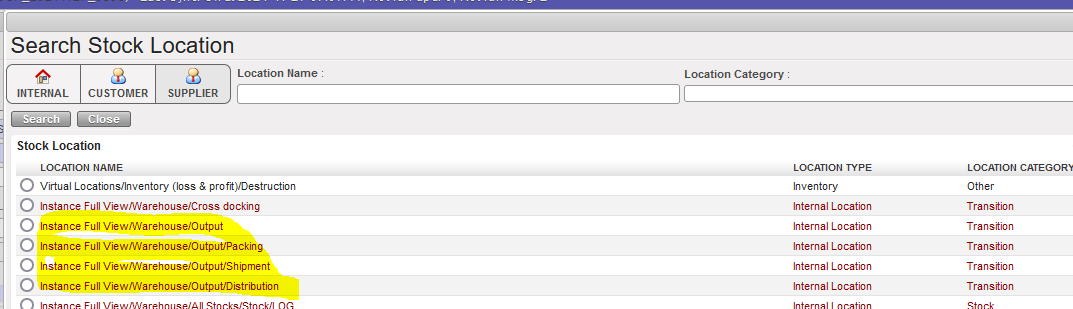
OCA requested this improvement to remove the output locations (Output, Packing, Shipment, Distribution) from the destination location in the INT from scratch, to avoid any inconsistent data in these locations, and to be consistent with the IR’s destination locations as well as including Quarantine and Destruction.

(US-9190) Backorder filename tab issue after the e-PL importation Vertical integration

This improvement requested by OCB, means that in the Incoming shipment from ESC, which is updated through the e-PL importation, in the Notes tab, any “filename” relates only to files imported on the specific IN which was updated by import. Back order INs without direct VI import should have this field blank.

(US-9173) Inconsistencies in location name MSF Customer

This ticket raised by support team after noticing that some instances in different sections contain created / configured locations with the same name “MSF Customer” as the default location. With this ticket, all those manually configured locations which have the same name or some variation of name of MSF Customer location have their location(s) changed to “Other_MSF_Customer”, and then users can de-activate the locations which are not in use.

(US-9070) IN line at project cancelled due to Coordo split & partial cancel

This important ticket was raised by OCA, and had previously led to many issues with incomplete/incorrect flows as the splitting of a line and then cancellation of one part of a split line led to all of the line in other document or instance being cancelled. This has now been resolved for all of the Test cases outlined in ticket.

(US-8451) RR: Allowing same product in multiple segments

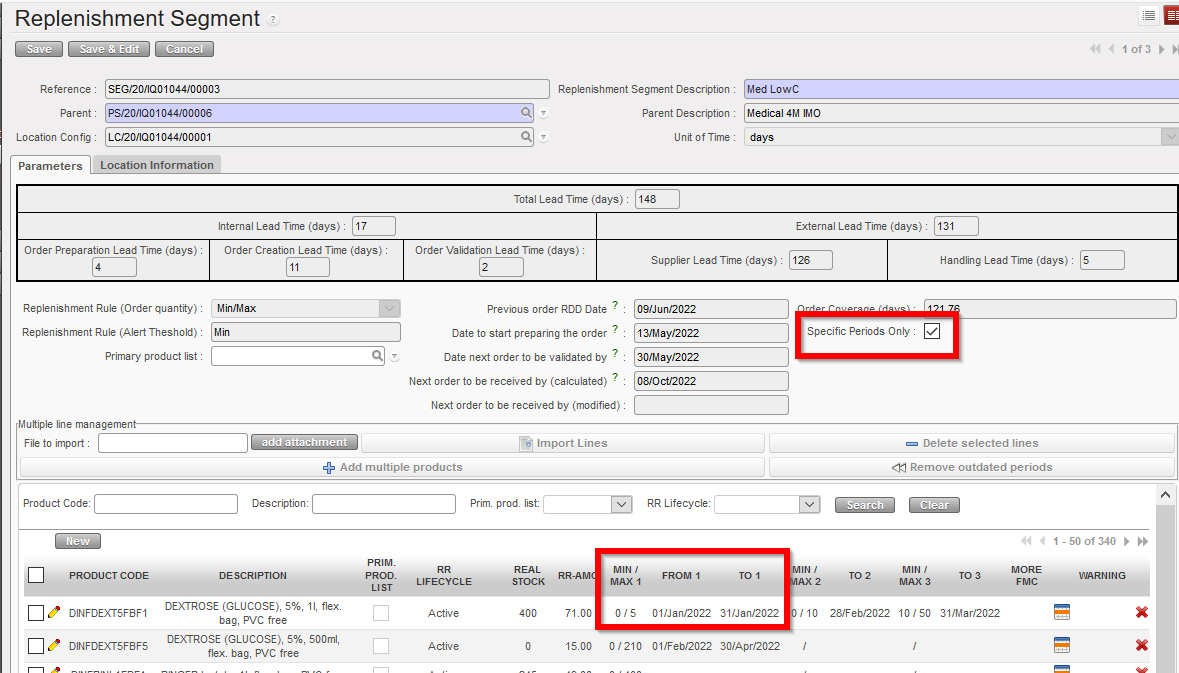
This ticket, raised by OCA introduces more flexibility into Replenishment Rules Replenishment Segments, and means that one product may be present across several segments belonging to the same Location Configuration as long as the product does not have an active value (FMC/Min Max or Auto Supply) in overlapping periods. When a product is active in one period of an RS, any other RS in which it is present must have the value “0” for this period. A product can be present in up to 3 active Replenishment Segments belonging to the same Location Config, and these Segments can have different types of RR applied. Having the same product in multiple RSs implies that all of the RSs involved must have the “Specific Periods only” checkbox ticked if the RR types are either Auto Supply or Min/Max, as was developed in US-8449 and implemented in release UF24.0

N.B. Please see Finance section of Release Notes to see further details of US-6475 ticket of addition of VAT corner to POs. and US-8567 also treatment of intermission partners.

All Supply tickets integrated in UF25.0

Table

Description automatically generated

Finance

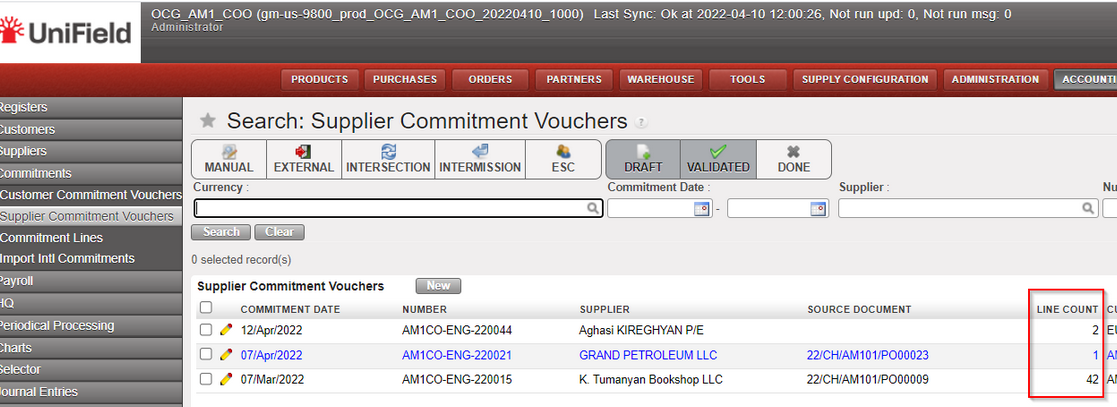
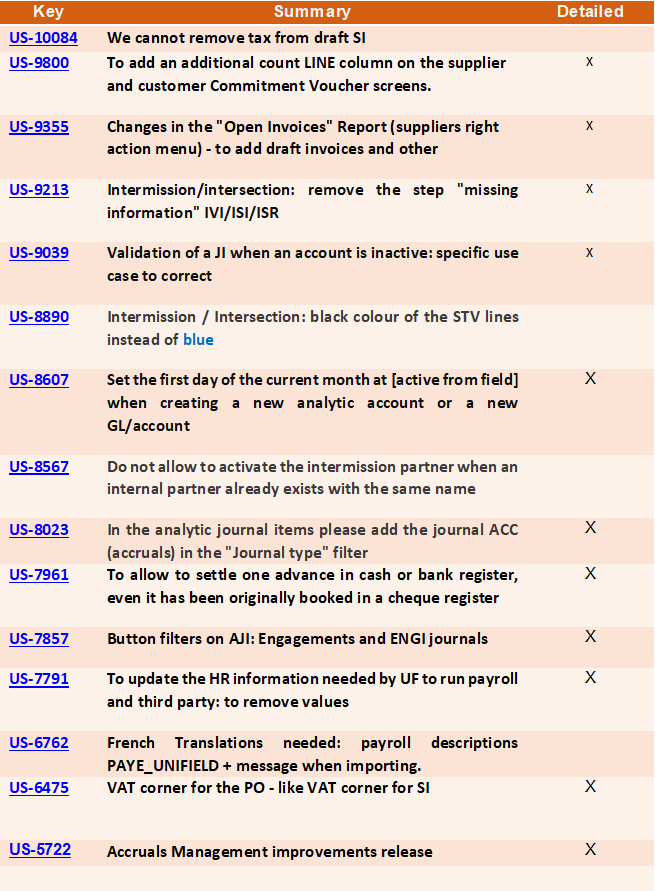
(US-9800) To add an additional count LINE column on the supplier and customer Commitment Voucher screens.

In the Supplier Commitment Voucher screen and in the Customer Commitment Voucher screen, we added the “Line count” column between “source document” and “currency”.

Go to Accounting >Commitments > Customer Commitment Vouchers /Supplier Commitment Vouchers

(US-9355) Changes in the “Open Invoices” Report (suppliers right action menu) – to add draft invoices and other

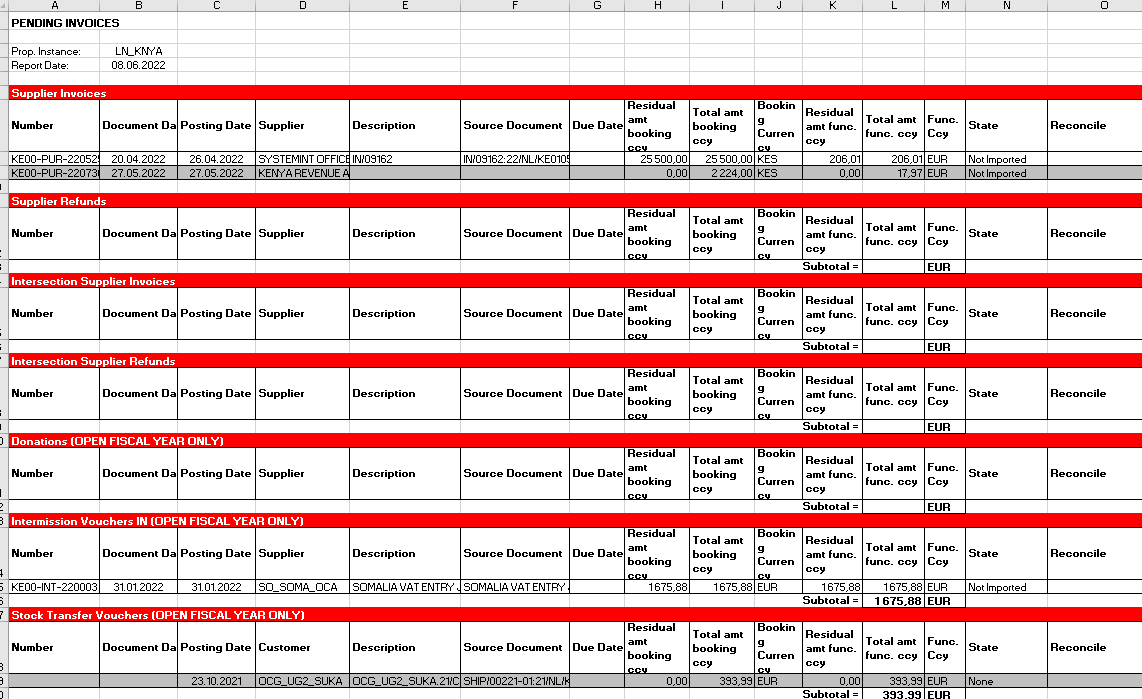
In the accounting/Suppliers/and submenus Supplier Invoices, Supplier Direct Invoices, Supplier Refunds, Intersection Supplier Invoices, Intersection Supplier Refunds, Donation, Intermission Voucher In), we have amended the content of the report named “Open Invoices”. The main issue is the addition of the drafts.

The new name is “Pending Invoices “. In French; “Rapport de factures en attente”.

It is placed in the right menu of the screen, with the other reports.

  • For the Supplier invoices: we will have the open invoices before and the draft invoices after (drafts in light grey in order to distinguish Draft from Open).
  • For the Donations: we will have the open and draft donations of the Open fiscal year + the donations in draft.
  • For the Intermission Vouchers IN: we will have the Intermission Vouchers IN of the Open fiscal year + the IVI in draft.
  • For the Stock Transfer Vouchers: we will have the Stock Transfer Vouchers of the Open fiscal year + the STV in draft.

Example:

(US-9213) Intermission/intersection: remove the step “missing information” IVI/ISI/ISR

When validating an IVI, ISI or ISR (Intermission Voucher IN, Intersection Supplier Invoices or an Intersection Supplier Refund), the user was asked to retype the total amount of the invoice. In the case it was not done, there was an error message, and the process was blocked.

This step did not have any added value and create an unnecessary step in a long and lasting process flow, so this step has been removed.

(US-8890) Intermission / Intersection: black color of the STV lines instead of blue

In order to align the behavior of STV invoice lines to the IVO or SI lines, we decided to put the lines in black (and not in blue).

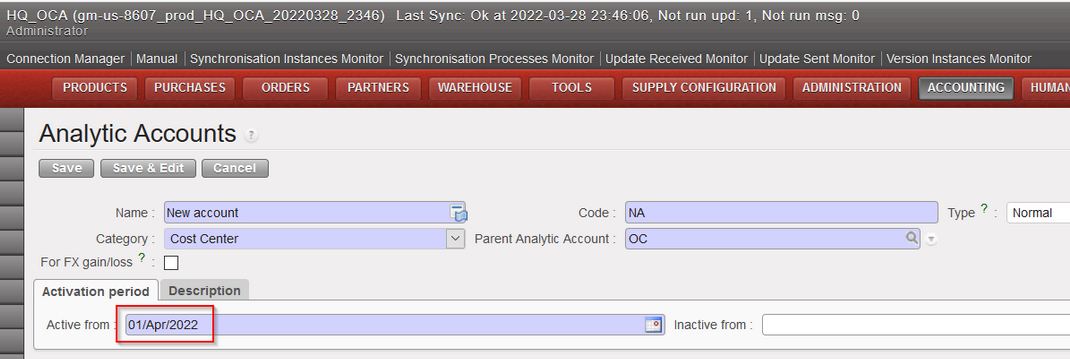
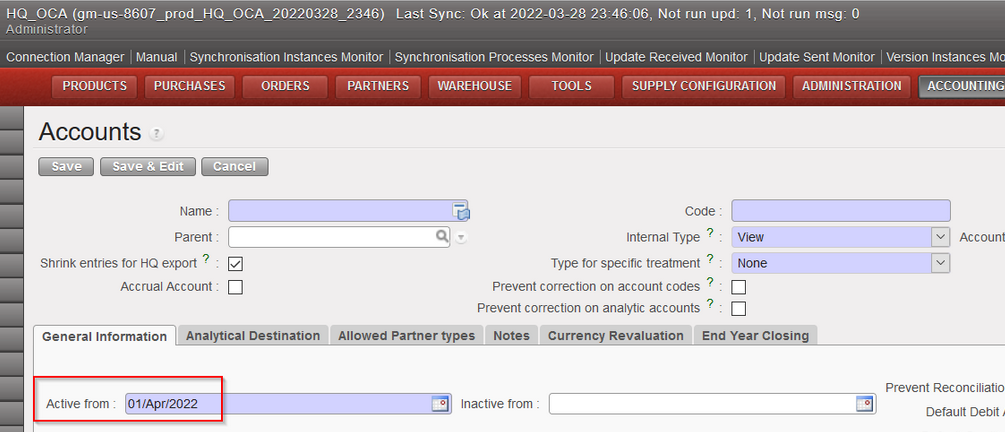
(US-8607) Set the first day of the current month at [active from field] when creating a new analytic account or a new GL/account

Now, when you create a new GL Account or a new Analytic Accounts the field “Active from” will have by default the first day of the current month.

(US-8567) Do not allow to activate the intermission partner when an internal partner already exists with the same name

When activating a partner type intermission, the system will check if the same name exists in the internal partners; if yes, the system will not allow to activate the partner (regardless of the status of the internal partner and whatever the letter case) and we will have an error message as follows:

(US-8023) In the analytic journal items please add the journal ACC (accruals) in the “Journal type” filter

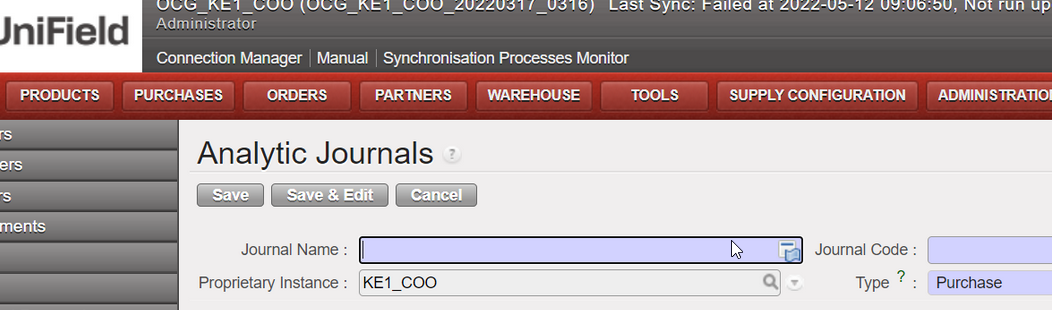
In Accounting/configuration/analytic accounting/analytic journals : the accrual journal was tagged to the journal type named “GENERAL”. Now the journal type “GENERAL” has been renamed to journal type “ACCRUAL”.

When opening a new Analytic Journals form, the type selected by default was “General”. Now it will be “Purchase”:

(US-7961) To allow to settle one advance in cash or bank register, even it has been originally booked in a cheque register.

Before, if an operational advance was created through a cheque register, it was not possible to close it through a cash nor bank register and we received a warning message “The register journal is not compatible with an advance return.

Now after this improvement, it is possible to settle an advance created in a cheque register through a cash or a bank register.

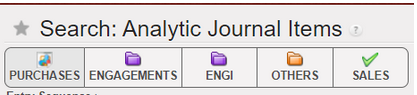
(US-7857) Button filters on AJI: Engagements and ENGI journals

Some improvements have been done in the filter buttons naming and in the searching options regarding AJI.

We go to Accounting/Journal Entries/Search: Analytic Journal Items:

  • If we toggle on search button “ENGAGEMENTS”, the result of the search will be the journal code column with “ENG” only.
  • If we toggle on search button “ENGI”, the result of the search will be the journal code column with “ENGI” only
  • If we toggle on both search buttons “ENGAGEMENTS” and “ENGI”, the result of the search will be the journal code column with both “ENG” and “ENGI

We have also changed the order of the filters and the name of one filter:

  • BEFORE
  • AFTER: The filter ORDERS has been renamed to SALES and replaced at the end of the filters

(US-7791) To update the HR information needed by UF to run payroll and third party: to remove values:

This improvement was done in order to assess the GDPR compliance of UF, given the facts below: we synchronized databases between continents in and out of EU and everyone having the Fin_HR group could access to the info.

In this improvement:

  • we deleted from the database the “not used” personal information from the staff list.
  • and we changed the import of the permois by not taking a list of fields anymore. This is the list of the fields that will not be retrieve anymore from the permois to Unifield:

Field

Name

Homere file

Column in Homere file

birthday

Date of Birth

staff.csv

datenaissance

gender

Gender

staff.csv

sexe

marital

Marital Status

staff.csv

Statut familial

mobile_phone

Mobile

staff.csv

portable

notes

Notes

staff.csv

commentaire

private_phone

Private Phone

staff.csv

tel_prive

work_email

Work E-mail

staff.csv

email

work_phone

Work Phone

staff.csv

tel_bureau

country_id

Nationality

staff.csv

nation

ssnid

SSN No

staff.csv

num_soc

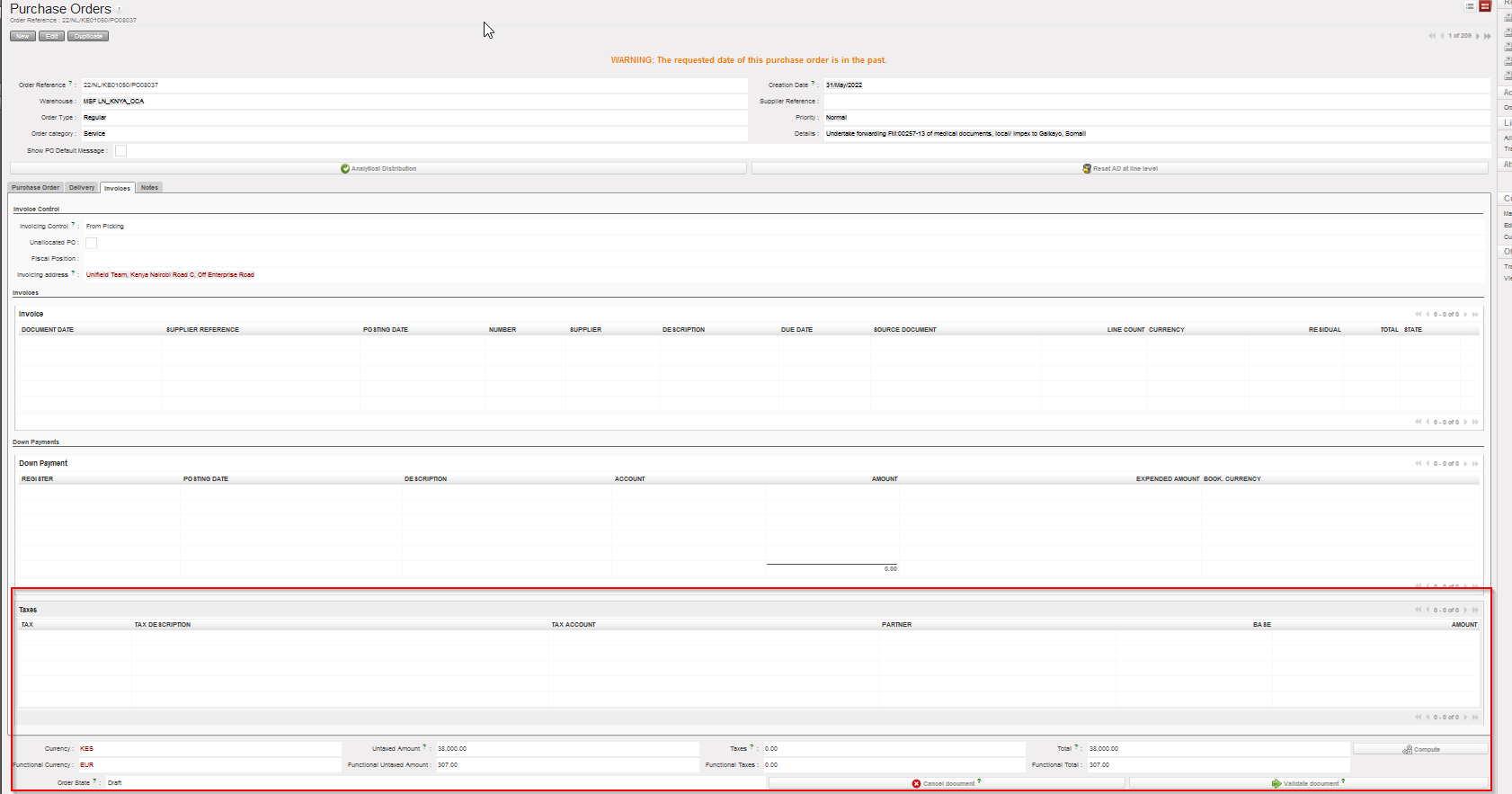
3.12 (US-6475) VAT corner for the PO – like VAT corner for SI

In this improvement we created a tax part in the PO (the same part as we have already in the Supplier invoice).

Go to PURCHASES > Purchase Management > Purchase Orders:

  • Click Edit “yellow pen” any PO
  • Click on tab “invoices”
  • The new part has been added at the bottom, after the Down Payments and it is named “Taxes”:

To consider below points:

  • The new box “Taxes” is available for External PO only.
  • If relevant, there is a new button on PO footer to remove the taxes at line level.
  • Adding a tax line or removing it, will affect in the total amount of PO.
  • SI Tax corner is populated from the PO Tax box.

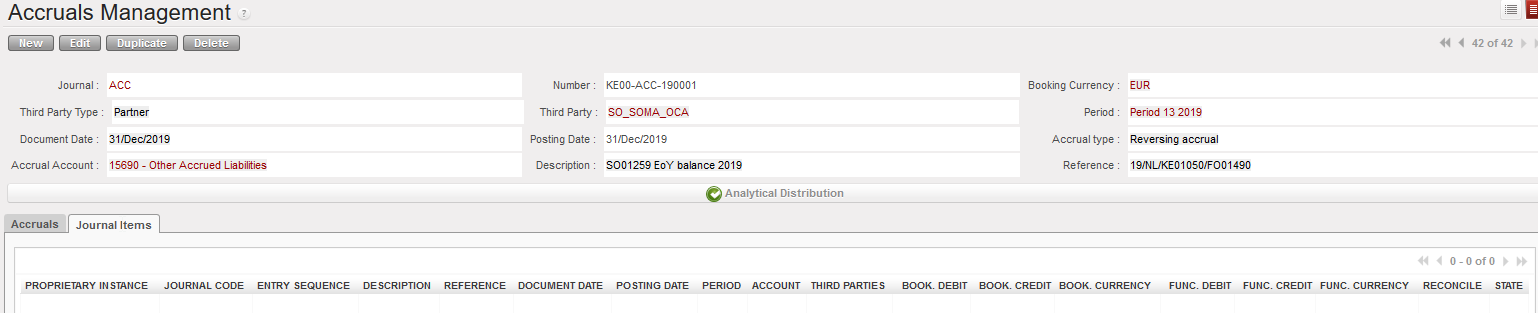
(US-5722) Accruals Management improvements release

We have done new improvements in the accrual functionality in terms of display and we have also added a new option: we can use more than one expense account in the accrual lines.

These changes have made the functionality user friendly.

Here you can visually see some of the improvements:

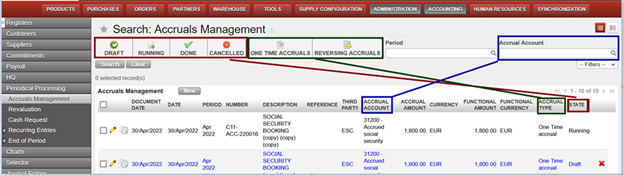
Go to Accounting > Periodical Processing > Accruals management > It will display “Search: Accruals Management

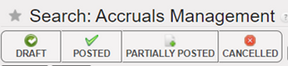
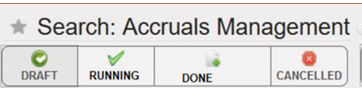
We renamed the status from: draft, posted, partially posted and cancelled

to: Draft, running, done and cancelled.

The new search options: 2 new buttons have been created “ONE TIME ACCRUALS” and “REVERSING ACCRUALS” as below, to search by toggle on/ toggle off:

We can also search by filters as below:

Here we have the new display of the screen “Search: Accruals Management” linked with the columns related.

Note that name of the column “Status” changed to “State”.

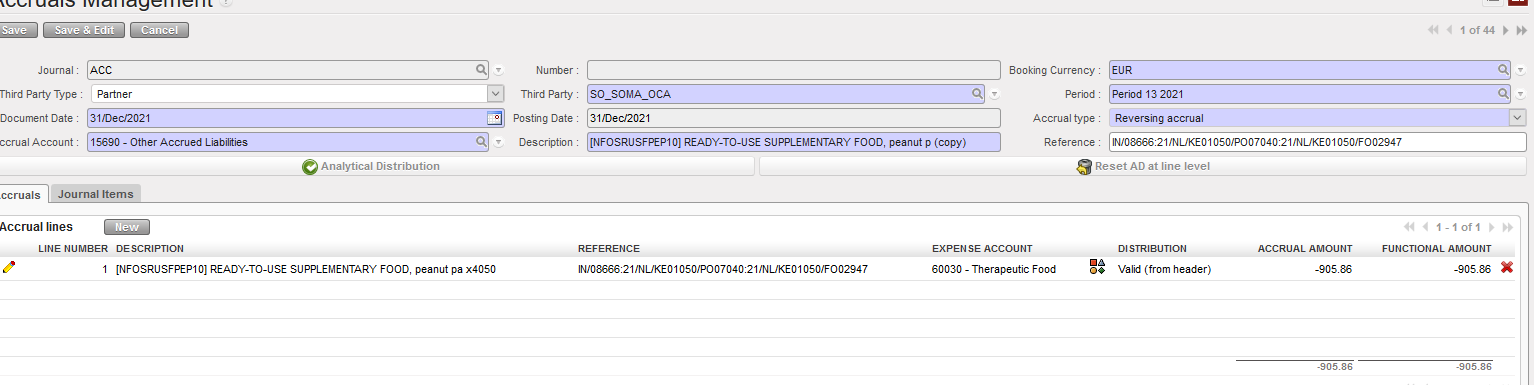
The display of the Accruals Management screen has also changed as follows:

Go to Accounting > Periodical Processing > Accruals management > Click on “New”

  • Screen for the Accrual type One Time Accrual
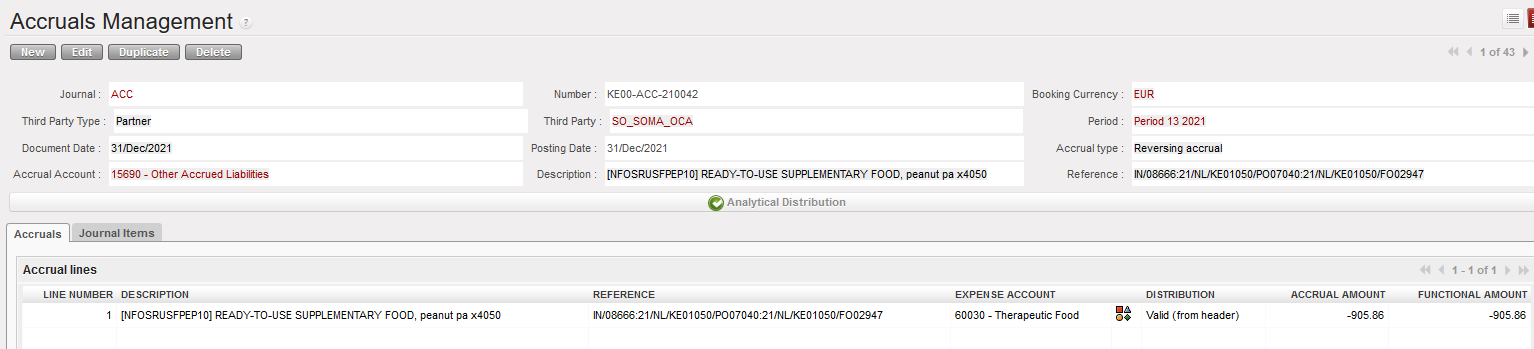
  • Screen for the Accrual type Reversing Accrual
  • Example with data:

We have now two tabs (instead of one before): Accruals and Journal Items:

  1. Tab named Accruals: which include the below columns:
  • The pencil (to edit only at draft status).
  • Line number.
  • Description of the line: it will be reported in the AJI and JE
  • Reference
  • Expense account.
  • Analytic distribution at line level.
  • Accrual amount.
  • Functional amount
  • And the X button to delete in draft status
  • The state (draft, running, done or cancelled)
  1. Tab named Journal Items: Including all accruals lines of the transaction (Expenses, Payables and receivables) as below:

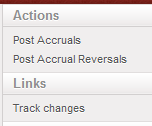
In the right action menu, we have renamed the actions to “Post Accruals” and “Post Accrual Reversals” and we have also added the track changes:

All Finance tickets integrated in UF25.0

Graphical user interface

Description automatically generated with low confidence

Non- functional

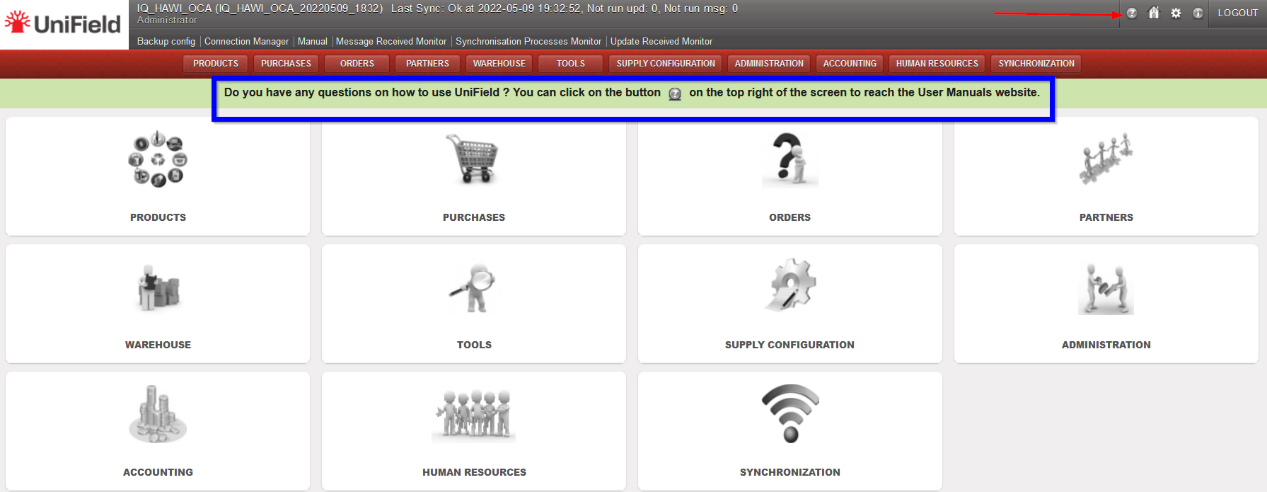
(US-9815) Create a link button to the User Manual Online.

Following the release of UniField documentation online, we have created a link inside UniField to the user manual. The icon has been added to the top right corner next to the Home button. Clicking on this icon will open the documentation site https://doc.unifield.org/, in a new tab.

A banner has been added to alert the users of this new feature. The banner will disappear once the user clicks on any menu.

Graphical user interface, table

Description automatically generated with medium confidence

(US-9736) Users Filter: Show not Synchronized

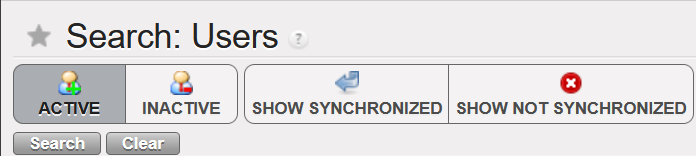
A new filter [SHOW NOT SYNCHRONIZED] has been added to the Users search menu to allow one to search for only non-synchronized users. Previously, it was only the Active, Inactive and Show synchronized filters.

Graphical user interface, text, application

Description automatically generated

All Non-functional tickets integrated in UF25.0

Table

Description automatically generated with low confidence

UNIFIELD V24.1 RELEASE NOTES

Release Details

Release version: UF 24.1

Date of production synchronization server patch: 27-April-2022 / 18:00 Geneva time

Latest user rights files updated: UF24.1 can be found here

Note that no user rights need to be loaded at each HQ. This will be done at the Sync Server by the Core team and will update the user rights via Sync for all HQs and missions.

JIRA filter for all integrated tickets: https://jira.unifield.org/issues/?filter=12413

Supply

In this intermediate release, the following tickets are included:

(US-9849) UD: Correction of product synch if Standardization level changed

This ticket corrects the issue found whereby products changed from NSL (Non Standard Local) to NST (Non Standard) / STD (Standard) were keeping their old behaviour and remaining inactive at Mission level. With this change, when UniData send any combination of updates including this change to standardisation level, any product which is STD or NST should now be active at Coordo & Project. This ticket also corrects products which already had this issue due to past UD updates.

(US-9833) Prevent addition of new lines on pick

This ticket corrects issue found so that it is no longer possible to add new lines onto a Picking Ticket. In the past this issue implied need for Data Fixes but this will no longer be the case.

(US-9826) prevent removal of Partner address due to IN maniplulation

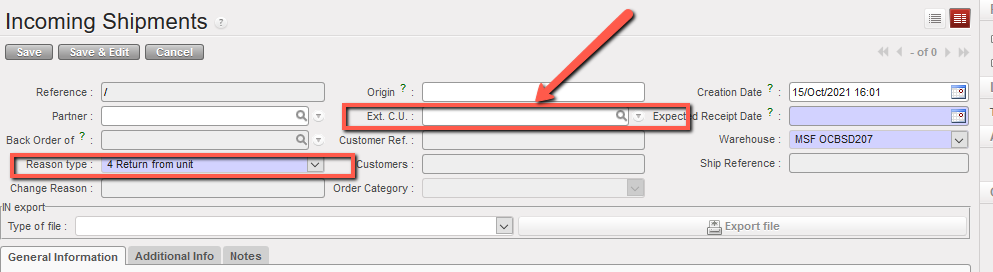
This issue which caused multiple issues with sourcing and shipping was a regression introduced with changes of US-9021/US-9219. It meant that if a user created an IN from scratch, added a partner, changed the Reason Type to “Return from Unit” and then added the the Ext Cu, then the address of the original partner added (same as that of creator’s instance) was automatically removed, which prevent actions such as those listed above from being completed. This has now been corrected.

(US-9637) Export Inventory Level change to format to allow generation

This issue was flagged by OCG as they were unable to access the generated Export Inventory Level due to the generated file being too large to store on the database. With this ticket, the format of the report has been changed to native xlsx, meaning it should be possible to access this report.

All Supply tickets integrated in UF24.1

Graphical user interface, application

Description automatically generated

Finance

(US-9818) UR: User with User_Manager is not able to export the list of staff + department field

Users with the User_Manager profile are now able to export the list of staff and department field.

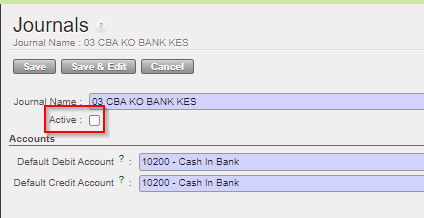
(US-9813) Possibility to inactivate journals (UF24): last fix to do in the new functionality

We discovered after the release UF24 a bug to be fixed for some use cases of inactivation of journals. The part of the code used to “get the last register” doesn’t work properly, so the register checked is not always the right one (that means that in the instances that could inactivate journals, the balances must be checked manually because for now we can’t rely on this automatic check). With this ticket this bug has been fixed.

Remember that to use the functionality you go here:

Go to >Accounting/configuration/financial accounting/journals/journals:

We have created the 2 filters Active and Inactive to do filters.

And then when you enter into the journal, there is a new field box to tick (Active Journal) or unticked (Unactive Journal)

All Finance tickets integrated in UF24.1

Graphical user interface

Description automatically generated

UniField v24.0 Release Notes

Release Details

Release version: UF 24.0

Date of production synchronization server patch: 16th March 2022 / 18:00 Geneva time

Latest user rights files updated: UF24.0 can be found here

Note that no user rights need to be loaded at each HQ. This will be done at the Sync Server by the Core team and will update the user rights via Sync for all HQs and missions.

JIRA filter for all integrated tickets: https://jira.unifield.org/issues/?filter=12407

Supply

(US-9219) IN from scratch, field Ext. Unit mandatory if RT is Return from unit

An improvement implemented for the IN from scratch: when user wants to choose “Return from Unit” as a Reason type, Ext. C.U becomes mandatory to be filled, this is to be consistent with check already done if products are added via import.

(US- 9361) Historical Consumption report – AMC per location, Adjusted AMC

As raised by Pharma, the following changes to the Historical Consumption report have been developed:

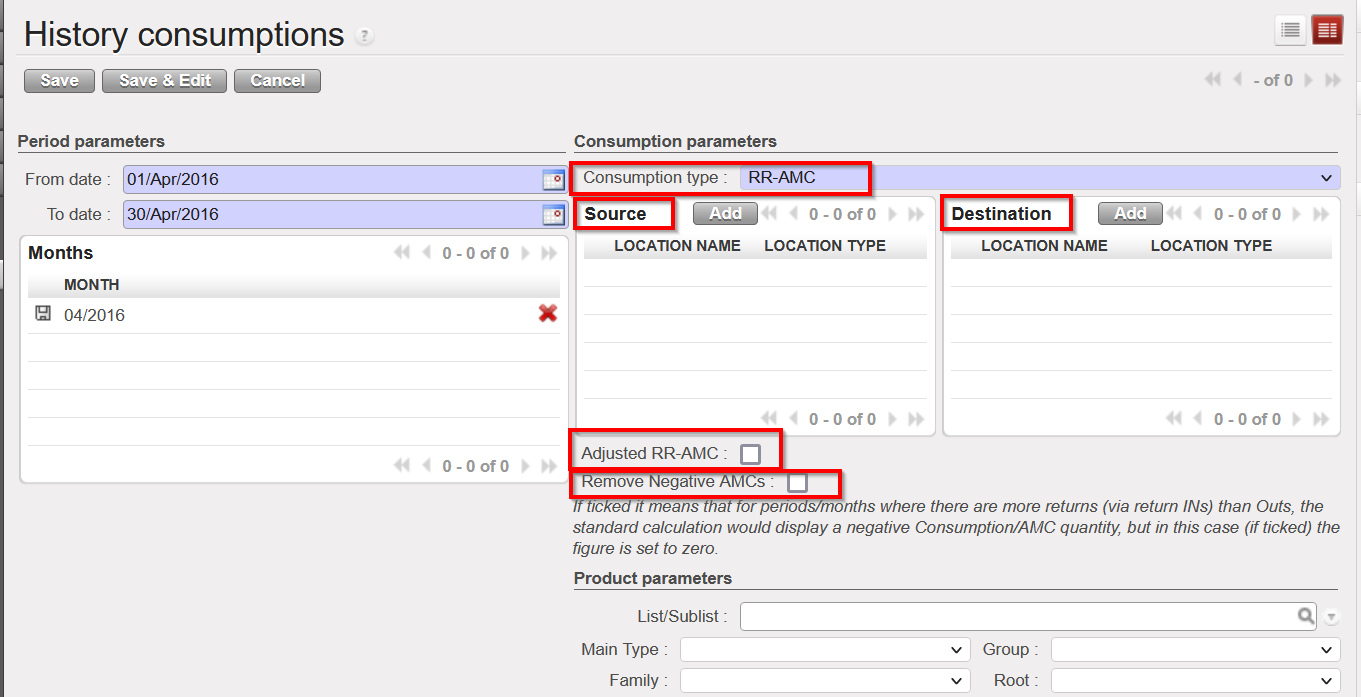
It’s possible now to select a new Consumption Type “RR-AMC”. This will be the 3rd option and the other 2 options remain. When this 3rd option is selected, it is possible to select one or multiple Source Locations and one / multiple Destination locations. This means it will be possible to see consumption for a specific location or group of locations or see consumption to a specific destination location or set of destinations. Source location(s) must be internal but destination location(s) can be internal or external.

When 3rd option (RR-AMC) is selected, there is a checkbox named “Display Adjusted RR-AMC”. When selected, the report will take into account and show the adjusted AMC based on any stock outs / substitution for products recorded via a recorded “Stock Out” with selected period. When the 3rd option RR-AMC is selected, it is still possible to see and use the “Remove negative AMCs” as before meaning no negative AMC figures (due to returns) will be displayed.

 (US-9359) Physical Inventory new export

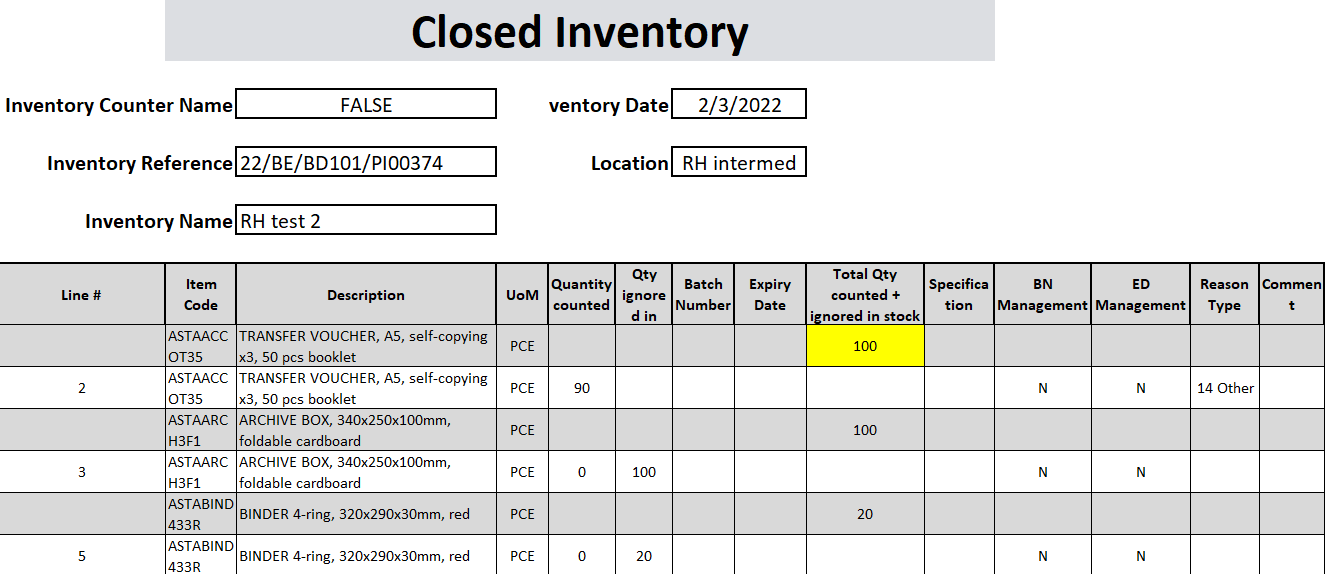
As per request from Pharma, a new excel export named “Closed Inventory” is available from Physical Inventory when in Closed Status via the Action menu.

  • Similar to the Discrepancy report but with additional information: any counted qty which does not result in a discrepancy will also appear in this report.

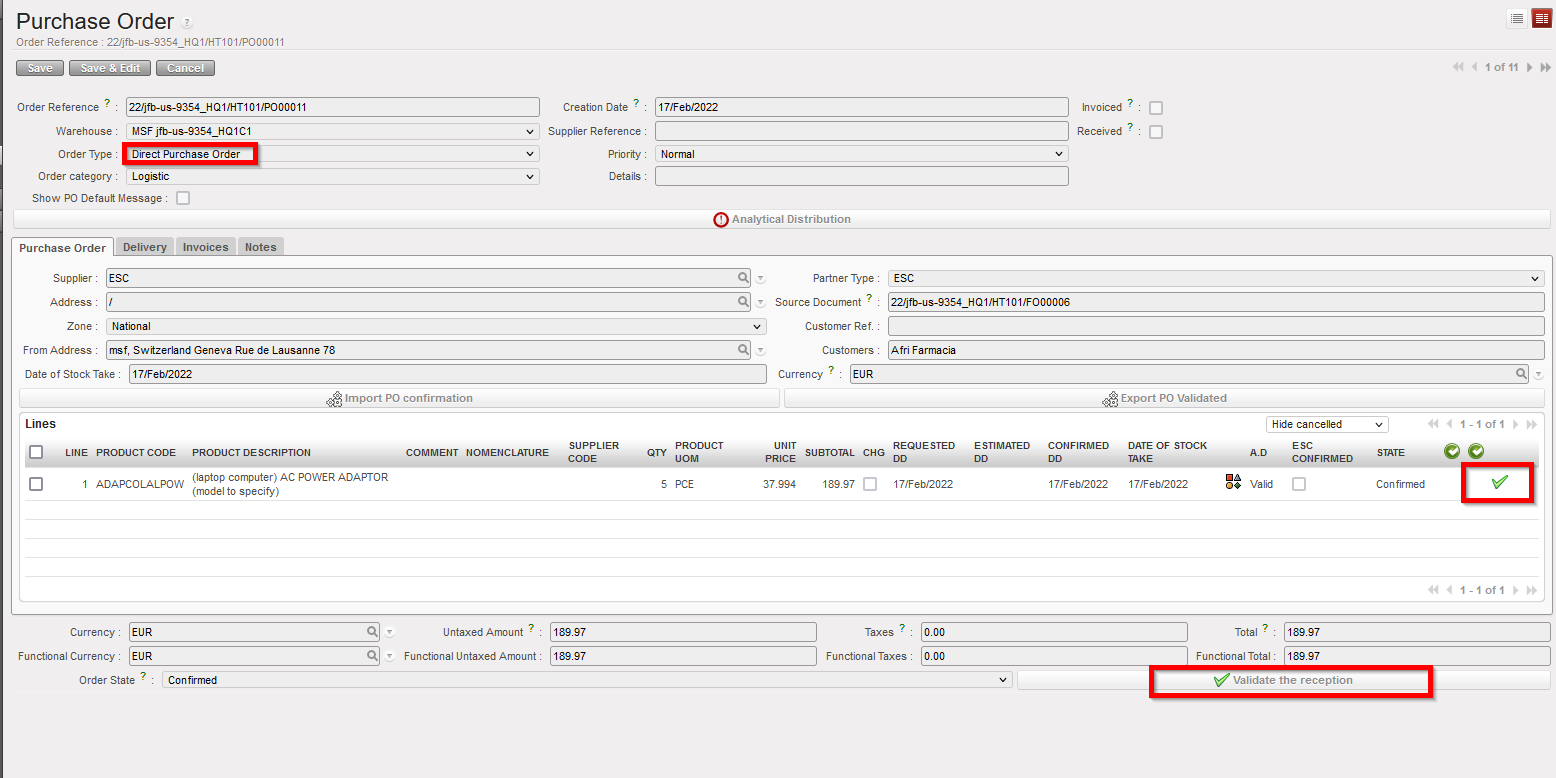
(US- 9354) No validate reception button for DPO to ESC

Improvement for consistency requested by OCP, for the DPO Flow, when DPO (coming from FO sourced to external partner) is done to an ESC, it’s possible now to confirm the reception at line level (and so close the line).

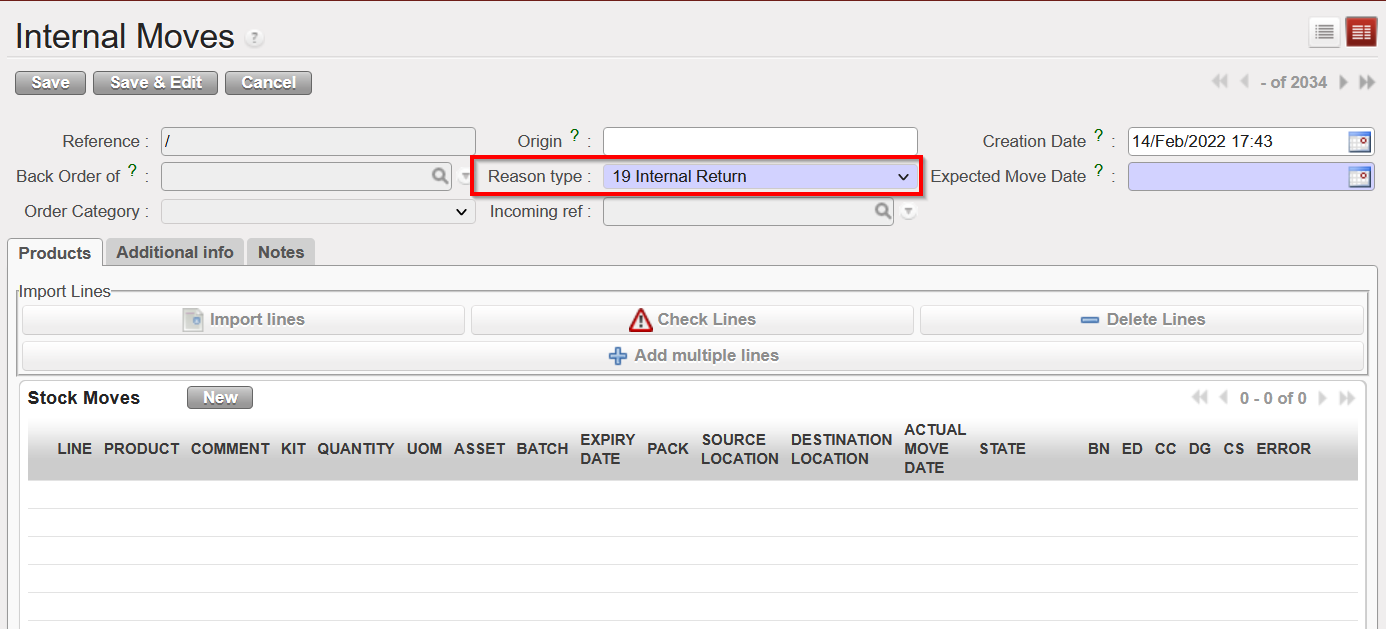
(US-9266) New Reason Type for INTs: Internal Return

Improvement requested by Pharma and necessary for the RR-AMC report modification described above: a new Reason Type now exists for Internal Movements (INTs). This can be selected manually in the INT, and there is no change to the default RTs proposed by system.The INTs with “Internal Return” will be treated in the same way as INs with RT “Return from Unit” when there is calculation on the RR-AMC of a specific location.

(US-9129) IN: PDF displays cancelled lines

Improvement requested by OCA, a change to the PDF of Incoming Shipments has been implemented: PDF will no longer show any lines which have been cancelled. Closed and Available lines will still be displayed.

(US-8955) BN/ED added to the Receptions & Deliveries Reports

Improvement requested by OCA, to extend the Receptions/Deliveries Reports by the two following columns: Batch Number / Expiry Date

(US-8867) (E-Validation) IR PDF signatory changes

Improvement in preparation for E-Validation development to update the signatories displayed for the IR PDF in Eng and in Fr: They now contain “Technical Responsible” FR: Responsable Technique and “Supply Responsible” FR: Responsable Approvisionnement

iii)Remove “Storekeeper” (the space for the other 2 above can be increased)

(US-8862) Page number and Document references are missing

Improvement requested by OCB, for the PDFs of IR, INT, & OUTs, all pages now contain the page number and the document reference as for the first page of each document.

(US-8843) Claim: Message to clarify that product/batch/ED not on doc

Improvement requested by OCA, in processing the Claims, when batches/Expiry Dates of products being returned are different to those received. Warning message displayed will be more accurate: (Prod/BN/ED not available in the IN/OUT)

(US-8699) Estimated DD on PO, reports to update

Improvement raised to ensure reports aligned with dev already made in US-8076 where an additional date field “Estimated Delivery Date” or EDD was added to the PO.

(US-8660) (Automated) VI: Display freight name in “Ship Reference”

Improvement requested by OCA , affecting Incoming shipments, meaning the “Ship Reference Field” will now be updated when this value is filled in IN/EPacking Vertical Integration (VI) file. This will not impact how this field displays for INs which are updated by synch. An additional filter on “Ship Reference” at header level for the IN list view has been added.

.

(US-8608) IR additional search/view on Location Requestor

Improvement requested by OCB, search field “Location Requester” has been added to the Internal Requests (IR) List view and is also reflected in same via by additional column there.

(US- 9603, US-9517) Import of AD into Draft PO/FO

Two requests from OCB, with these it is now possible to import Analytical Distribution directly into a Draft PO/FO at line level. Only 1 AD (1 Cost Centre and 1 Destination) can be added onto each line. The action to export / import templates are both via the “Import AD” button.

In the import file, only the AD values will be imported. No other information can be modified or added via the import file. Percentage must be “100%” and system will check that Line number and Product Code match those of onscreen PO.

If there is already an AD added in onscreen PO, exported template will show this. If at header level there are multiple ADs added, the exported template will show percentage value as “Mix” and ADs will be blank. In the case that there are already ADs in the onscreen PO, it is possible to remove (delete) them by importing the file with blank AD values. However if there are multiple ADs at header level and export and import have “Mix” as percentage value, then the values will remain if AD fields are blank. At import, there is a check that AD values exist, but the main/secondary check will remain after import, when line/PO/FO is validated.

(US-8449) RR: Min/Max and AutoSupply validity dates added

Improvement to Replenishment Rules (RR) functionality requested by OCA, affecting the RR Product Segment and Inventory Review. In this RR product segment:

>The RR types Min / Max & AutoSupply can now be applied with specific validity dates, in the same way as was already the case for RR type Order Cycle.

>The default is that validity periods are not applied for Min/Max & AutoSupply but they can be applied by ticking onscreen checkbox “Specific periods only” or changing value in import/export of Segment. If unselected, values other than 1st column cannot be filled / are not accepted at import.

>Import/export of Segment now has multiple columns to allow for these values: “Min / Max 1” “From” “To”, Min / Max 2″, “To” etc.

For the Inventory Review: 3 columns which display Min / Max and Auto Supply values, are replaced by just one column “RR Type” which will display the RR of that Segment: “”Order Cycle” “Min/Max” “Auto Supply”. The columns at end of the report which previously showed FMC values for each month “RR-FMC M0 Aug” have been renamed to “RR value M0 Aug” to reflect relevant value for any of the 3 RR types.

(US-8122) Consolidated MSR : improvement

Improvement raised by OCP for the Consolidated MSR Dates: Last Update value to be added at header of export.

(US-4642) Creation of and conversion to EPREP locations

Improvement requested by OCG and raised and supported also by Pharma for EPREP Locations:

i)All newly-created configurable locations which have “Eprep” type selected will be flagged automatically as of “EPrep” type, a check will be made at creation that the name contains the word “Eprep” in Eng / Fr.

Pre-existing intermediate locations, can be converted into being “Eprep” according to user rights via the menu:

Supply Configuration>Warehouse configuration>Regular Warehouse Management>Convert Intermediate Stock to Eprep

Once a location has been created as Eprep type or converted to it, this cannot be reversed. The EPrep type of location now is reflected as a sub type of location under Configurable Locations in the warehouse structure, and appears in pink as per previous dev (US-9044) to apply colour coding to location types. MSReport has an additional column which shows EPrep stocks qties.

(US-9143) OCA : Patch script to automatically set AD destination to OPS

As per OCA’s request, exceptionally there will be a Patch script included in this release to change AD Destination to OPS for all Validated POs to ESC type suppliers across all OCA instances.

(US-9391) Patch script to rename incorrect references in INs and INT

A second patch script is to be included to rename INT and IN documents which have incorrect prefixes ( ”PICK/XXX”). They will have the correct document prefix added in front of their existing reference (so IN/PICK/XXXXX ) to allow for traceability. The issue causing this problem has been solved via US-9312.

All Supply tickets integrated in UF24.0

Table

Description automatically generated

Finance

(US-7563) Possibility to inactivate GL journals

In the [Accounting/configuration/financial accounting/journals/journals] screen, we have created a filter with [active] or [inactive] status on the header of the journal list for activation and inactivation of the GL journal.

The standard display is [active]: Only active journals are displayed in the standard display screen. Registers related to inactive journals are not listed anymore on the register creation screen on [accounting/registers/register creation].

In the Journals we have the field Active:

The [inactive] journals cannot be used anymore in the interface:

    • as third party of an entry
    • to book a manual journal entry
    • We cannot import a file to the journal from manual journal entry, or into a register for register lines should check the active status of the journal code seen in the import.

The creation of a journal with the same code as an inactive journal it is not allowed.

We have added in the exportable fields the [Active] status in the export of the list of journals.

The conditions to allow the inactivation will be:

  1. For liquidity journals, before allowing the inactivation check:
  2. all registers have been closed
  3. all manual journal entries have been posted
  4. the balance of the last register is zero

We will receive error messages as the following one:

  • For non-liquidity journals: all entries have been posted on the journals.

The activation-deactivation will synchronize to the other instances. We will prevent the deactivation if there are draft, or temp posted entries / documents. For the GL journals that have been deactivated, we will show the correction wizard in AJI and JI.

We have added the field “Active” in the Journal Track Changes.

We will not allow:

  • The selection of inactive journals in the invoices
  • The duplication of JE and invoices on inactive journals
  • The re-opening of a register on an inactive journal
  • The selection of inactive journals in the Recurring Models
  • The inactivation of a journal if a Recurring Plan which isn’t “Done” uses it
  • The selection of a Recurring Model on an inactive journal, in the Recurring Plans
  • The duplication of a Recurring Model on an inactive journal / of a Recurring Plan using a Recurring Model on an inactive journal
  • The selection of an inactive Bank Journal in the Cheque Journal form
  • The selection of inactive journals as Refund Journal in the Refund Wizard
  • The Refund Type “Modify” for the invoices booked on an inactive journal

Reporting

  • We will not show the registers related to inactive liquidity journal in the [liquidity position report]
  • We will show the inactive journals in the [liquidity balances] report as far as there have been movements within the period considered in the report. So, the related line won’t be displayed on the condition that the journal is inactive, and the “Starting Balance”, the “Movements”, and the “Closing Balance” are all 0.00.
  • We have added a new column in the [liquidity balances] report: [Journal Status].
  • (US-9708) In the reports “Trial Balance”, “Partner Balance”, “General Ledger”, and “Partner Ledger” the inactive journals will be displayed in red.
  • (US-9698) In the Search views of the invoices, we have done a standard search view, with a filter hiding the inactive journals by default.

(US-8896) Intermission/Intersection: synch rule when the account code on STV/IVO is not available/active at client level

We have changed the synchronisation rule of balance sheets at STV lines between 2 sections using different sets of balance sheets (B/S) accounts. Before this change, UF synchronized the lines booked in B/S, as far as the account codes used were the same. OCA balance sheet numbers are completely different than other OCs.

When an ISI or IVI is created at synch time, the account on each line is taken from (by order of priority) the related CV line if any, else on the product or product category, else directly from the account used on the line in the other instance. In case the account is not found or is inactive, the related line is created without account and is displayed in red (until the account is set). The lines concerned are listed in the related “Synch Message Received” which appears as “Partially Not Run”.

It is not possible to validate the invoice if the accounts are still missing.

This should be the only use case (UC) where invoices can be created with “empty” accounts. Therefore, it is not possible to create an invoice by duplicating another invoice with missing accounts: all the accounts must be filled in first.

(US-9241) To remove the “merge lines by account” functionality from invoice objects where it is available (SI and ISI)

We have removed the “merge lines by account” functionality.

(US-9214) manual STV/IVO synch check box and (US-9331) Synch check box of manual STV/IVO when created from duplicate

US-9214: Intermission/intersection: manual STV/IVO synch check box:

  1. if the partner chosen is intermission/intersection, the check box is ticked.
  2. if the partner chosen is not intermission/intersection, the check box is Unticked:
  3. when the user creates a partner, the user clicks on [validate] button, we will always make a check to ensure the consistency between type of partner at [partner] field and [synch] check box.
  4. if the partner is not intermission/intersection and the synch check box is active, we will not allow to validate. Error message: ” You are not allowed to synch an invoice to this partner. Please remove the tick from the check box “sychronization” from the tab Counterpart invoice”.

(US-9325) Add a filter button named “OPEN FY” on STV/IVO/ISI/IVI

We have added a filter button named “OPEN FY” on STV/IVO/IVI/ISI screens.

The Fiscal year to consider is the FY of the posting date.

The following statuses are considered as NOT open: draft, mission closed and HQ closed.

This filter button “OPEN FY” is ticked by default.

When the filter button “OPEN FY” is unticked ==> all objects are displayed.

When the filter button “OPEN FY” is activated:

  1. we can see all draft invoices (whenever their posting date).
  2. we can see all invoices if their posting date is in the FY Open.
  3. we can see just the cancelled posting date in the FY Open and the invoices with NO posting date.

(US-8985) Intersection: To add the legal entity names in the STV PDF print out form

In accounting/customers/STV and then in the first tab “invoice”, we are talking about the report pdf named “print invoice” only related to the STV (intersection flow).

  1. We have added the legal name of the supplier (in the pdf is in the first line on the left) and of the customer (in the pdf it is in the first line on the right).
  2. The legal name was not currently in the system, so we have added a field containing this information in the “Partners form”.

The field legal name is placed below the field “Name”:

(Note: when we create an instance, the instance must also be created as an internal partner).

It has been decided that the legal name will appear in the pdf document for all partner types (because there are still intersection instances that are not using Unifield)

  1. If the legal entity name is not available in the system, it will be empty.
  2. The second line is the Name and this remains the same.

(US-8870) Intersection: To be able to identify where the partner has been originally created “instance creator”

In the Suppliers form we have created a new field “Instance Creator” in the tab “General”.

We have added this field in all partners type synchronisation rules.

We have also added this field in the export action menu.

All Finance tickets integrated in UF.24.0

Table

Description automatically generated

Non- functional

US-9570 Automate Interval Number to 12 in all OCB instances

This change is only for OCB instances as they requested to set the automatic sync to only run 2 times before office hours. As the auto sync interval must always match the auto patch interval, we included a patch script in the UF24.0 release to implement this change for only OCB instances.

US-9456 Change sync rule 413 and improve display of JI/JE/AJI

Failed datapush at OCBHQ, (Data Push create: OperationalError: out of memory). The memory error was raised when the instance tried to compute the sync rule #413 to sync JI (account.move.line).

The rule was created in 2012 for the pilot 0.4 used to flag a JI as corrected but currently only posted JI can be corrected so the domain is not needed anymore. We therefore changed the rule to ensure that with this release:

  • Performance during sync is improved
  • Display of JI/AJI/JE has been largely improved. This will largely benefit all OCs (HQ) users

US-9423 Checks on sync instance configuration

Checks on sync instance configuration will ensure register actions in the instances leading to wrong sync groups as seen in US-9412 are prevented. The checks in question have been implemented in the sync server at instance validation to ensure:

  • A coordination must have exactly 4 groups of each type (Mission, HQ + Mission, Coordinations and OC), all in the same OC,
  • A project must have 3 groups: Mission, HQ + Mission, OC. All in the same OC.
  • The HQ + Mission group used on an instance must contain the parent instance
  • The Mission group used on a project must contain the parent instance

Otherwise, the instance validation is denied.

US-9256 Include Continuous backup info in the Sync Version Instance Monitor

For all versions of UF23.0 and below, the report Administration/HQ Monitor/Version Instance monitor available at HQ only includes info regarding cloud back up. With the UF24.0 release, new columns as below have been added to accommodate continuous backup info too:

  • Backup type
  • basebackup_date
  • rsync_date

US-9160 Add new account (Donation) to Product Synch rule

The Donation account has been added to the product sync rule. Users in the past have not been able to add this account at field level. Even if, they attempted to add it at HQ, it was not synched so there was no way for it to be filled at mission level as seen in US-9106. This release fixes this. Donation expense account once filled at HQ will be synced down.

US-9693 Version Instances Monitor: add OS and Architecture

Following this release, The Windows version information and the architecture (32-bit vs 64-bit) of UniField servers will be added to the Version Instances Monitor.

All Non-functional tickets integrated in UF24.0

Text

Description automatically generated

UniField v23.0 Release Notes

Release Details

Release version: UF 23.0

Date of production synchronization server patch: 8th December 2021 / 18:00 Geneva time

Latest user rights files updated: UF23.0 can be found here

Note that no user rights need to be loaded at each HQ. This will be done at the Sync Server by the Core team and will update the user rights via Sync for all HQs and missions.

JIRA filter for all integrated tickets: https://jira.unifield.org/issues/?filter=12396

Supply

(US-9044) Change to Stock locations display

As per request from Pharma, the view of stock locations has been changed. In all views, the name of the location “Quarantine before scrap” has been changed so it is now “Expired/ Damaged /For Scrap”, and its parent location has been renamed from “Quarantine” to “Quarantine / For Scrap”. In the “Location Structure” screen (Warehouse>Inventory Management>Location structure) and in the “Search Stock Location” window (which appears when user must add a location to a document e.g. to choose the “Location requestor” in the IR, stock movements etc), different types of location appear in different colours.

Location colours are: Internal Consumption Units and Intermediate Stocks: Blue; External Consumption Unites: Green; Input and Cross docking: Purple; MED, LOG and Stock: Grey, Expired / Damaged / For Scrap: Light Orange; Quarantine (analyze): Dark Orange.

For all locations which were previously displayed with their location path, this has been removed and only the name of the Location is displayed.
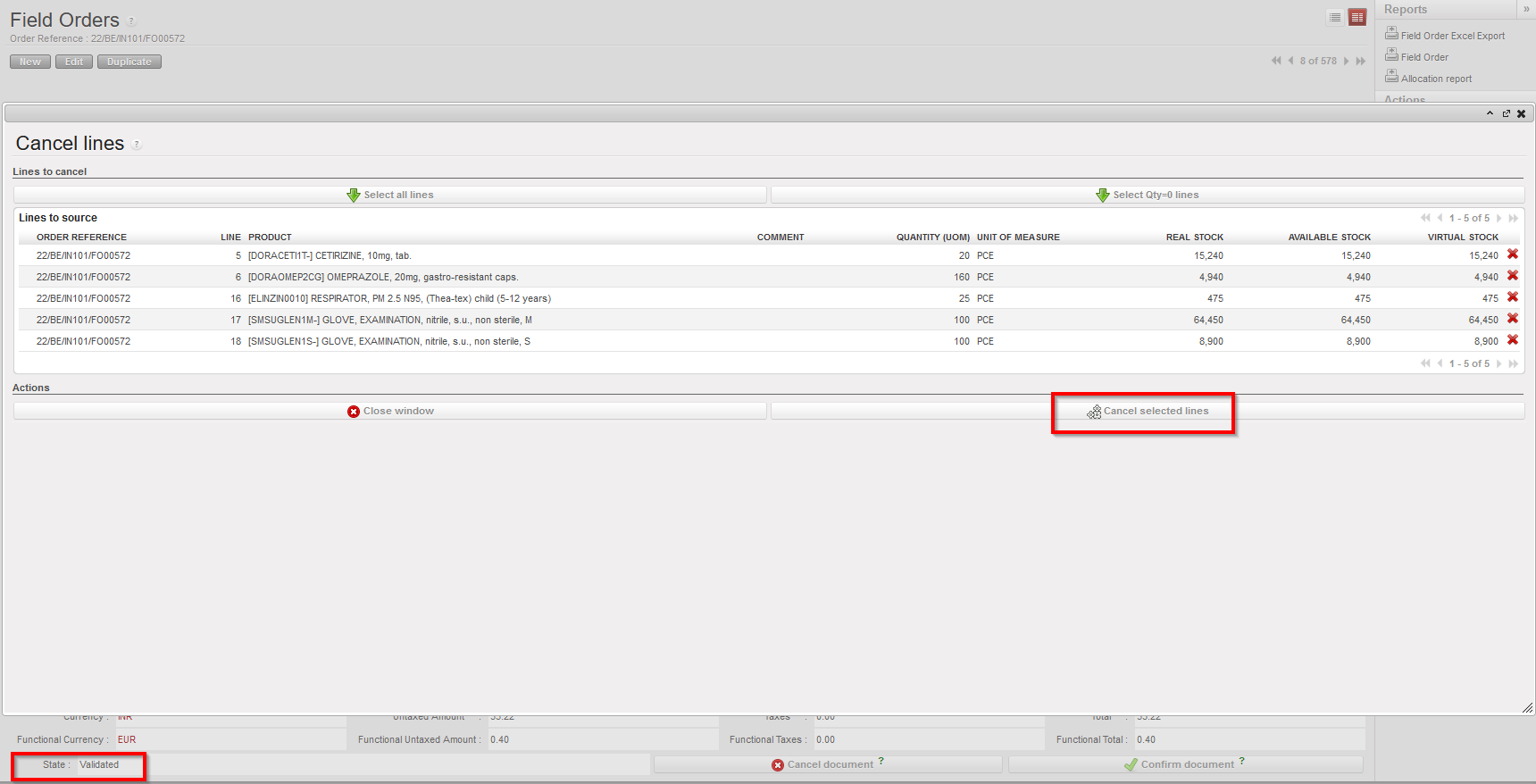
(US-8452) Replenishment Rules: Outdated FMC removal + Segment export

As per request from OCA, a new button has been added to Replenishment Rules (RR) Replenishment Segment screen called “Remove Outdated FMCs”. It can only be used when the Replenishment Segment is in Draft status, and the type of RR is “Order Cycle”.

When clicked it will remove any FMC values and their dates for any FMC which is wholly in the past. FMCs which are valid will be moved to the left to fill any removed ones.

Also the name of the file which is exportable from the RR Replenishment Segment has been corrected to display “SEG_ XXDBXXXXDATE”.

(US-1128) Theoretical Kit Composition (TKC) import for creation

As per request from OCG, when creating a new Theoretical Kit Composition (Products>Kit Management>Theoretical Kit>Theoretical Kit Composition), it is now possible to choose an existing TKC and import its products directly into the new TKC. The new TKC can have products from existing TKCs added multiple times, and then these products can be removed or more added directly in the screen.

(US-8972) IN synched to receive Inactive product and message

Now when an IN receives an update via synch from a sending instance, containing a product which is not active in the receiving instance, the IN is still updated (to Available Shipped) and there is a warning on the relevant line(s) indicating issue with product. Line(s) containing inactive product cannot be processed until product is activated.
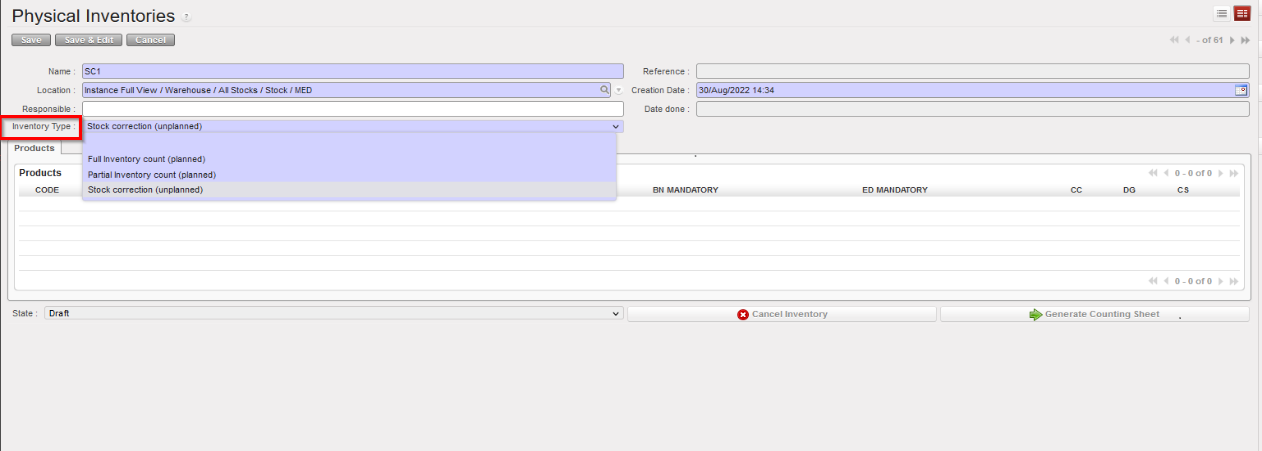
(US-8433) VI: IN simulation screen more accurate

As requested by OCB, now when a Vertical Integration (VI) import file is imported onto an Incoming Shipment and file does not contain all lines in original IN, in the simulation screen, the change “CHG” flagged is now “Ign” meaning line not in import file is ignored. Previously the CHG column showed “Del” (Delete) for these lines, which was inaccurate.
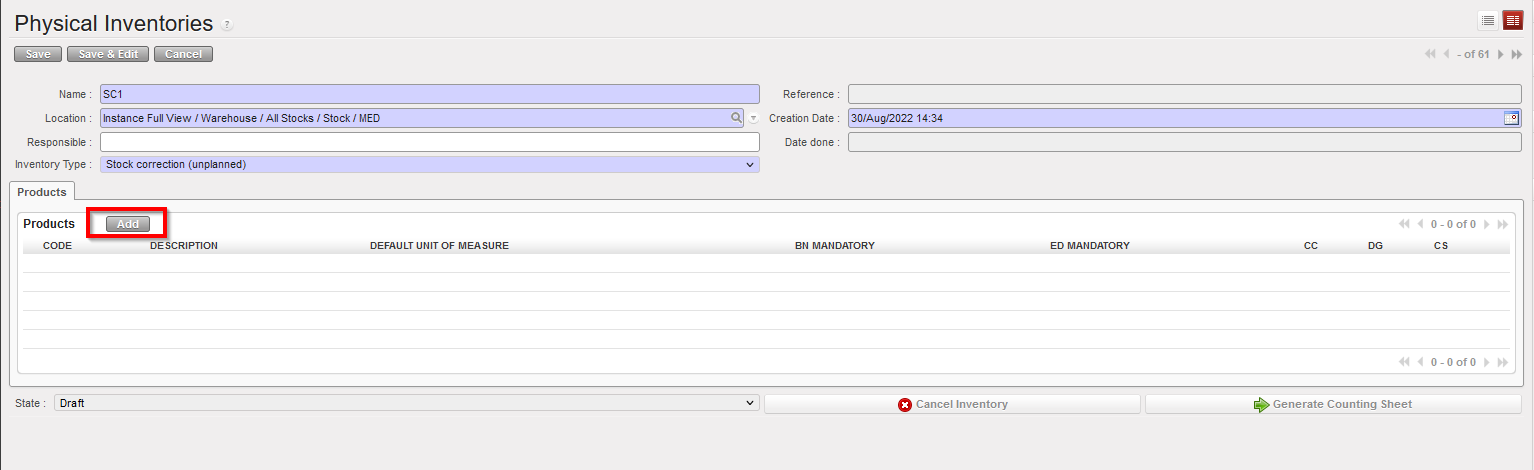
(US-8794) Correction on products to allow correct UR control of Active status

Development has been made which means User Rights can now be used to correctly control products which should be able to be Activated/Deactivated, depending on the Product creator, Standardization Level and level of instance (HQ, Coordo, Proj).

Of the Products which descend from HQ to Coordo, only the ones which have UniData as Product creator and which are “Non-standard Local” can be de-activated at Coordo, and this by a user with appropriate User Rights.

(US-9176) Claim: IN of returned goods uses wrong Source Location

The ticket raised by OCA to resolve a BUG, when products are returned by claim, now the IN of the returned products bears the name of the partner, and in the stock move reports of the returned items, it shows the MSF supplier in the source location and not the stock therefore, there is no negative stock of the product due to this transaction, previously, the name of the partner was not shown in the IN, the location of the source was a stock, resulting in a negative stock of the returned item.

(US-9147) RDD field in Validated PO should not be modifiable

New improvement for validated purchase orders which is consistent with previous improvement US-8076 “Management of PO 2 RDDates Estimated Delivery Date”. After validation, users will not be able to change RDD anymore at header or line level. Via VI, any change to the RDD will be reflected in the EDD line level, without changing the original RDD (this remains unchanged and is as per previous ticket).

(US-8951) Synched INs: warning if Cancel line & Track changes update

New improvement for Synced incoming shipments between instances, A non-blocking warning message will appear for processing or cancelling any line in the INs linked to synchronised flow with Available status, and in Track changes reports, correct status for IN (Available, Available Shipped, Available Updated) appears.

(US-8923) PPS: not possible to return packs from Sub-Ship

A Bug has been solved, users can now return packs from the sub-ship, after picking/packing lines to draft shipment, processing partial packs to sub-ship, adding more packs from the remaining packs to sub-ship, and then it is possible to return packs from sub-ship, and add parts of the packs to sub-ship again.

(US-5357) Product Nomenclature Status to be received from UniData

An extra field has been added to receive the Nomenclature “status” from UniData.

The aim of this improvement is to prevent UniField users from creating new products with obsolete Nomenclatures.

UniData already manages the status of Nomenclatures and sets those which are no longer Valid to Archived. Now this field is present also in Nomenclatures in UniField.

Before any update is received from UniData, the default Nomenclature status for products in UniField is valid. For any Nomenclature status which is updated to “Archived” by UniData linkage, any existing product with this Nomenclature can still be used, but no new product can be created using Archived Nomenclature. The Nomenclature status is visible on Root level of Nomenclatures.

N.B.: The equivalent development on UniData side to send status via linkage is due in release early next year so no update to UniField for these values is expected before then.

(US-8847) Inconsistent/missing status label in Delivery Order PDF

The ticket raised by OCA to fix a BUG, in the Delivery Out PDF, the State is now compatible with the correct status of the delivery out, Dispatched and Received status appear now correctly in the pdf.

(US-8732) RR: Improve pipeline synchronization to project

On OCA’s request for new improvement, for purchase orders synchronized between instances, date changes to Validated supplier POs even if PO lines status does not change, now are synched to project/requesting instance and appear in the pipeline report, such as in EDD/CDD changes in validated/confirmed POs.

All Supply tickets integrated in UF23.0

Table

Description automatically generated

Finance

(US-7929) Whenever REV/COR are generated, their posting date must be within the same FY as the posting date of the original entry.

In this ticket we have put in place a new generic rule: the possibility to correct the transaction only when the posting date of the transaction is in the same fiscal year of the original entry posting date.

For example:

  • Initial document date in 2020.
  • Initial posting date in 2021.
  • FY 2020 closed and FY 2021 open.
  • Correction with posting date in 2021.

==> In this situation we can correct the transaction in 2021, as the correction posting date is in the same fiscal year of the original entry posting date.

(US-8459) OCG: Funding Pool and financing contracts: to add new filters.

We have added a new filter:

Go to Accounting/Grant management/Financing contracts/ tabs Funding pools and tab Reporting lines:

Funding Pools analytical account => In the Search Account/Destination view (click Add in the tab Accounts/Destinations), we have added a new filter ‘Analytical Destination Account’ as a free text (no magnifying glass) so search can be based with text.

Financing Contract => in the reporting line tab, when adding Account/Destination, add a new filter ‘Analytical Destination Account’ as a free text (same as for FP)

(US-8585) Intersection: create a specific journal and new name for SI from intersection flow.

A new improvement has been done in the intersection flow by the creation of a specific journal ISI (Intersection Supplier Invoice) and a new name for the invoices coming from an intersection flow (ISI Intersection Supplier Invoice).

By the past, all invoices received from an intersection partner were created as Supplier Invoices.

For the refunds:

  • The Stock Transfer Refund (STR) correspond to the STV refund and it will stay in the existent journal SAL.
  • The Intersection Supplier Refund (ISR) correspond to the ISI refund and it will stay in the new created journal ISI.

The new ISI in the new journal ISI (new) has the similar behaviour to the SI on Intersection partners currently (same menu, same buttons, same filters…). Only exception: everything related to taxes is removed.

STR (new) are generated at STV refund time, with POSITIVE amount (just the sense of the JI/AJI will change). They can also be manually created (no check whether the amount is negative or not). Their behaviour is similar to the one of the Customer Refunds currently (they appear in the same menu, have the same buttons, the same filters…).
They DO NOT replace the Customer Refunds which are kept as they are (but not generated via STV refund anymore).

ISR (new) are generated at ISI refund time, with POSITIVE amount (just the sense of the JI/AJI will change). They can also be manually created. Their behaviour is similar to the one of the Supplier Refunds on Intersection partners currently (they appear in the same menu, have the same buttons, the same filters…). Only exception: everything related to taxes is removed.
The Intersection partners will be removed from SI and from SR: the SI and SR currently linked to Intersection partners will still be named “Supplier Invoices” and “Supplier Refunds”, and won’t be moved to the new menus, as they use different journals (so different Entry Sequences).

STR and ISR are not synced.

  • STV can be refund cancel and modify (no refund refund).
  • ISI can only be refund cancel if the counterpart invoice status is in closed state (no refund modify / refund possible).
  • STR and ISR have no refund button possible.

(US-8839) Customer Commitment Vouchers from Field Order – Intermission/intersection.

In UF22 we did the CV linked to the PO to intermission and intersection partner type at the requester side. The objective is now to generate a CV from the provider side so credit of expense are triggered via CV when the FO lines are confirmed.

When related to intermission and intersection provider partners, they often have to purchase goods externally before to ship them to the requester instance.

During the time the supplier instance buy the goods and ship the goods, they generate expenses that are on behalf of the requester that are only offset when the shipment is triggered and the draft client invoice (STV or IVO) are validated.

This functionality tends to generate credit of expenses in the engagement accounting entries (positive Analytic Journal Items) in between the field order is confirmed and the time the credit of expenses are generated when the invoice is validated.

The function is optional and defined in the reconfigure menu. Indeed, not all OCs will use this functionality and within each OC, only instances that are playing the role of regional supplier shall fully benefit from this functionality. Other instances that sometimes play the role of provider will decide to use it or not.

(US-8845) Inactive cost centers block update of Incoming Shipment

The update of an IN/Incoming shipment will not be blocked if the linked cost centres/destinations are not valid. However, in this case, it is not possible for the user to validate the SI unless a Finance user modifies the cost center/destination and sets it to an active one.

The use case that we correct was this one:

  • HQ1C1: PO validated to HQ1C2, AD: HT101 / OPS, sync
  • HQ1C1: set HT101 and OPS as inactive
  • HQ1C2: source FO to stock or PO, P/P/S, sync
  • HQ1C1: no more NR to confirm the PO, IN is available shipped

(US-8900) STV’s invoice Excel Export – Equivalent of IVO’s Invoice Excel Export (intermission/intersection).

You will be able to have a new excel file called “Invoice Excel Export” from the STV in order to follow the flow. This file exists already for the IVO.

Go to: Accounting > Customers > Stock Transfer Vouchers > select STV line > go to the right menu “Reports” and you will find the “Invoice Excel Export” report.

Details of columns:

Column A: Document number: As documents are in the same page we will give a number per document to distinguish them. Ordinal number of the document as per selected STV. Ex. there are 3 STV selected, the numbers would be 1, 2, and 3.

Column B: Line number: Number of the line on each STV. In the same example below, if the 1st STV has 3 lines, the 2^nd^ has 2 and the last 4, the numbers on this column would be 1,2,3 (related to 1st STV) ,1,2 (related to 2nd STV), and 1,2,3,4 related to the last STV.

Column C: Product: fill the product code related to the line. Leave empty or write FALSE when the product code is not filled for the manual STV.

Column D: Description: Description of the line in the STV.

Column E: Quantity: quantity of the line in the STV.

Column F: UOM: Unit of measure of the line in the STV.

Column G: Percentage: 100% if the line is not split or percentage of the analytic split if line split.

Column H: Unit price: unit price as it is on the STV line. In booking currency.

Column I: Sub-total: subtotal of the line as what is it in the STV In booking currency.

Column J: Account: account code of the line in the STV.

Column K: Cost center: Cost center of the line in the STV.

Column L: Destination: Destination on the line in the STV.

Column M: Voucher number: SAL number of the voucher. In case the voucher is not posted leave blank or fill FALSE.

Column N: Voucher status= status of the voucher (invoice object: draft, open, paid, closed).

Column O: Posting date: posting date of the STV.

Column P: Ship#: Number of the shipment generating the STV. Leave blank or fill FALSE for manual STV.

Column Q: Partner: the partner visible from the header of the STV.

Column R: FO number: number of the FO source of the process as it is seen in the supplier and customer sections. Leave blank or fill FALSE for manual STV.

Column S: PO number: Number of the PO to external partner in order to buy the goods. Leave blank if sourced from stock. Leave blank or fill FALSE for manual STV.

Column T: Counterpart invoice number: as per on the counterpart invoice tab of the STV.

Column U: Counterpart invoice status: as per on the counterpart invoice tab of the STV.

Please note that the Funding Pool is excluded from the list.

All Finance tickets integrated in UF23.0

Non- functional

US-8367 Add the version to the UR files exported from Tools

New improvement when working on URs, we need to extract the files from Tools, then update them and import them in the sync server for release into productions.

The system will automatically add the current version (same as version next to log out button) when exporting UR files from Tools. As we can see below:

Access_Controls_List_Export_UF20.0rc3_20210304.

To perform this action: Go to Tools > Import/ Export > Non-Functional > choose Object to Import/Export > Export all data

US-5357 Product Nomenclature Status for Unidata linkage

The ticket is both supply and IT and already described in supply section above.

US-9217 OCP-NE1-COR admin account unable to view Hardware id

This ticket raised by OCA resolves a bug in the French version of UniField when accessing the entity ID. When the user logs in with the admin account to a French instance, the user is not able to see the entity ID, just the value of the last update. As you can see in the example below:

This issue is resolved in this 23.0 release. Admin users should now be able to view and access the entity Id as seen in the French instance example OCP_NE1_COR below:

Go to synchronization > Maintenance > Entity ID:

The result of this action:

All Non-functional tickets integrated in UF23.0

UniField V22.1 Release Notes

Release Details

Release version: UF 22.1

Date of production synchronization server patch: 20-October-2021 / 18:00 Geneva time

Latest user rights files can be found here.

Note that no user rights need to be loaded at each HQ. This will be done at the Sync Server by the Core team and will update the user rights via Sync for all HQs and missions.

JIRA filter for all integrated tickets: https://jira.unifield.org/issues/?filter=12394

Supply

(US-9115) Replenishment Rules, Compute data issue

This issue, flagged by OCA, meant that any Replenishment Rule Segment containing both whole FMC periods in the past and products which were expiring was blocked from having its data recomputed, meaning the order calculation and reports could not be accurately generated. This issue has now been corrected.

(US-8336) Prevention of product merge Not Runs

Previously, the merge products functionality, used at Coordo to merge Local products with Standard, Non-standard or Non-Standard Local products only checked on 2 aspects of product usage at project level: Quantity in Stock and Quantity in pipeline. Both needed to be zero. This caused issues as at Coordo; a product could be merged if both criteria were fulfilled, but the merge of products was then blocked at project level due to the product being in use in a transaction.

With this ticket a 3rd check is added: if the product is in any transaction at project level. When a product is in a transaction, this will now be flagged and visible in the onscreen Mission Stock report, via the checkbox “Used in a transaction” being ticked. This information is now used by the merge functionality to check that only products which can be fully merged in all mission instances are able to be merged at Coordo.

(US-9110) IN return from Unit import inconsistency

This bug, found by Pharma, meant that when the template for the Return from Unit import into INs from scratch did not contain Batch / Expiry information for products which were BN or ED mandatory, the import was ignored, which was inconsistent with the checks and behaviour of the import of standard IN import. Now both imports behave in the same way, and products lacking Batch / Expiry information are now imported. This information can be added manually to lines after import.

All Supply tickets integrated in UF22.1

Non- functional

(US 8019) OCB: using webservice to import destinations

Tools’ import functionality now supports, apart manual import, direct call to XMLRPC port and allows to automate ingest of imports to Unifield.

(US-8999) REVPROX not restarting after certificate renewal

The issue reported on several instances where revprox reverse proxy exits after certificate renewal is now fixed in this UF22.1 patch.after certificate renewal is now fixed in this UF22.1 patch

All Non-functional tickets integrated in UF22.1

Table

Description automatically generated

UniField v22.0 Release Notes

Release Details

Release version: UF 22.0

Date of production synchronization server patch: 15-September-2021 / 18:00 Geneva time

Latest user rights files updated: UF22.0 can be found here.

Note that no user rights need to be loaded at each HQ. This will be done at the Sync Server by the Core team and will update the user rights via Sync for all HQs and missions.

JIRA filter for all integrated tickets: https://jira.unifield.org/issues/?filter=12383

Supply

(US-8646, US-8584, US-8432, US-8560) Changes to Products & how they are synched

With this release there are several changes to products to improve their alignment and also for user-friendliness.

For products with the type ESC, ITC, HQ, if they are deactivated in the higher instance (HQ level for all except Local products, which would be de-activated at Coordo level) this de-activation is synched to all lower instances. This was already the case before. However, previously, where a product in the lower instance was still in use (Stock / in an open document), the product could not be de-activated and there was no Not Run synch update. With this change, the de-activated product will automatically be set as UF status “Phase out” meaning that if a product can be de-activated by synch, it will be. If product cannot be de-activated by synch, it will remain Active, but status will change to Phase Out, and there will be a Not Run synch update. These 2 changes should help users identify where such a case has occurred. This is consistent with how UniData products already behave.

Where a product is de-activated in a higher instance, and in the lower instance the product is not in any open document or in stock, but it is in a product list, now its existence in a product list will no longer block its deactivation. Product will be de-activated, and it will be possible to see in the product list “Old products” tab, that this product was removed.

For the case of synched flows between Instances with different products (e.g. Intermission or Intersection), for the case that a PO or FO is created by synch and includes a product which does not exist in the receiving instance, there is now a message onscreen on the relevant document (PO or FO) warning the user that a product code could not be created. As with before, there is still a Not Run created, and the message on this has been made clearer.

(US-8520) New Import into IN from scratch

An improvement for Pharma, there is a new import file with specific checks for INs which are created from scratch (i.e. not linked to a PO) and which are for returns from external consumption units. There is a specific button for this import (see screenshot) and before the file can be imported, the header fields “Ext CU” and “Reason Type” and of course “Expected Receipt date” fields must be filled. Reason Type must be “Return from Unit”. The import file has a specific format, but the same checks are made as for the original import lines functionality.

(US-8280) IN Physical Reception date field change

As initiated by OCB, the already-existing “Physical Reception date” field on Incoming Shipments (INs) has been moved to appear on the pop-up “Products to process” displayed once the “Process” button has been clicked.

Any date entered here and then processed with lines will appear in Closed IN in the “Additional Info” tab. As per before, if no date is entered here when processing the IN, the Actual Reception date will be taken for this field.

(US-7927, US-8076) Modification to PO RDD date management & pipeline

Previously, a second RDD field “Requested Delivery Date (modified)” had been added at header level to POs in order to manage the updated delivery dates from suppliers for lines which were not yet confirmed. With this ticket, the 2nd Requested DD is renamed to “Estimated Delivery Date” (EDD). As well as being present at header level, this field has also been added at line level, and is visible onscreen directly in POs, and in FOs it is visible only in line pop-ups. The line level can be filled manually or pushed from the header level field. There is no change to the format of the Vertical Integration PO import and export files. The date value is synched in the same way as the original RDD value was.

Labels for the other dates have been modified to be consistent with the naming, “Delivery Requested Date” has become “Requested DD” etc and also in the OST the original “Estimated DD” label has been changed to “Calculated DD” with the same value, so as not to be confused with the term in POs.

There has also been work done to align how the pipeline and its dates are displayed in different screens and reports, taking into account that Validated PO lines are considered as pipeline.

(US-8014) New AMC report not showing negatives

As requested by Pharma, a parallel report has been developed in the Historical Consumption report. Warehouse>Reporting>Consumption Reports>Historical Consumption

There is a new checkbox which appears when Consumption Type is “Average Monthly Consumption”. The checkbox “Remove Negative AMCs” has a fuller explanation below it, and when ticked, the “Historical Data report” can be generated which does not show any negative AMCs at the month level, and the “Entire Period AMC” is based on the figures shown for each month. When the checkbox is not ticked, a similar report can be generated showing the figures as per the regular calculation for AMC (including negatives), and it is still possible to view the (original) onscreen version for this via the View Historical Data button.

(US-8719, US-8558, US-9028) Replenishment Rules changes

Some improvements and corrections made to the Replenishment Rules include: The Inventory Review report excel export had had grouping added to its columns to make it more readable. These can be expanded and contracted.

It is now possible to add a value of “0” for FMC values for any status of product

When UI is viewed in French, the comma character “ , “ is accepted to indicate a decimal place.

(US-8944) Migration of Local Products to new Thermosensitive codes/values

As per the mapping agreed by Pharma, and already implemented by UniData for UniData products, all Local products in UniField which had old Thermo values have been migrated to the new equivalent Thermo values. No active ITC, ESC and HQ products had old Thermo values, so none needed to be migrated.

(US-8364) Display of Physical Inventory Counting Sheet

In the Physical Inventory, when adding products, it was already possible to specify system should add products with movements in the last X months. With this change, the number of months specified to add products can be used to filter and display also the batches of the added products based on this timed selection. Where user has added products specifying products with movements in the last 5 months, this would be the default option ticked in the new checkbox on the “Generate Counting sheet” pop-up (see below) and only batches which have been moved in the last 5 months will be displayed in the counting sheet.

If this checkbox is unticked, the original product selection remains unchanged, so all products with movements in the last 5 months will be displayed, but all of their batches will be displayed even those which were last moved several years before.

If the checkbox “only count lines with stock different than 0” is ticked, the new checkbox cannot be ticked. All previous displays of the Counting Sheet are still possible.

For the case that multiple additions of products were performed, the system will propose the greatest number of months used during the additions.

(US-8175) Forced reception, Not Run management & New Not Run type

With this ticket there is a correction to specified flows where lines in a project IN belonging to a synched flow have been manually changed (e.g. cancelled) by a user, without waiting for the synch to update the IN, and then the Coordo has sent the line.

In order for the update by synch of the other lines in the IN to not be blocked, a new type of Not Run synch message has been created. It is called a “Partially Not Run” meaning the message itself was run for the document (so the IN has been updated with all lines where possible), but the flagging of Synch message as “Partially Not Run” indicates there were problematic lines in the document which could not be updated.

This type of Not Run is automatically displayed in the Message Received Monitor in the same way as standard Not run messages, but its line is displayed in Orange rather than Red, and there is a specific filter button for this type in the header.

This type of Synch message has a button “Set as Totally Run” to allow user to set to fully Run in order to remove from this filter on the dashboard:

All Supply tickets integrated in UF22.0

Finance

(US-7903) Request to have Commitment vouchers linked to the PO with Inter-section / intermission partner types

Operational centers have agreed to implement commitment vouchers for intersection and intermission flows.

  • All Funding Pools are allowed in the Commitment Vouchers “Automatic – Intersection” and “Automatic – Intermission” (i.e. we don’t restrict to PF only).
  • We will use the AD directly from the PO for the invoices generated by synch (so for these invoices, we will not use the AD of the CV).
  • When we synch and the synch creates IVI /SI, we use the account of the CV (this account can be modify in the CV that have a status draft).

Behavior to take into consideration:

  • CV will still be deducted from amount of IVI or SI until the CV full amount is reached.
  • CV will be set to done if total amount is reached, whatever the state of the PO, the remaining backorders / invoices to come.
  • CV will be set to done once a IVO/STV is validated and if the PO or PO line is in closed state (even if the amount of the CV is not reached).
  • CV will not be set as done once a IVO/STV is validated and if the PO or PO line is not in closed state and the total amount of the CV is not reached.
  • CV will not be set as done in case the PO or PO line becomes closed after reception and if no IVI or SI are validated at a later stage (cancel invoices).
  • In case a line is added on the FO of C2, no added line on the CV of C1 for consistency.
  • Pushed FO from C2 to C1, no CV are created at C1.

(US-7449) The AD of the CV and SI lines will be the one of the PO

We have changed the way AD is calculated in Invoice and in CV. The objective is to align PO/Invoices and CV aligned on the PO analytical distribution behaviour:

Please be aware that the CV in progress that were created before this change will keep the former behaviour, the improvement is just for the new POs and their CVs (this improvement is not retroactive).

Some notes:

  • When transferring AD from PO to Invoice, system use the product as linked object (note that it is not possible anymore to delete products coming from PO in invoices).
  • When transferring AD from PO to CV, system use the product as linked object.
  • It will not be possible to delete product lines in CV but it will be possible to change the account code in draft status (not in validated status); for manual CV the account code is editable at validated status (current behaviour).
  • AD will be per product in SI and CV the same as it is in POs.
  • Each CV line or SI line will generate AJIs according to the AD of the line, AD being the one from the PO.
  • The updates between SI and CV will be based on the product line and not anymore – based on the account code.

(US-9003) Set all Intermission partners with the functional currency (EUR / CHF)

We noticed there were some intermission partners that have another currency than the functional currency while only functional currency is allowed for Intermission partners so we proceeded with a patch script to set all intermission partners with the functional currency.

All Finance tickets integrated in UF22.0

Non- functional

(US-9026) Invalid date in a wizard pop-up generates a Pink Screen

Since UF21.0, an invalid date value into the date field for example inputting an invalid physical reception date when processing an IN would return a pink screen. The UF22.0 release fixes this by returning an invalid date error message instead of the pink screen.

(US-8869) Remove stocked internal files from IR (doc) import

As reported in US-8853, all files used to import IRs are being retained by the database. This causes abnormal growth of db size. With the UF22.0 release, import files will be deleted automatically after a successful import since these files are not needed or available functionally.

(US-8866) Add the last update sequence pulled next to hardware id

When the Core team is updating the hardware id of an instance, we have to ensure also that the “Last update sequence pulled” at the sync server corresponds to the last update sequence pulled” at the instance level. This is to ensure that the restored dump is the correct one to avoid any missing/discrepancies of data. We have noted several incidents following a request for hardware id update where we found out that the backup restored is not the latest one.

In this release, we have added the last update sequence pulled next to the hardware id in the sub menu “Entity id”. This field is read only and is updated after each sync. This will ensure that when requesting hardware id update, requesters will copy the hardware id as well as the last update sequence pulled to ensure it matches with the sync server.

(US-8865) Huge Sync Message to Process Blocks Synchronisation

Huge sync messages to process for example a PO with 1000+ lines would block synchronisation due to memory error. The UF22.0 release fixes this issue.

(US-8776) Code fix to remove the tag on users created by duplication

Duplicating a synched user in a coordination or project instance has been retaining the synced flag on the duplicated local user. With the 22.0 release, the sync flag is removed when a sync user is duplicated. The login field of a synced user in coordination or project cannot be changed either (only read, no write access/edit)

All Non-functional tickets integrated in UF22.0

Text

Description automatically generated

UniField v21.1 Release Notes

Release Details

Release version: UF 21.1

Date of production synchronization server patch: 07-July-2021 / 18:00 Geneva time

Latest user rights files updated: UF21.0 can be found here with record of changes here

Note that no user rights need to be loaded at each HQ. This will be done at the Sync Server by the Core team and will update the user rights via Sync for all HQs and missions.

JIRA filter for all integrated tickets: https://jira.unifield.org/issues/?filter=12380

Supply

(US-8812) OUT import not working

This issue, raised by Pharma, meant that it was no longer possible to import line information into an OUT (Delivery Order) created from scratch. This was caused by US-8010 released in UF20. This is now corrected so the import is now working.

(US-8795) VI import on PO Stock Take Date check

This issue raised by OCG and linked to US-8638 meant that when a VI import in XML format was done either manually or via Auto VI on a PO, for new lines added via import a Stock Take Date could be added which was after the PO Creation date. This was not conforming to the expected range of STDate and meant the PO lines were then blocked after. With this ticket, the check is done on the STDate in import file, a warning is raised and line not imported if STDate is not conforming. It is still not mandatory to add a Stock Take Date on new lines, and in the case there is no STDate, then the system will take the same date as the creation date of the PO.

(US-8650) Check on Inactive products at document level > line level

This issue raised by multiple OCs, was due to the system making a check at document level that all product lines contained Active products. There were many cases where a document contained a now Inactive product, and the line for this product was closed, but due to this check the other lines in the transaction were being blocked from progressing. The check has now been transferred from being at document level to the specific line(s) being processed. This means that Inactive products in already processed (closed) lines will no longer block the processing of lines with Active products in the same document.

All Supply tickets integrated in UF21.1

Finance

(US-8810) OCG_XX1_COO : not runs with model: dest.cc.link (due to VM duplication; disaster recovery test)

Due to a OCG IT Virtual Machine test recovery, OCG HQ has been duplicated, creating sync issues between the fake and the production HQ, creating not runs on the combination destinations and cost centers in several missions. This ticket fixes the not run.

All Finance tickets integrated in UF21.1

Non- functional

(US-8753) Set admin password in UF to “never expire” by default

Following improvement in password policy US-7019 (UF21.0 release), all production passwords were set to expire every 6months with the exemption of sync users and unidata users. In this UF21.1 patch, we added admin user accounts to the short list of users set by default to “Password never expires”. This means that when the 6months elapse, administrator accounts will not be prompted by the system to change password.

All Non-functional tickets integrated in UF21.1

UniField v20.1 Release Notes

Release Details

Release version: UF 20.1

Date of production synchronization server patch: 5th May 2021 / 18:00 Geneva time

Latest user rights files updated: UF20.1 can be found here with record of changes here

Note that no user rights need to be loaded at each HQ. This will be done at the Sync Server by the Core team and will update the user rights via Sync for all HQs and missions.

JIRA filter for all integrated tickets: https://jira.unifield.org/issues/?filter=12370

Supply

(US-8539) Product de-activation mechanism on split documents

When a user/synch tries to de-activate a product, the system will check if it was in stock or in any open document, and if so, the de-activation would be blocked.

The issue flagged by OCA was that if the document was an old FO or PO and was split (with a suffix -1, -2 or -3) because it was created & processed pre-SLL (Ticket allowing status to be different at line level), then the de-activation of a product in one of these documents was blocked even if the line/document was Closed or Cancelled. With this ticket, the system will no longer block for the case of these split documents, so the product can be de-activated if it meets the originally defined criteria.

(US-8436) Change to Direct Purchase Order linked documents

In UF20 release, the tickets US-7617 & US-7552 were included which meant that when Incoming Shipments (INs) linked to a Direct Purchase Order (DPO) are processed or cancelled at requestor (project) instance, the details of this reception/cancellation are synched up to the DPO instance.

OCG identified that this was not always the case, and specifically for when an FO was sourced to multiple DPOs the linked IN information was not correctly synched up. With this ticket, this issue is corrected so that in the case of an FO being sourced to multiple DPOs, each of these will have a separate IN created at project to ensure the accurate data is synched back.

For FOs sourced in this way between UF20 and UF20.1 (this release) a separate ticket, US-8554 has been created to ensure correction of these flows via Data Fix after this release.

(US-8389) Block moves to Virtual locations via INTs

This issue identified by OCB was that users could create Internal Movements (INTs) from a stock location to a virtual location (such as “Inventory Profit &Loss”) therefore bypassing the correct procedures such as doing a Physical Inventory to adjust stock levels. This has now been corrected and is no longer possible.

(US-8349, US-8185) Claims issues

These 2 issues meaning that VI auto IN import was blocked due to Claim in progress, and there being an unclear Not Run synch message when a Claim was raised and then closed in the same instance before it was synched to the Supplier instance have now been corrected. The VI auto import is no longer blocked in this case, and for the second, the Not Run synch message now clearly communicates the issue with related document Ref.

(US-8200) IN processing issue

For a specific user case, when the Outgoing Transport document had been processed with a quantity already in stock (Crossdocking) in advance of the ordered quantity being actually received via the Incoming Shipment, the VI import of this Incoming Shipment was blocked. This has now been corrected.

All Supply tickets integrated in UF20.1

Finance

(US-8535) OCA: Automated VI – export to HQ system error message

To fix an error message linked to OCA automated VI, we have added a configurable pause in the process between the generation and the push of the VI files to the sftp server.

All Finance tickets integrated in UF20.1

Non- functional

(US- 8487): Certificate Renewal Issues

Certificate renewal issues were identified in some instances due to a failure in the auto-renewal. These instances were forced to renew certificates manually because the revprox code that automatically renews certificates on instances failed. This is due to a bug introduced by US-8158 and the new LE authority causing revprox not to consider the certificates as certomat ones. This bug is fixed and resolved in this release.

All Non-functional tickets integrated in UF20.1