UniField v22.0 Release Notes

Release Details

Release version: UF 22.0

Date of production synchronization server patch: 15-September-2021 / 18:00 Geneva time

Latest user rights files updated: UF22.0 can be found here.

Note that no user rights need to be loaded at each HQ. This will be done at the Sync Server by the Core team and will update the user rights via Sync for all HQs and missions.

JIRA filter for all integrated tickets: https://jira.unifield.org/issues/?filter=12383

Supply

(US-8646, US-8584, US-8432, US-8560) Changes to Products & how they are synched

With this release there are several changes to products to improve their alignment and also for user-friendliness.

For products with the type ESC, ITC, HQ, if they are deactivated in the higher instance (HQ level for all except Local products, which would be de-activated at Coordo level) this de-activation is synched to all lower instances. This was already the case before. However, previously, where a product in the lower instance was still in use (Stock / in an open document), the product could not be de-activated and there was no Not Run synch update. With this change, the de-activated product will automatically be set as UF status “Phase out” meaning that if a product can be de-activated by synch, it will be. If product cannot be de-activated by synch, it will remain Active, but status will change to Phase Out, and there will be a Not Run synch update. These 2 changes should help users identify where such a case has occurred. This is consistent with how UniData products already behave.

Where a product is de-activated in a higher instance, and in the lower instance the product is not in any open document or in stock, but it is in a product list, now its existence in a product list will no longer block its deactivation. Product will be de-activated, and it will be possible to see in the product list “Old products” tab, that this product was removed.

For the case of synched flows between Instances with different products (e.g. Intermission or Intersection), for the case that a PO or FO is created by synch and includes a product which does not exist in the receiving instance, there is now a message onscreen on the relevant document (PO or FO) warning the user that a product code could not be created. As with before, there is still a Not Run created, and the message on this has been made clearer.

(US-8520) New Import into IN from scratch

An improvement for Pharma, there is a new import file with specific checks for INs which are created from scratch (i.e. not linked to a PO) and which are for returns from external consumption units. There is a specific button for this import (see screenshot) and before the file can be imported, the header fields “Ext CU” and “Reason Type” and of course “Expected Receipt date” fields must be filled. Reason Type must be “Return from Unit”. The import file has a specific format, but the same checks are made as for the original import lines functionality.

(US-8280) IN Physical Reception date field change

As initiated by OCB, the already-existing “Physical Reception date” field on Incoming Shipments (INs) has been moved to appear on the pop-up “Products to process” displayed once the “Process” button has been clicked.

Any date entered here and then processed with lines will appear in Closed IN in the “Additional Info” tab. As per before, if no date is entered here when processing the IN, the Actual Reception date will be taken for this field.

(US-7927, US-8076) Modification to PO RDD date management & pipeline

Previously, a second RDD field “Requested Delivery Date (modified)” had been added at header level to POs in order to manage the updated delivery dates from suppliers for lines which were not yet confirmed. With this ticket, the 2nd Requested DD is renamed to “Estimated Delivery Date” (EDD). As well as being present at header level, this field has also been added at line level, and is visible onscreen directly in POs, and in FOs it is visible only in line pop-ups. The line level can be filled manually or pushed from the header level field. There is no change to the format of the Vertical Integration PO import and export files. The date value is synched in the same way as the original RDD value was.

Labels for the other dates have been modified to be consistent with the naming, “Delivery Requested Date” has become “Requested DD” etc and also in the OST the original “Estimated DD” label has been changed to “Calculated DD” with the same value, so as not to be confused with the term in POs.

There has also been work done to align how the pipeline and its dates are displayed in different screens and reports, taking into account that Validated PO lines are considered as pipeline.

(US-8014) New AMC report not showing negatives

As requested by Pharma, a parallel report has been developed in the Historical Consumption report. Warehouse>Reporting>Consumption Reports>Historical Consumption

There is a new checkbox which appears when Consumption Type is “Average Monthly Consumption”. The checkbox “Remove Negative AMCs” has a fuller explanation below it, and when ticked, the “Historical Data report” can be generated which does not show any negative AMCs at the month level, and the “Entire Period AMC” is based on the figures shown for each month. When the checkbox is not ticked, a similar report can be generated showing the figures as per the regular calculation for AMC (including negatives), and it is still possible to view the (original) onscreen version for this via the View Historical Data button.

(US-8719, US-8558, US-9028) Replenishment Rules changes

Some improvements and corrections made to the Replenishment Rules include: The Inventory Review report excel export had had grouping added to its columns to make it more readable. These can be expanded and contracted.

It is now possible to add a value of “0” for FMC values for any status of product

When UI is viewed in French, the comma character “ , “ is accepted to indicate a decimal place.

(US-8944) Migration of Local Products to new Thermosensitive codes/values

As per the mapping agreed by Pharma, and already implemented by UniData for UniData products, all Local products in UniField which had old Thermo values have been migrated to the new equivalent Thermo values. No active ITC, ESC and HQ products had old Thermo values, so none needed to be migrated.

(US-8364) Display of Physical Inventory Counting Sheet

In the Physical Inventory, when adding products, it was already possible to specify system should add products with movements in the last X months. With this change, the number of months specified to add products can be used to filter and display also the batches of the added products based on this timed selection. Where user has added products specifying products with movements in the last 5 months, this would be the default option ticked in the new checkbox on the “Generate Counting sheet” pop-up (see below) and only batches which have been moved in the last 5 months will be displayed in the counting sheet.

If this checkbox is unticked, the original product selection remains unchanged, so all products with movements in the last 5 months will be displayed, but all of their batches will be displayed even those which were last moved several years before.

If the checkbox “only count lines with stock different than 0” is ticked, the new checkbox cannot be ticked. All previous displays of the Counting Sheet are still possible.

For the case that multiple additions of products were performed, the system will propose the greatest number of months used during the additions.

(US-8175) Forced reception, Not Run management & New Not Run type

With this ticket there is a correction to specified flows where lines in a project IN belonging to a synched flow have been manually changed (e.g. cancelled) by a user, without waiting for the synch to update the IN, and then the Coordo has sent the line.

In order for the update by synch of the other lines in the IN to not be blocked, a new type of Not Run synch message has been created. It is called a “Partially Not Run” meaning the message itself was run for the document (so the IN has been updated with all lines where possible), but the flagging of Synch message as “Partially Not Run” indicates there were problematic lines in the document which could not be updated.

This type of Not Run is automatically displayed in the Message Received Monitor in the same way as standard Not run messages, but its line is displayed in Orange rather than Red, and there is a specific filter button for this type in the header.

This type of Synch message has a button “Set as Totally Run” to allow user to set to fully Run in order to remove from this filter on the dashboard:

All Supply tickets integrated in UF22.0

Finance

(US-7903) Request to have Commitment vouchers linked to the PO with Inter-section / intermission partner types

Operational centers have agreed to implement commitment vouchers for intersection and intermission flows.

  • All Funding Pools are allowed in the Commitment Vouchers “Automatic – Intersection” and “Automatic – Intermission” (i.e. we don’t restrict to PF only).
  • We will use the AD directly from the PO for the invoices generated by synch (so for these invoices, we will not use the AD of the CV).
  • When we synch and the synch creates IVI /SI, we use the account of the CV (this account can be modify in the CV that have a status draft).

Behavior to take into consideration:

  • CV will still be deducted from amount of IVI or SI until the CV full amount is reached.
  • CV will be set to done if total amount is reached, whatever the state of the PO, the remaining backorders / invoices to come.
  • CV will be set to done once a IVO/STV is validated and if the PO or PO line is in closed state (even if the amount of the CV is not reached).
  • CV will not be set as done once a IVO/STV is validated and if the PO or PO line is not in closed state and the total amount of the CV is not reached.
  • CV will not be set as done in case the PO or PO line becomes closed after reception and if no IVI or SI are validated at a later stage (cancel invoices).
  • In case a line is added on the FO of C2, no added line on the CV of C1 for consistency.
  • Pushed FO from C2 to C1, no CV are created at C1.

(US-7449) The AD of the CV and SI lines will be the one of the PO

We have changed the way AD is calculated in Invoice and in CV. The objective is to align PO/Invoices and CV aligned on the PO analytical distribution behaviour:

Please be aware that the CV in progress that were created before this change will keep the former behaviour, the improvement is just for the new POs and their CVs (this improvement is not retroactive).

Some notes:

  • When transferring AD from PO to Invoice, system use the product as linked object (note that it is not possible anymore to delete products coming from PO in invoices).
  • When transferring AD from PO to CV, system use the product as linked object.
  • It will not be possible to delete product lines in CV but it will be possible to change the account code in draft status (not in validated status); for manual CV the account code is editable at validated status (current behaviour).
  • AD will be per product in SI and CV the same as it is in POs.
  • Each CV line or SI line will generate AJIs according to the AD of the line, AD being the one from the PO.
  • The updates between SI and CV will be based on the product line and not anymore – based on the account code.

(US-9003) Set all Intermission partners with the functional currency (EUR / CHF)

We noticed there were some intermission partners that have another currency than the functional currency while only functional currency is allowed for Intermission partners so we proceeded with a patch script to set all intermission partners with the functional currency.

All Finance tickets integrated in UF22.0

Non- functional

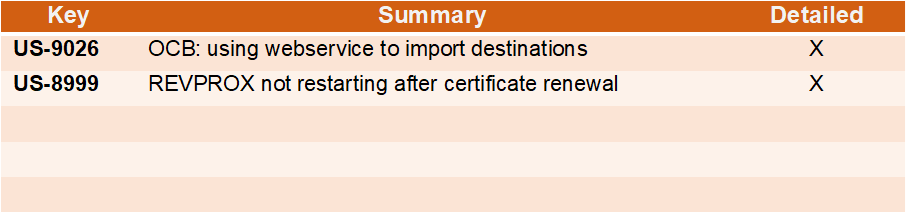
(US-9026) Invalid date in a wizard pop-up generates a Pink Screen

Since UF21.0, an invalid date value into the date field for example inputting an invalid physical reception date when processing an IN would return a pink screen. The UF22.0 release fixes this by returning an invalid date error message instead of the pink screen.

(US-8869) Remove stocked internal files from IR (doc) import

As reported in US-8853, all files used to import IRs are being retained by the database. This causes abnormal growth of db size. With the UF22.0 release, import files will be deleted automatically after a successful import since these files are not needed or available functionally.

(US-8866) Add the last update sequence pulled next to hardware id

When the Core team is updating the hardware id of an instance, we have to ensure also that the “Last update sequence pulled” at the sync server corresponds to the last update sequence pulled” at the instance level. This is to ensure that the restored dump is the correct one to avoid any missing/discrepancies of data. We have noted several incidents following a request for hardware id update where we found out that the backup restored is not the latest one.

In this release, we have added the last update sequence pulled next to the hardware id in the sub menu “Entity id”. This field is read only and is updated after each sync. This will ensure that when requesting hardware id update, requesters will copy the hardware id as well as the last update sequence pulled to ensure it matches with the sync server.

(US-8865) Huge Sync Message to Process Blocks Synchronisation

Huge sync messages to process for example a PO with 1000+ lines would block synchronisation due to memory error. The UF22.0 release fixes this issue.

(US-8776) Code fix to remove the tag on users created by duplication

Duplicating a synched user in a coordination or project instance has been retaining the synced flag on the duplicated local user. With the 22.0 release, the sync flag is removed when a sync user is duplicated. The login field of a synced user in coordination or project cannot be changed either (only read, no write access/edit)

All Non-functional tickets integrated in UF22.0

Text

Description automatically generated

UniField v21.1 Release Notes

Release Details

Release version: UF 21.1

Date of production synchronization server patch: 07-July-2021 / 18:00 Geneva time

Latest user rights files updated: UF21.0 can be found here with record of changes here

Note that no user rights need to be loaded at each HQ. This will be done at the Sync Server by the Core team and will update the user rights via Sync for all HQs and missions.

JIRA filter for all integrated tickets: https://jira.unifield.org/issues/?filter=12380

Supply

(US-8812) OUT import not working

This issue, raised by Pharma, meant that it was no longer possible to import line information into an OUT (Delivery Order) created from scratch. This was caused by US-8010 released in UF20. This is now corrected so the import is now working.

(US-8795) VI import on PO Stock Take Date check

This issue raised by OCG and linked to US-8638 meant that when a VI import in XML format was done either manually or via Auto VI on a PO, for new lines added via import a Stock Take Date could be added which was after the PO Creation date. This was not conforming to the expected range of STDate and meant the PO lines were then blocked after. With this ticket, the check is done on the STDate in import file, a warning is raised and line not imported if STDate is not conforming. It is still not mandatory to add a Stock Take Date on new lines, and in the case there is no STDate, then the system will take the same date as the creation date of the PO.

(US-8650) Check on Inactive products at document level > line level

This issue raised by multiple OCs, was due to the system making a check at document level that all product lines contained Active products. There were many cases where a document contained a now Inactive product, and the line for this product was closed, but due to this check the other lines in the transaction were being blocked from progressing. The check has now been transferred from being at document level to the specific line(s) being processed. This means that Inactive products in already processed (closed) lines will no longer block the processing of lines with Active products in the same document.

All Supply tickets integrated in UF21.1

Finance

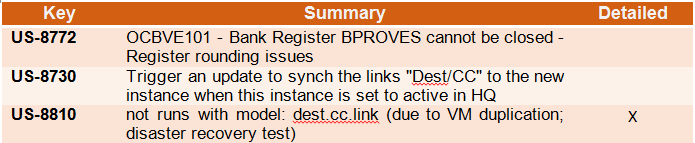
(US-8810) OCG_XX1_COO : not runs with model: dest.cc.link (due to VM duplication; disaster recovery test)

Due to a OCG IT Virtual Machine test recovery, OCG HQ has been duplicated, creating sync issues between the fake and the production HQ, creating not runs on the combination destinations and cost centers in several missions. This ticket fixes the not run.

All Finance tickets integrated in UF21.1

Non- functional

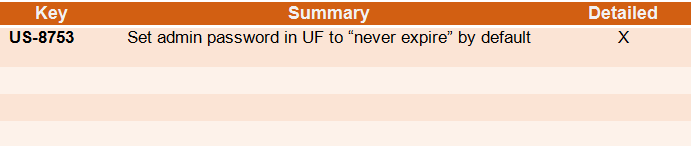
(US-8753) Set admin password in UF to “never expire” by default

Following improvement in password policy US-7019 (UF21.0 release), all production passwords were set to expire every 6months with the exemption of sync users and unidata users. In this UF21.1 patch, we added admin user accounts to the short list of users set by default to “Password never expires”. This means that when the 6months elapse, administrator accounts will not be prompted by the system to change password.

All Non-functional tickets integrated in UF21.1

UniField v20.1 Release Notes

Release Details

Release version: UF 20.1

Date of production synchronization server patch: 5th May 2021 / 18:00 Geneva time

Latest user rights files updated: UF20.1 can be found here with record of changes here

Note that no user rights need to be loaded at each HQ. This will be done at the Sync Server by the Core team and will update the user rights via Sync for all HQs and missions.

JIRA filter for all integrated tickets: https://jira.unifield.org/issues/?filter=12370

Supply

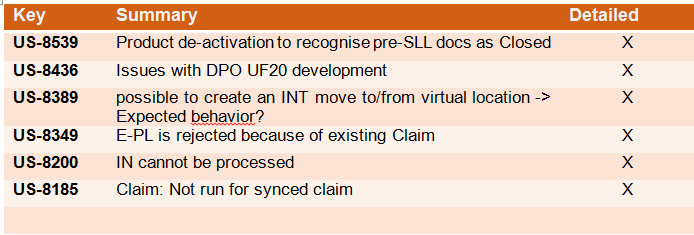
(US-8539) Product de-activation mechanism on split documents

When a user/synch tries to de-activate a product, the system will check if it was in stock or in any open document, and if so, the de-activation would be blocked.

The issue flagged by OCA was that if the document was an old FO or PO and was split (with a suffix -1, -2 or -3) because it was created & processed pre-SLL (Ticket allowing status to be different at line level), then the de-activation of a product in one of these documents was blocked even if the line/document was Closed or Cancelled. With this ticket, the system will no longer block for the case of these split documents, so the product can be de-activated if it meets the originally defined criteria.

(US-8436) Change to Direct Purchase Order linked documents

In UF20 release, the tickets US-7617 & US-7552 were included which meant that when Incoming Shipments (INs) linked to a Direct Purchase Order (DPO) are processed or cancelled at requestor (project) instance, the details of this reception/cancellation are synched up to the DPO instance.

OCG identified that this was not always the case, and specifically for when an FO was sourced to multiple DPOs the linked IN information was not correctly synched up. With this ticket, this issue is corrected so that in the case of an FO being sourced to multiple DPOs, each of these will have a separate IN created at project to ensure the accurate data is synched back.

For FOs sourced in this way between UF20 and UF20.1 (this release) a separate ticket, US-8554 has been created to ensure correction of these flows via Data Fix after this release.

(US-8389) Block moves to Virtual locations via INTs

This issue identified by OCB was that users could create Internal Movements (INTs) from a stock location to a virtual location (such as “Inventory Profit &Loss”) therefore bypassing the correct procedures such as doing a Physical Inventory to adjust stock levels. This has now been corrected and is no longer possible.

(US-8349, US-8185) Claims issues

These 2 issues meaning that VI auto IN import was blocked due to Claim in progress, and there being an unclear Not Run synch message when a Claim was raised and then closed in the same instance before it was synched to the Supplier instance have now been corrected. The VI auto import is no longer blocked in this case, and for the second, the Not Run synch message now clearly communicates the issue with related document Ref.

(US-8200) IN processing issue

For a specific user case, when the Outgoing Transport document had been processed with a quantity already in stock (Crossdocking) in advance of the ordered quantity being actually received via the Incoming Shipment, the VI import of this Incoming Shipment was blocked. This has now been corrected.

All Supply tickets integrated in UF20.1

Finance

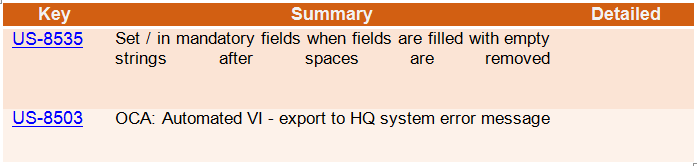
(US-8535) OCA: Automated VI – export to HQ system error message

To fix an error message linked to OCA automated VI, we have added a configurable pause in the process between the generation and the push of the VI files to the sftp server.

All Finance tickets integrated in UF20.1

Non- functional

(US- 8487): Certificate Renewal Issues

Certificate renewal issues were identified in some instances due to a failure in the auto-renewal. These instances were forced to renew certificates manually because the revprox code that automatically renews certificates on instances failed. This is due to a bug introduced by US-8158 and the new LE authority causing revprox not to consider the certificates as certomat ones. This bug is fixed and resolved in this release.

All Non-functional tickets integrated in UF20.1

UniField v21.0 Release Notes

Release Details

Release version: UF 21.0

Date of production synchronization server patch: 16-June-2021 / 18:00 Geneva time

Latest user rights files updated: UF21.0 can be found here with record of changes here

Note that no user rights need to be loaded at each HQ. This will be done at the Sync Server by the Core team and will update the user rights via Sync for all HQs and missions.

JIRA filter for all integrated tickets: https://jira.unifield.org/issues/?filter=12374

Supply

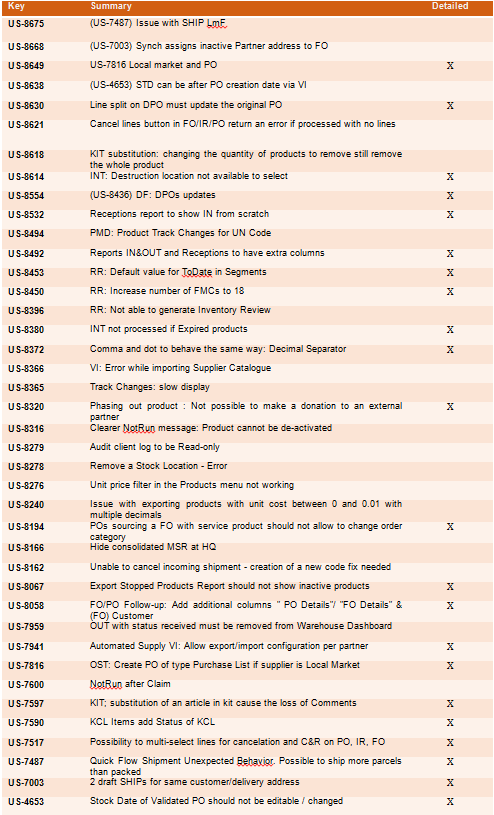
(US-7517) IR, PO, FO multi line cancellation

With this ticket comes an improvement in usability allowing users to select multiple lines directly in the IR/PO/FO or still to use the same pop-up window as before to select products for either Cancel or Cancel & Resource.

(US-7590, US-7597) Kit improvements on KCL status & comments

In these 2 tickets raised by OCB, the system now displays the status of each of the Kit components via Products>Kit Management>Kit Composition List, along with some filter buttons for each of these statuses.

In the Kit Composition list, when using the Substitute Item functionality it is now possible to see the comments linked to each KCL line, and in the substituting items, it is possible to keep the same comment as per the line removed or also to add a new comment for the replacing line.

(US-8320) Phase Out status products can be shipped out

This is a modification linked to previous alignment of UniData and UniField status of products (US-7158). UniData products with “Phase Out” status can now be consumed and sent out of the instance. This includes donations and regular outs to internal, external, intermission and intersection partners as well as Real consumption.

(US-7487, US-7003) Ship improvements – delivery address & surplus packs

Now there is a check at processing PPL and SHIPs that the partner’s delivery address exists/is active, and warning to change this if not. There is also a warning on the Partner file if user tries to delete an address which is currently used in a PPS open document.

There is an addition to the PPS flow to complement US-5859 which limits the modification/addition of packs to being done in “quick flow” in the Draft Shipment so that it is not possible to ship more parcels than exist in shipment.

(US-8194, US-7816) Sourcing/POs – Local market & Service product

Some modifications so that if “Local Market” supplier is selected in the OST, the type of PO will automatically be switched and created as Purchase List. This can be manually changed back if needed.

When an FO with a Service product is sourced to a Direct PO, it is now no longer possible to change the DPO to a regular or purchase list type PO.

(US-8372) Supply documents product price, non-acceptance of comma

When User Interface (UI) is in English, unit price fields in documents IR, PO, FO, IN, Product cost revaluation and Initial Stock Inventory will no longer accept comma “,”. Only full stop/period “ . “ will be accepted as decimal marker. No change to how French UI works or to any imports.

(US-8450, US-8453) Replenishment Rules: increased FMCs & default dates

Two improvements to the Replenishment Rules functionality, both affecting the Replenishment Segment. It is now possible to fill in up to 18 FMC values per line/product, which gives a longer planning horizon if needed. For FMC dates, when the calendar button is used to enter them, the calendar displayed will no longer show a default of “today’s” date but rather, the date of the column entered previously in order to minimise clicks for user to select future dates.

(US-7941) Vertical Integration: Auto VI multiple ESCs possible

For automated Vertical Integration, both import and export for Supply (PO, IN and Catalogue) it is now mandatory to define the specific ESC supplier for each job. This means that auto vi jobs can be active for multiple ESC Suppliers, one job for each supplier and each action.

(US-8058, US-8067, US-8492, US-8532) Reports additions

As requested by Pharma, extra columns will now be displayed in the IN&OUT and Receptions reports, and the Receptions report will now show INs created from scratch (not from PO).

Reports FO follow-up per Client and PO follow-up per supplier will also have extra columns. The Export Stopped products report is now renamed to Export Phase Out products, and will no longer display inactive products.

(US-4653, us-8162) Stock Take Date improvement & IN correction

It is now not possible to change the Stock Take Date on POs which are validated or a status after. The STDate after PO validation can only be updated by the Synch in the case of a synched flow. For products added on POs sourced to external Supplier (e.g. to ESC) then new lines will accept a STDate if date value is on/before PO creation date. Split lines will automatically take date of original line.

The issue raised where lines in Incoming Shipments (INs) could not be cancelled due to system checking Stock Take Date of POs which for historical reasons were not conforming to expected STDate. This has now been corrected.

(US-8554, US-8630) Direct Purchase Order corrections

In previous release, US-7617 meant Direct Purchase orders can now be closed/cancelled by synch when project/receiving instance process/cancel the Incoming Shipment. In a follow up ticket US-8436 on an intermediate release, the behaviour of INs was changed to allow for FOs split across multiple DPOs. However the DPOs created in this way between the 2 releases remained not being updated correctly by the synch. This ticket acts in the same way as a Data Fix would to allow the Not Run messages to be executed across all instances with this issue so the DPOs receive the correct updates.

In a second ticket, the flow where a DPO was created and then a line was split and then confirmed was corrected so that at project/requester instance, the PO split line is no longer displayed as Draft status but in Confirmed status to match its DPO counterpart.

(US-8614, US-8380) Internal moves, destruction location & expired products

Correction made to internal moves (INT) allowing only virtual location of “Destruction” to be selected as destination location. Other virtual locations were previously made inaccessible for this in US-8389.

Another issue corrected is that where an IN is processed for expired goods, the chained INT linked to it will automatically be processed in the normal way and expired goods will arrive at destination location.

All Supply tickets integrated in UF21.0

Finance

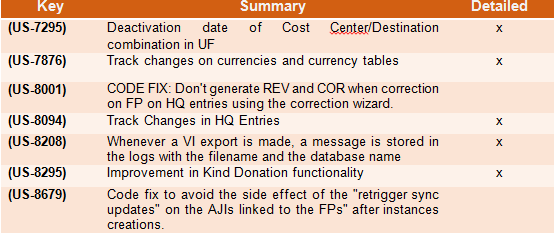
(US-7295) Deactivation date of Destination/ Cost Center combination in UF.

  • In this ticket we have added the activation and deactivation date of the combinations of destinations / cost centers.
  • Additionally to the checks on the activation dates of Destination and Cost Center individually, system will also check the activation dates of their combinations.
  • The display of this combination inactivation date will be in the Destination Analytic Account configuration in the Cost Center (CC) tab. It can be filled manually.
  • There is the possibility to fill these dates by import via Tools.
  • All parametrization is always done at HQ level.

(US-8295) Improvement in Kind Donation functionality

New functions have been added to the In Kind Donations functionality as below:

1. Do not allow to delete with the red x the IKD lines as far as the IKD is from supply.

  • If IKD comes from supply (regardless of the partner types): allow to create additional lines which are editable and that can be deleted.
  • Allow to delete/edit lines when IKD is manually created.

2. We did a new cancel button on IKD like on STV/IVO when we have a donation in draft. The object is not removed, just greyed. Similar to STV/IVO the object and details is visible but not useable.

3. We created the split function in IKD.

  • If we try to split a line with 0 amount we will be blocked (also via de wizard).
  • If we want to split an invoice that has one line amounted 0, it will be possible just if we delete this line.

4. Now we can change product, account, quantity, unit price and description from a donation coming from a supply flow. ==> we frozed the donor, the source document, the product and the quantity fields of a donation coming from a supply flow.

5. We created the import-export functionality as the one created for the supplier invoices in 2020: “Import Invoice Line / Export Invoice Line”.

The field “notes” that is in a tab of the invoice lines of a SI/IVI/IVO/STV will be also available in the excel spreadsheet.

6. There were no changes in the behavior of the ODX journal nor in the “duplication” behaviour: If the donation comes from a supply flow the source document will not be copied if we duplicate the document. If the donation is manual, the source document will be copied if we duplicate the document.

(US-7876) Track changes on currencies and currency tables

We implemented the track changes on currencies in these screens:

  • Accounting/configuration/currency management/currencies.
  • Accounting/configuration/currency management/currency tables.
  • on the currencies we can track:
    • the creation of the currency
    • the editions of every field, including the changes on the rates.
  • on the currency tables we can track:
    • the creation of the currency table
    • the editions of the code, the name, the state, the addition and deletion of currencies
    • to see the changes on a currency itself: click on the button on the right of the currency line.

(US-8001) CODE FIX: Don’t generate REV and COR when correction on FP on HQ entries using the correction wizard.

We did a code fix to correct a wrong behaviour: If the AD (analytical distribution) of an HQ entry is edited using the correction wizard to change either its Funding Pool and/or its Free1/2 account, REV/COR entries were generated, whatever the period state. This is not the case anymore, no REV/COR entries are generated.

(US-8094) Track Changes in HQ Entries

Thanks to this ticket, we will trace:

  • the fields used as headers in the list view of the HQ entries.
  • the transition to “Validated” (the tag on which the filters To Validate and Validated depend), so that we can spot when the HQ entries have been posted.
  • the split and unsplit of entries. Note: lines coming from a split will be identifiable because the “Original HQ Entry” will have a value for these lines (contrary to the “original” lines).
  • the analytic reallocation
  • the change of the account

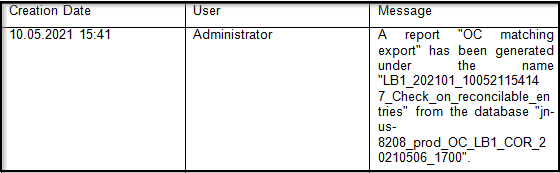
(US-8208)Whenever a VI export is made, a message is stored in the logs with the filename and the database name

Whenever a VI export is made, a message is stored in the logs only (i.e. nothing is displayed in the interface) with the filename and database name. Logs are visible under Administration => Reporting => Audit => Client Logs.

This applies for these reports:

  • OCP matching export
  • Export to HQ system (OCP)
  • OCB matching export
  • OCB matching export Access Interface
  • Export to HQ system (OCB)
  • Export to HQ system (OCB) Access Interface

Example of log:

All Finance tickets integrated in UF21.0

Non- functional

(US-7019): Password policy best practices

Following a request to improve the UniField password policy, the following best practices have been integrated in this release as follows:

  • Unifield user password has been enhanced with the following requirements -> 8 Characters : 1 capital letter, 1 number, 1 special character.
  • Expiration of passwords: Users will be forced by the system to change their passwords every 6 months after their last password update. This rule will not apply for:
    • production sync users, generic sandboxes, and testing environments (runbots and VMs for core team and dev)
    • Administrator user
    • UniData users

NB: After the release, all users in production (including admin) will be prompted to change their passwords at login.

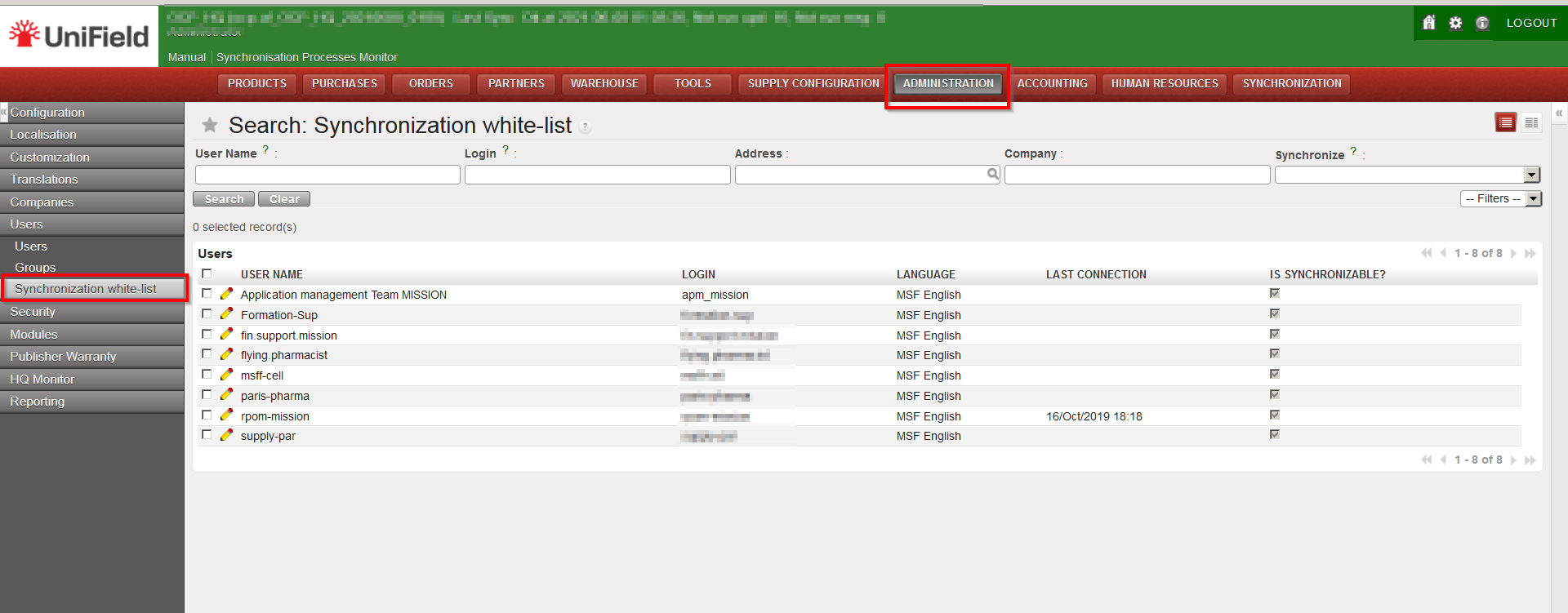
Each OC IT referent will be responsible for changing passwords for the synchronised users (synchronization white list) at HQ except for the apm user which will be updated by core team. Below is a screenshot guide on where to find the synchronisation white list in UF.

(US-8172): Most secure/efficient ways for auto clean-up of UF DB backups

The current 20.1 and older versions of UF allowed for failed backup files to be valid and kept which consumes disk space. This issue is fixed in this version 21.0. UF will no longer keep failed backup files (all dumps that complete with a non-zero exit code will be considered as a failure by the system). The failure generates a report of an empty KO file in the “Get Backup Files” view

(US-8403): UF All-In-One setup may corrupt pre-existing PostgreSQL configuration files if not ending with new-line

The postgres configuration file was being corrupted causing postgres service to stop. This was due to an erroneous appendage of lines in the postgres.conf file. UF21.0 fixes the issue by adding a new line break before the parameters added by UF in the config file.

All Non-functional tickets integrated in UF21.0