Finance User Manual ENG -> 2. Finance Configurations -> 2.2 Fiscal Year and Accounting Periods -> LUFI-20203 Configuration Fiscal Year Dates
LUFI-20203 Configuration Fiscal Year Dates
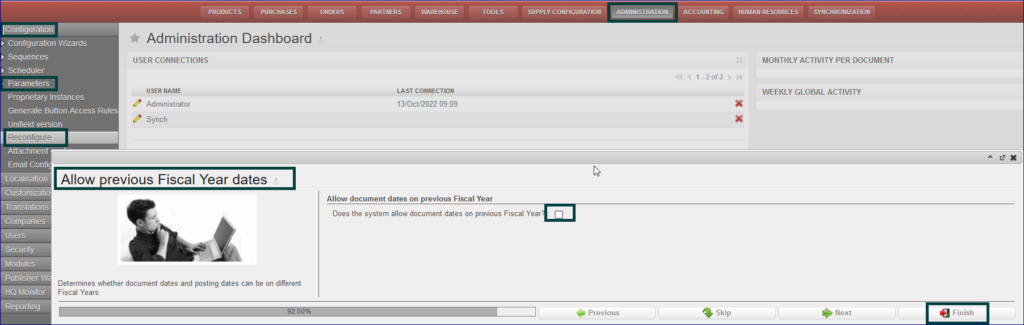
It is possible for any OC to choose whether to allow document dates from previous fiscal year or not. A new option is added in the Reconfigure “Allow document dates on previous Fiscal Year“. During instance creation, if you want to allow having documents dates from previous fiscal year then you need to tick the box. According to the current internal procedures on each OC, this box will be ticked only in OCB and OCP for the auto creation, the process as below:
Go to Administration> Configuration > Parameters > Reconfigure
It will open new window “Allow previous Fiscal Year dates“
Tick on box with “Does the system allow document dates on previous Fiscal Year?
Click on “Finish“