
Finance User Manual ENG -> 2. Finance Configurations -> 2.3 Multi-Currency Management -> LUFI-20305 Manual Currency Creation
LUFI-20305 Manual Currency Creation
LU Introduction
Most currencies used by MSF are based on the accepted ISO standard. However, on occasion it may be necessary to add a non-standard currency. If this is the case in your mission, you must request Headquarter (HQ) to create the currency. It will then synch down to your instance as inactive. You will have to activate it.
How to Create a Non-Standard Currency Manually
Go to: Accounting/Configuration/Currency Management/Currencies
A list of active currencies appears
- In the {Currencies} Search view, click on {New} button.
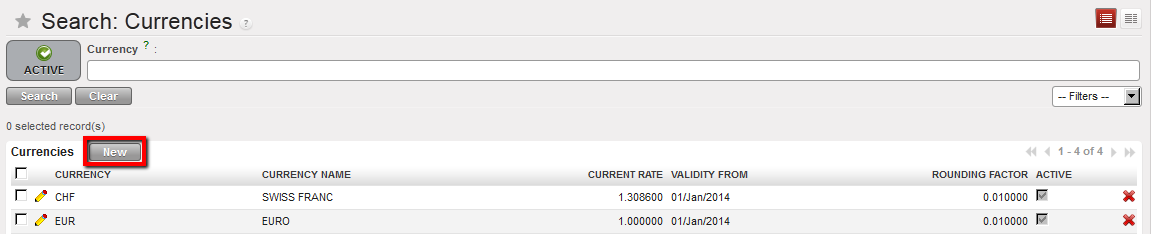
Select {New} in the Search Currencies view to create manually a new currency
2. Complete the currency form as follows.
| Field title | entry protocol: currency form | Source for Information |
| Currency | 3-character code in capital letter | HQ |
| Currency Rate | Manual input. | HQ |
| Currency Name | COUNTRY CURRENCY ALL CAPS | HQ |
| Symbol | Not required | N/A |
| Rounding factor | Defaults to 0.01000 | System |
| Computational Accuracy | Defaults to 4 | System |
3. In the Rates field, click on {New} to add a new rate.
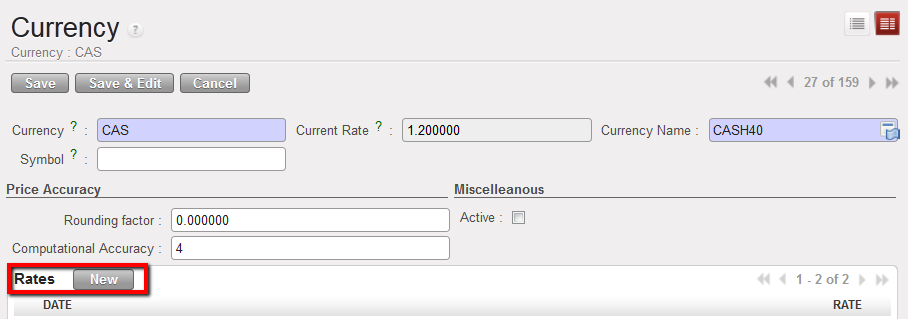
4. Enter the effective “as of” {Date} and the {Rate}. Click {Save & Close} if finished, or {Save & New} if adding more rates for additional periods.
The rate is saved in the currency form.
| Title of field | entry protocol: currency rates | Source for Information |
| Date | The effective start date of the rate to be used for converting entries to the functional currency. If no additional rates are added for subsequent dates, then this rate will prevail. | Consider the earliest posting date for which you will have entries in this nonstandard currency. |
| Rate | The exchange rate relative to the EUR or CHF, e.g. CUR/EUR. | HQ |
5. Remember to save the form.

6. Synchronize
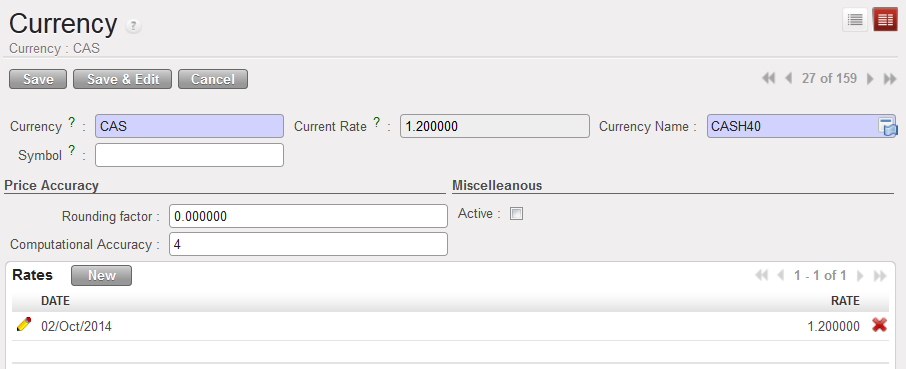
Manual creation of a non-standard currency
