
Finance User Manual ENG -> 2. Finance Configurations -> 2.5 Analytic Accounts -> LUFI-20505 Analytic Account Inactivation
LUFI-20505 Analytic Account Inactivation
A. LU Introduction
Inactivating analytic accounts is performed at HQ. This action prevents users from booking future entries on an account that is not in use anymore.
Deactivation is synchronized down to all missions and new entries for the inactivated analytic accounts are blocked. The check on Destination and Cost Center are based on Posting Date, e.g. the Posting Date of a new entry can’t be on or later than the inactivation date of the account. For Funding Pools, the check is on Document Date. If the entry’s Posting Date (Destination or CC) or Document Date (funding Pool) is outside the analytic account activation period, you will get the following error message:
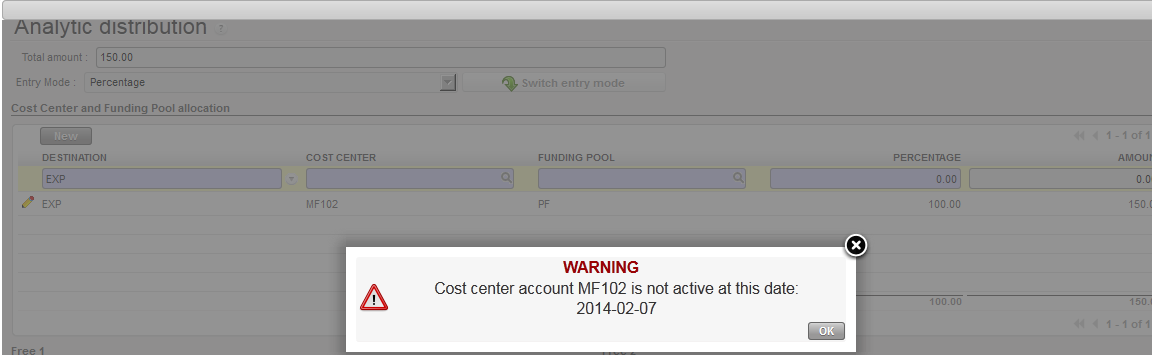 System control on an inactive analytic account
Because the inactivation date can be set for a past date, it may result in not run synchronization updates if entries that have been created earlier for the now inactive accounts are modified.
B. How to Inactivate an Analytic Account
Go to: Accounting/Configuration/Analytic Accounting/Analytic Accounts
- A list of active analytical accounts appears.
- In the {Name} field, enter the account name you want to inactivate.
- Once the account is retrieved, click on the pencil
 to edit the form.
 - In the {Activation period} tab, go to the {Inactive from} field, enter a date to inactivate the account.
- Click {Save} button.
The analytical account is inactivate
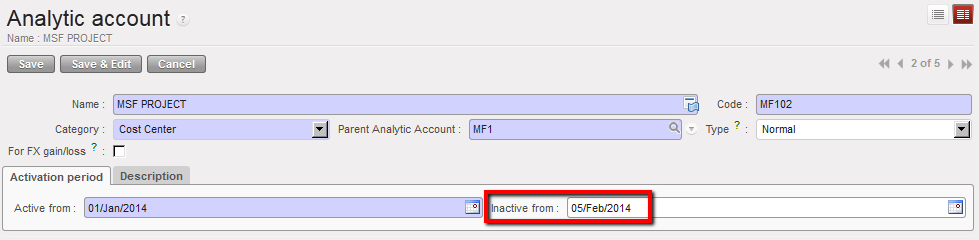
Analytic account inactivation
The validity of sub cost center must match with the parent cost center validity; in case of not matching, a warning popup will appear based on the posting date of the entry:
- If the parent Cost Center is not active, you cannot create a child to this parent:

If the sub-cost center validity date is greater than the parent cost center validity date, you will be blocked.

If the sub-cost center validity date is greater than the parent cost center validity date and also if the sub-cost center activation date is lower than the parent cost center activation date, we will see a warning popup as below:

