
Finance User Manual ENG -> 2. Finance Configurations -> 2.7 Liquidity Journals and Their Corresponding Registers -> LUFI-20703 Monthly Register Creation
LUFI-20703 Monthly Register Creation
LU Introduction
Cash, bank and cheque registers need to be reconciled at the end of each month (period). Therefore, at the end of each month, the user needs to close their register(s) and create new registers for the following month. The user does not need to wait for the closing of the previous months register to open the new register. The opening balance will not be finalized until the previous month’s register is closed.
To create a new register, a function called {Register Creation} is used. It is virtually the same process to create a month’s bank, cheque or cash register.
How to Create a New Months’ Register Using the Register Creation Function
Go to: Accounting/Registers/Register Creation
- In the {Period} field, select the period in which you want to create the registers (remember that UniField only displays {open} periods).
- Click on {Confirm Period}.

{Register creation} wizard.
3. Delete the registers you do not want to create by clicking on the Red Cross  . You want to create all cash, cheque and bank registers that have active cashboxes and bank accounts.

Deleting registers that should not be created

4. Click on {Create Registers}
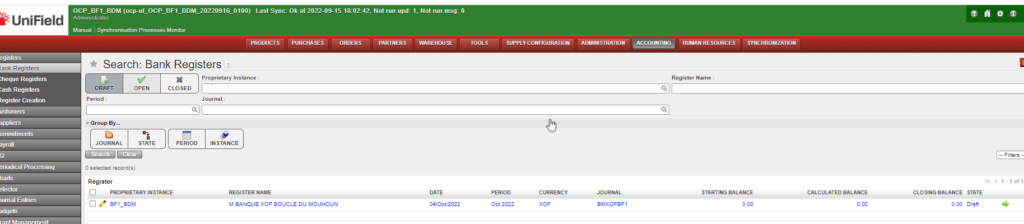
The registers are created in {Draft}. You will need to open each register. You will find the cash registers in the {Cash registers} sub-module, the bank registers in the {Bank registers} sub-module and the cheque registers in the {Cheque Registers} sub-module.

