
Finance User Manual ENG -> 3. Payments -> 3.3 Finance Payments and Registers -> LUFI-30307 Direct Invoices
LUFI-30307 Direct Invoices
LU Introduction
Another type of payment within UniField is the Direct Invoice. Finance can create a direct invoice which is a stand-alone invoice in the {Accounting} module that can be created in the cash, bank or cheque registers.
It is important to remember that Direct Invoices can’t be linked with a product and that Direct Invoices don’t support any tax handling.
How to Create a Direct Invoice
Go to: Accounting/ Registers
- Open the register in which you want to record a direct invoice payment. Don’t forget to select the register with the correct currency.
- Click on {Direct Invoice} button.
 Bank register and {Direct Invoice} button
A {Supplier Direct Invoice} wizard appears
- Complete the fields by selecting a supplier, filling in a document date. The posting date and register posting date default to today’s date and can be changed. Insert a reference if relevant. However the invoice number will be automatically used as purchase and liquidity journals entries references.
- In the invoice tab, click on {New} to create invoice lines.
- Insert a description and select an account. Fill in quantity and unit price. Save the line.
- Allocate the expense to an analytical dimension by clicking on the analytical wizard; the destination will be set by default based on the account code but can be modified.
{Supplier Direct Invoice} creation.

5. Click on {Validate} button.
The Direct invoice is created in Temp status in the register but the invoice state is still in Draft. The total amount of the invoice is booked on the account code 30020 {Trade payables}. A supplier invoice number is created.
Register entry is created in Temp when the Direct Invoice is validated
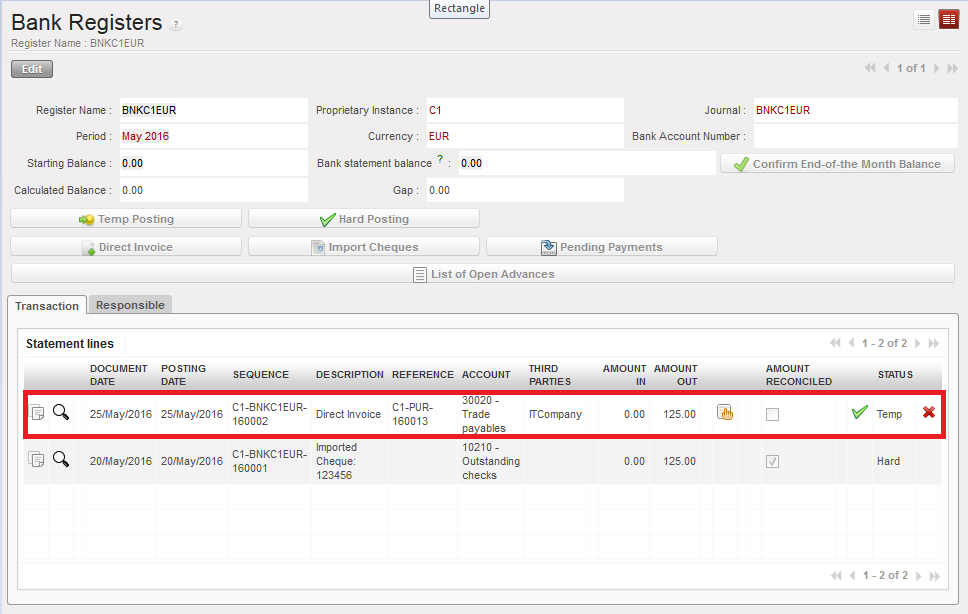
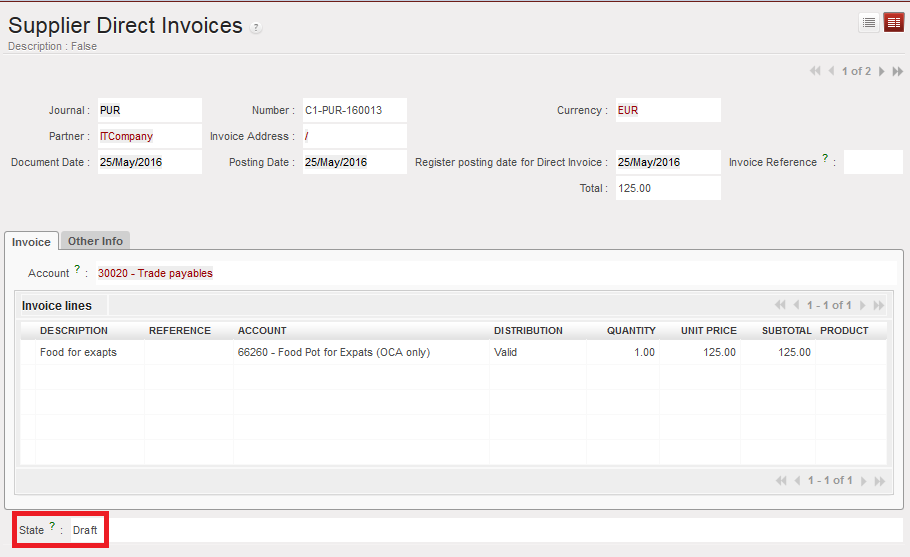 The invoice is draft and has a reference (number)
In the journals, journal entries are created at the same time as unposted:
In the purchase journal:
-
- Credit to 30020 Trade Payables
- Debit to expense account
In the liquidity journal:
-
- Credit to cash account if the invoice was paid in cash
- Debit to 30020 Trade Payables

Unposted Journal Items generated when the Direct Invoice is validated. The invoice reference is the booking reference of the purchase and liquidity journals entries.
Should you need to edit, re-compute the total or review the invoice before validating the register line (hard post), click on, proceed to the edition and validate the invoice. The register line and journal entries will automatically be updated.

When you hard post the register line, it becomes {Hard}. The invoice is marked as {Paid} and the journal entries are {Posted}. Entries on account 30020 are automatically reconciled.
 Hard posted direct invoice entry

 Posted Journal entries when a Direct Invoice register line is hard-posted. The A/P account is reconciled.
| Register line state | Direct invoice state | Journal entry state |
| Temp-posted | Draft | Unposted |
| Hard-posted | Paid | Posted |
