Finance User Manual ENG -> 5. Searching, Correcting and Closing -> 5.1 Searching -> LUFI-50109 Synchronisation of Queries
LUFI-50109 Synchronization of Queries
How to create a Sync Finance Queries from HQ or Coordination:-
In TOOLS/Tools/Finance Queries/New
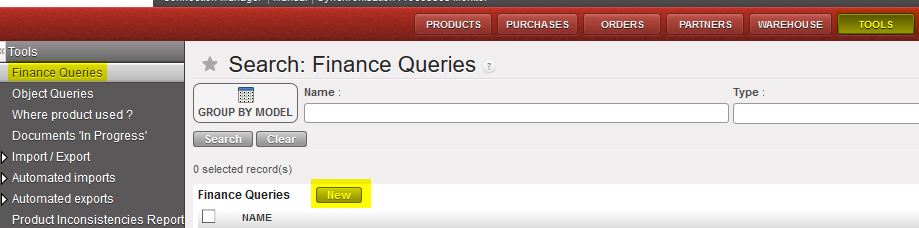
- Select the query type:

- GL Selector
- Analytic Selector
- Combined Journals report
- General Ledger
- Trial Balance
- Balance Sheet
- Balance by account
- Balance by analytic account
- Partner Ledger
- Partner Balance
- This creates a saved query as if it was directly accessed via the corresponding sub-menu. If you create the query from Tools, it then appears in the related sub-menu
- From Tools, it is then possible to see all saved queries of the related instance
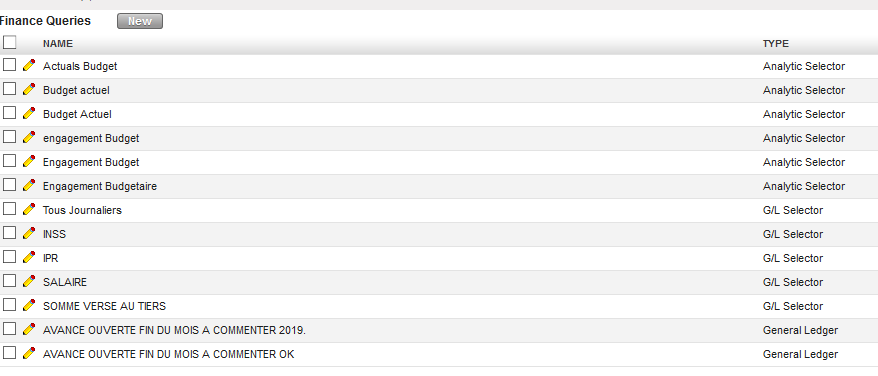
- Only from HQ and Coordination, it is possible to activate the sync so it sync down to all lower instances.
- How to activate the sync on a saved query:-
- Click on the plug or from inside the query and the sync will be activated
The query will sync down to all lower instances and will be visible directly in the corresponding sub-menu
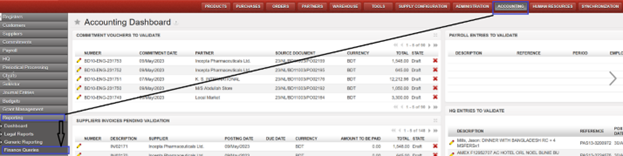
- It is possible also to check finance queries through the “Reporting” menu.
- Go to Accounting > Reporting >Finance Queries ,it includes the same columns of “Finance Queries” under Tools:
- It is not possible to delete the synchronized finance queries:
- Go to Tools > Finance queries OR Accounting > Reporting >Finance Queries
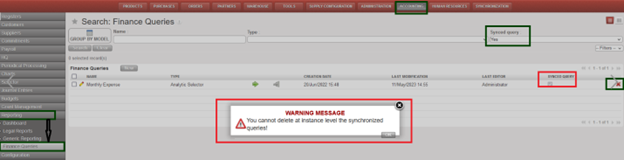
- Try to delete one of “Synced query” you will receive a warning message “You cannot delete at instance level the synchronized queries!“